1920s Aesthetic Photo Generator
Upload a photo and get flapper hair, period jewelry, and Art Deco styling worked into it.
What the 1920s Photo Generator does
Gatsby parties, themed photo shoots, and anyone curious about how they'd look at a 1920s speakeasy all run into the same problem: finding or renting the right look takes more effort than a themed photo is worth. This generator takes a photo you upload and reworks the hair, makeup, jewelry, and outfit into a Roaring Twenties style, from finger waves and beaded headbands to Art Deco necklaces and jazz-age dress details. The instruction box controls how far it goes, so you can ask for a subtler daytime look or a full flapper party outfit. It's a styling tool, not a costume rental or a historically documented reconstruction.
See a sample result
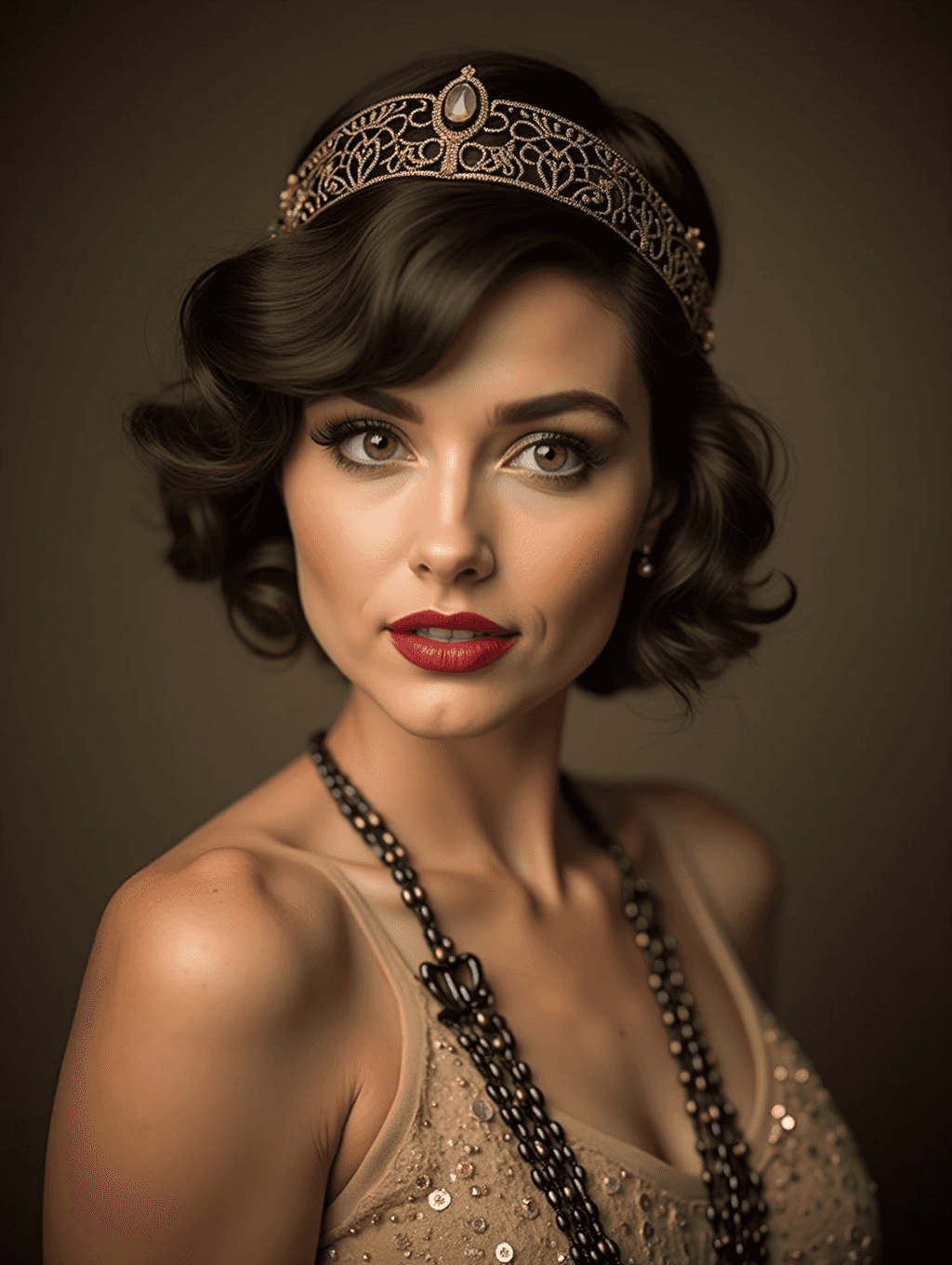
Input: A current, well-lit photo of a woman facing the camera with shoulder-length dark hair, wearing a plain top against a neutral background. The result looks similar to the image at the top of this page.
The result restyles the hair into a shorter, wavy bob with soft curls framing the face, topped with a beaded, jeweled headband in gold tones. Makeup shifts toward bold red lipstick, defined eyebrows, and soft rouge on the cheeks. The plain top is replaced with a sleeveless champagne dress covered in sequins, layered under long strands of black and gold beaded necklaces that fall past the collarbone. Small drop earrings are added, and the lighting is reworked into a moody, warm-toned studio look against a dark olive backdrop, closer to a period portrait than a casual snapshot. Hair length, jewelry, and clothing change substantially, and the face gets a polished, retouched finish (smooth skin, sculpted brows), so compare it with your original before sharing it as you. It's a stylized interpretation of the era rather than a documented period photograph.
How it works
- 1
Upload a photo showing your face and hair
A clear, front-facing photo with your hairline and shoulders visible gives the model the most to restyle into finger waves, a headband, and period jewelry.
- 2
Set the look you want in the instruction
The default gives glamorous flapper styling, but you can ask for a specific detail, such as a particular jewel tone, a feather accessory, or a more daytime, less sequined outfit.
- 3
The model restyles hair, makeup, jewelry, and clothing
It reshapes the hairstyle toward finger waves or a bob, adds a beaded or jeweled headband, applies bold red lipstick and period makeup, and swaps clothing for beaded or embroidered 1920s-style pieces.
- 4
Download the finished portrait
You get one restyled image per run, ready to use as a themed profile photo, a party invitation graphic, or a keepsake from a Gatsby-style event.
Use cases
A Gatsby or speakeasy party invitation
Generate a themed portrait to use on an invitation, event page, or social post announcing a 1920s-themed party.
Previewing a flapper costume before committing
See roughly how finger waves, a headband, and beaded jewelry would look on you before renting or buying a full costume.
A themed profile photo for a limited run
Swap your usual profile photo for a Roaring Twenties look during a themed event, promotion, or seasonal campaign.
A keepsake photo from a themed shoot or event
Turn a regular photo from a Gatsby party or themed shoot into something that reads more like a period portrait.
Tips for better results
- Use a photo with your hairline and shoulders visible so the model has room to restyle both hair and neckline.
- Name a specific accent color or accessory in the instruction, like a feather headpiece or a particular jewel tone, for a more personal result.
- Ask for a toned-down daytime look in the instruction if the full beaded, sequined default is more than you want.
- Expect makeup, jewelry, and hairstyle to change together, since this restyles the whole portrait rather than applying a single filter.
- If the first result doesn't land on the mood you had in mind, adjust the instruction or try another source photo in a new run; each run uses credits.
Frequently asked questions
Will it just add a filter, or actually change my hair and outfit?
It changes more than a filter would. This is a generative restyle, so hairstyle, jewelry, makeup, and clothing all shift to match the 1920s look, not just the color tone.
Can I ask for a specific style, like Art Deco jewelry or a feather accessory?
Yes, the instruction is editable. Naming a specific accessory, jewel tone, or hairstyle steers the result toward what you describe instead of the general flapper default.
Is this historically accurate to real 1920s fashion?
It's a stylized, general interpretation of the era's look, not a researched or historically verified reconstruction of a specific year, region, or designer's work.
What kind of source photo works best?
A clear, front-facing photo with your hair and shoulders visible works best, since the model needs that space to rebuild hairstyle, jewelry, and neckline.
Will my face change in the result?
It usually keeps your overall look, but small facial details can shift slightly since this is a generative edit rather than a simple overlay.
Can I upload more than one photo?
Yes, but every image you add feeds into one generated result as a reference, and credits are charged per image. To compare how the look reads on different photos, run them one at a time.
Plans start at $9 a month. See pricing