Fashion Checker
Upload a photo of an outfit and get an AI breakdown of style, color coordination, and fit.
What the Fashion Checker does
You've got an outfit on and a nagging question: does this actually work? This tool looks at a photo of what you're wearing and gives you a structured read: what style category it fits into, how the colors work together, whether the fit and silhouette are doing you favors, and whether the whole thing suits a specific occasion. It calls out patterns, textures, and any visible brand or designer details, and flags anything that looks off, like clashing colors or an odd fit. You can add a question in the details box, such as whether it works for a job interview or a first date, and the analysis responds to that. It's a style opinion from an AI model looking at one photo, not a professional stylist's judgment, so use it as a second look, not the final word.
See a sample result
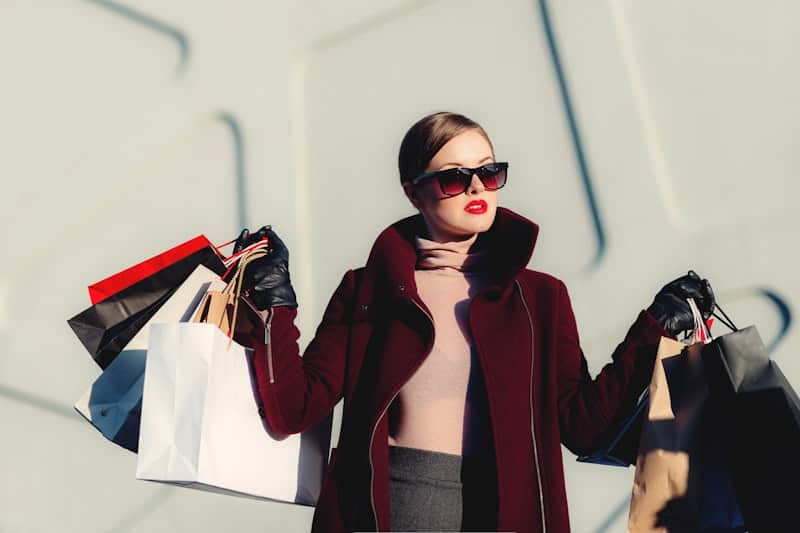
Input: An outdoor photo, cropped at the hips, of a woman in a burgundy coat with a zip and funnel collar over a blush turtleneck, with a strip of a gray bottom visible below. She wears black leather gloves, dark sunglasses and red lipstick, and holds several shopping bags in each hand.
- Color coordination84%
- Fit and silhouette70%
- Occasion versatility70%
Style category: Polished streetwear, cold-weather layering
The burgundy coat and blush turtleneck sit close together on the color wheel, giving the outfit a coordinated, warm-toned look, while the gray below acts as a neutral base that keeps the palette from feeling too matched. The red lip picks up the burgundy, which ties the look together. The coat's high collar and clean lines read as tailored rather than casual, and the black leather gloves and sunglasses add a sharper, more finished edge. Fit looks intentional through the shoulders. The photo stops at the hips, so the bottom's cut, its length and the shoes can't be judged; upload a full-length shot for those.
Brand or designer details aren't visible clearly enough in the photo to identify, and the shopping bags themselves are a styling prop rather than part of the outfit assessment. This reads well for a cold-weather daytime look with a polished edge; for a more casual setting, swapping the coat for something lighter would shift the whole outfit down a notch in formality.
How it works
- 1
Upload a clear, full-length outfit photo
Good lighting and a full view of the outfit, from shoes to top, gives the AI the most to work with. Cropped or dark photos limit what it can assess.
- 2
Add context in the details box if it matters
Mention the occasion you're dressing for, like a job interview, a wedding, or a casual weekend, and the assessment weighs the outfit against that context.
- 3
The AI analyzes style, color, and fit
It identifies the style category, checks color coordination and pattern mixing, evaluates fit and silhouette, and notes any visible brand or trend elements.
- 4
Get scores and a written breakdown back
You'll see a written assessment plus 0 to 100 scores across a few style categories, along with specific notes on what's working and what isn't.
Use cases
A second opinion before you leave the house
Snap a quick photo in the mirror and get a read on whether the colors and fit work before committing to an outfit for the day.
Checking an outfit against a specific occasion
Add the event in the details box, like a client meeting or a first date, and see whether the AI thinks the outfit reads as appropriate for it.
Building a personal style sense over time
Run a few different outfits through the tool to notice patterns in what gets flagged as strong or weak, and use that to shape future choices.
Sanity-checking a secondhand or thrifted find
Get an outside read on how a new piece works with your existing wardrobe before deciding whether it earns a permanent spot in your closet.
Tips for better results
- Use a full-length photo instead of a close-up so the AI can assess the whole silhouette, not just the top half.
- Shoot in daylight or bright, even indoor lighting so colors read accurately instead of shifted by warm or dim light.
- Mention the occasion in the details box if you want the assessment weighed against a specific context.
- Try the same outfit with small changes, like swapping shoes or adding a layer, to see how the scores shift.
- Treat brand or designer notes as visual guesses, not confirmed identification, especially without a clear logo in frame.
Limitations
This is a visual style read from an AI model, not a professional stylist consultation or a definitive judgment on taste. It can misjudge fit in photos with unusual angles or loose framing, and it can't confirm brand authenticity or fabric quality from a photo alone. Scores reflect one model's assessment of one image and can vary between runs or lighting conditions, so use them as a starting point for your own decision rather than a final answer.
Frequently asked questions
How accurate is the color coordination score?
It reflects how the AI reads color relationships in the photo you upload, which can shift with lighting, camera white balance, and photo quality. Treat the score as a helpful estimate rather than a color-matched measurement.
Can it tell me if an outfit is right for a job interview?
Yes, if you mention the occasion in the details box. The assessment then weighs formality, fit, and color choices against what's typically appropriate for that setting.
Does it identify the brand of clothing I'm wearing?
Only when a logo or distinctive design detail is clearly visible in the photo. Without that, it describes style and construction in general terms instead of guessing a specific brand.
What if my outfit photo is a close-up rather than full length?
The analysis still runs, but fit and silhouette scores are less reliable without seeing the whole outfit. A full-length photo from shoes to top gives the most complete assessment.
Can I ask about a specific part of the outfit?
Yes, use the details box to ask a direct question, like whether the shoes match, and the written analysis addresses it alongside the general breakdown.
Will I get the same scores if I run the same photo twice?
Scores can vary slightly between runs since the AI generates a fresh assessment each time rather than pulling from a fixed database. Small differences are normal.
Plans start at $9 a month. See pricing