What the Weight Loss Photo Generator does
Sticking with a fitness goal is easier when you have something to picture, and it's hard to picture a version of yourself you haven't seen yet. This generator takes a photo you upload and produces a visualization with a leaner, more toned build, meant purely as motivation, not a forecast of what you'll actually look like. It doesn't know your body composition, health history, or how your specific body responds to diet and exercise, so treat the result as a mood board image, not a target set in stone. It's built for people who want a motivational image to keep alongside a real fitness plan, not a substitute for one.
See a sample result
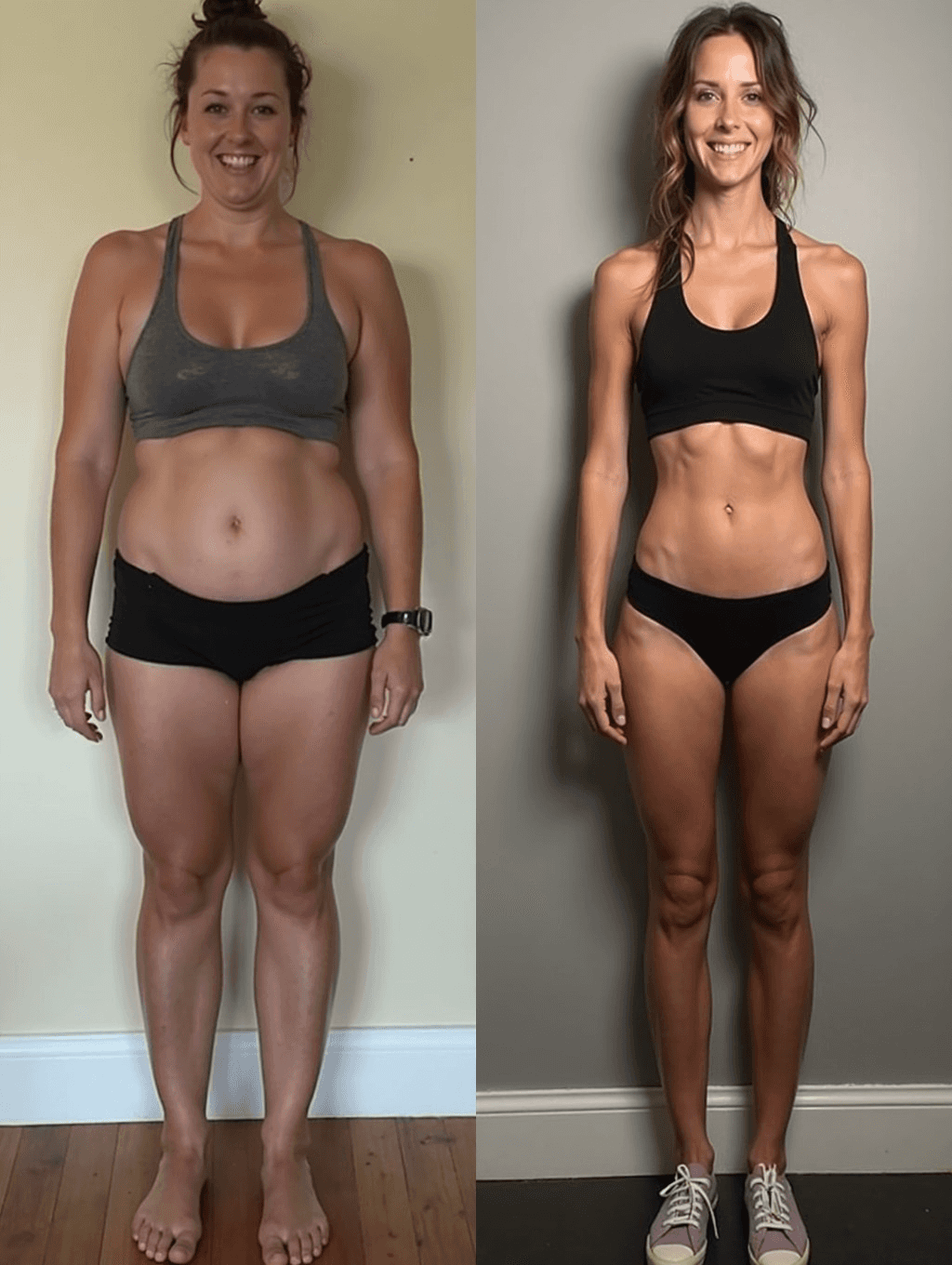
Input: A well-lit, full-length phone photo of a woman standing barefoot against a plain wall in a sports bra and shorts, facing the camera. The hero at the top of this page shows this kind of before photo on the left and the generated visualization on the right.
The default instruction asks for a "slimmer, more toned physique", and it goes further than most people expect. In the hero's right panel, the body is much slimmer, with defined abs and arms, a black sports top and briefs in place of the original outfit, sneakers added, and a new gray wall behind her.
Things to notice before you use a result like this:
- The change is large by default. The visualization shows a very lean, fitness-model build, not a modest step. If you want something closer to a realistic next stage, write that in the instruction, for example "slightly leaner, same outfit, same background".
- The person can drift. Hair, face shape and skin all shift in the hero's right panel, so it barely reads as the same person. Check the face against your original.
- Nothing here is a forecast. The proportions come from general visual patterns, not your weight, body type, health or training history, and they don't show what's healthy or achievable for you.
Use it as a picture to motivate a plan you're already working on with real guidance, not as a target body to measure yourself against.
How it works
- 1
Upload a clear, full-body photo
A photo showing your body from about head to knee or full length, in fitted rather than baggy clothing, gives the model the clearest shape to work from.
- 2
Edit the instruction if you want a specific direction
The default aims for a leaner, more toned look, but the instruction is editable, so you can describe a milder change, a specific area of focus, or a different overall build.
- 3
The model generates a visualization, not a prediction
It adjusts body shape, muscle definition, and posture in the image based on general visual patterns, not your metabolism, health data, or how bodies actually respond to training and diet.
- 4
Download the result to use as motivation
You get one image per run, meant to sit on a vision board or lock screen as encouragement, not as a guarantee or a medical projection of any kind.
Use cases
A motivational image to start a fitness routine
Generate a visualization to keep as a reminder of why you're starting a new workout or nutrition habit, without treating it as a fixed goal photo.
A vision board addition alongside a real plan
Pair the image with an actual fitness or nutrition plan from a coach or professional, using the visualization purely as encouragement.
Visualizing effort, not a shortcut
Use the result to picture the kind of change consistent effort could support over time, rather than expecting the image itself to reflect a specific number of pounds or weeks.
A personal, private motivation tool
Keep the image for yourself as a private source of motivation rather than sharing it as evidence of results, since it isn't a real transformation photo.
Tips for better results
- Use a full-length or near-full-length photo in fitted clothing so the model has a clear body shape to work from.
- Describe a modest, realistic change in the instruction rather than an extreme one if you want the visualization to feel achievable.
- Pair the image with an actual plan from a doctor, trainer, or dietitian instead of treating the picture as the plan itself.
- Remember your body is your own; use this as encouragement, not as a standard to judge your current photo against.
- If the first result goes too far or focuses on the wrong area, rewrite the instruction and run it again; each run uses credits.
Limitations
This tool produces a stylized visualization for motivation, not a prediction of real weight loss, body composition, or health outcomes. It has no information about your metabolism, medical history, genetics, or how your body actually responds to diet and exercise, and it cannot simulate a real transformation. It isn't fitness, nutrition, or medical advice, and it shouldn't be used to set a specific body as a required goal or to compare against your current photo in a way that feels discouraging. Only upload your own photo: reshaping someone else's body without their consent can be hurtful and humiliating. If you're working on a health or weight goal, talk to a doctor, registered dietitian, or qualified trainer for guidance based on your actual body, not a generated image.
Frequently asked questions
Will this show me what I'll actually look like if I lose weight?
No. It's a visual mockup for motivation, not a prediction. Real results depend on your body, health, diet, and training, none of which the tool knows or accounts for.
Is this a substitute for a real fitness or nutrition plan?
No. Use the image as motivation alongside guidance from a doctor, dietitian, or trainer, not as a plan or a medical or fitness recommendation on its own.
What kind of photo works best?
A full-length or near-full-length photo in fitted clothing, well lit and facing the camera, gives the model the clearest body shape to adjust.
Can I ask for a smaller or more subtle change?
Yes, the instruction is editable, so you can describe a milder adjustment instead of the default leaner, more toned look.
Will my face and identity stay the same in the result?
It's meant to keep your overall look, but this is a generative edit, so small facial and body details can shift. Review the result before using it.
Should I use this as a way to judge my current body?
No. It's meant as encouragement, not a comparison standard. Your current body isn't a problem to fix, and the tool isn't a measurement of anything real.
Plans start at $9 a month. See pricing