Constellation Identifier
Point your camera at the night sky, then find out what you're actually looking at.
What the Constellation Identifier does
You caught a wide shot of the night sky on a clear night and now you want to know what's actually in it. This tool looks at your photo and works out which constellations, bright stars, and star patterns are likely visible, based on shapes, spacing, and relative brightness in the frame. It's built for stargazers, campers, and anyone who took a photo of a striking sky and wants names attached to it. You get back a short readout of the most likely constellations with a confidence score for each, plus context on the pattern and how to find it again with your own eyes.
See a sample result
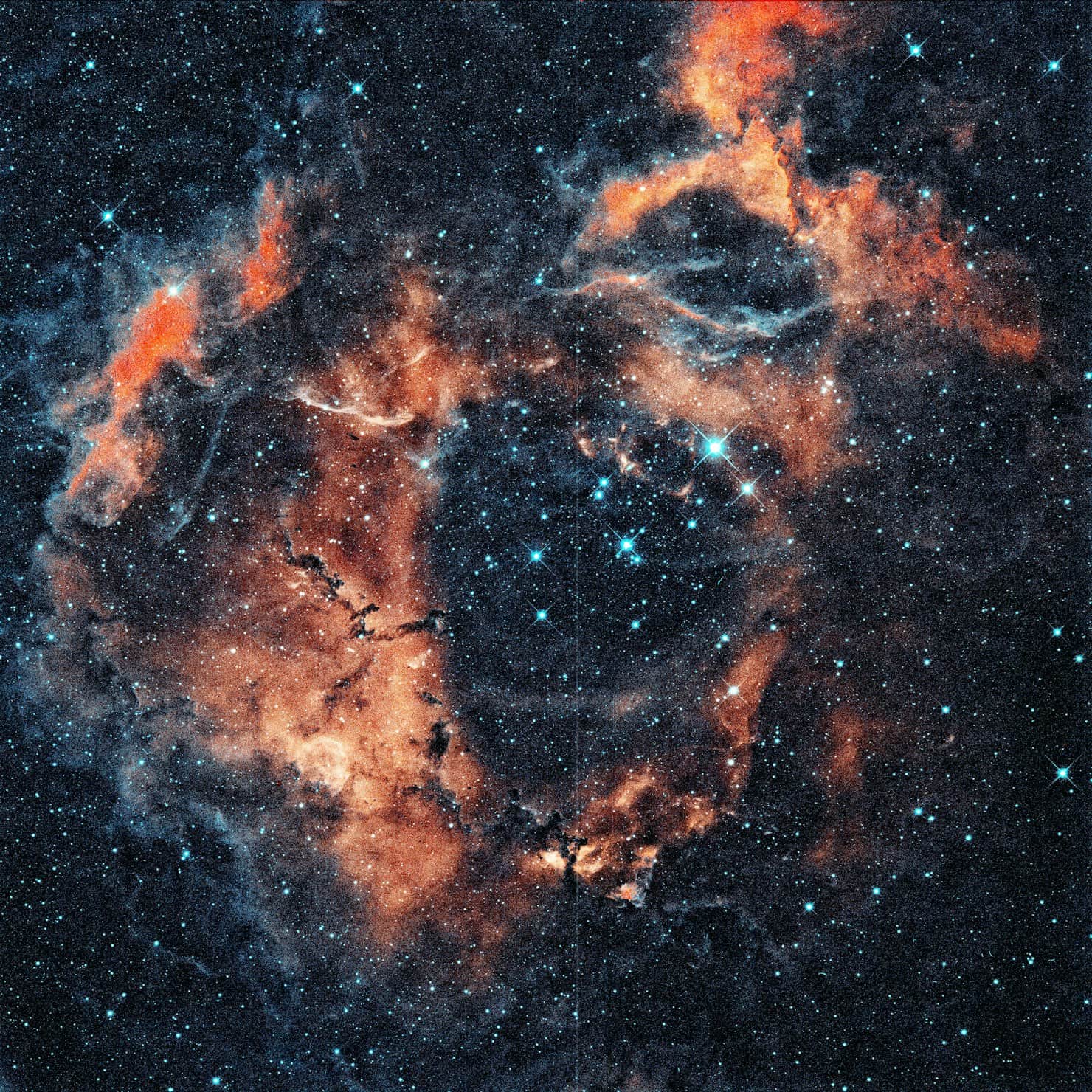
Input: A zoomed-in astrophotography shot of a round, ring-shaped orange and rust-colored nebula with blue filaments, a hollow center holding a small group of bright blue-white stars, and dark dust lanes along the lower left edge.
- Rosette Nebula, Monoceros76%
- Soul Nebula, Cassiopeia14%
- Heart Nebula, Cassiopeia10%
Most likely object: the Rosette Nebula in Monoceros (76%)
This frame is too narrow to show a constellation's star pattern, so the read comes from the object itself. A roughly circular shell of glowing gas with a cleared-out middle and a knot of young blue stars at its heart is the classic look of the Rosette Nebula. The central stars would be the open cluster NGC 2244, whose radiation carved out that hollow.
Other possibilities
Soul Nebula, Cassiopeia (14%): another large emission nebula with a cavity and embedded clusters, but it usually looks more lopsided than round.
Heart Nebula, Cassiopeia (10%): similar colors in narrowband images, though its outline is heart-shaped rather than a ring.
What stands out
The orange and teal palette points to narrowband filters mapped to false color and a long, stacked exposure. You won't see these colors by eye, and through binoculars the Rosette is only a faint smudge.
Viewing tip: Monoceros has no bright stars. Find Orion, then look east of Betelgeuse toward Procyon; the Rosette sits roughly between them, best on winter evenings in the Northern Hemisphere.
How it works
- 1
Upload a wide, reasonably steady shot of the sky
A phone photo taken on a tripod or braced against something steady works best. Wider shots that capture more sky give the AI more star patterns to compare against known constellations.
- 2
The AI reads star positions and brightness
It looks at how bright points are spaced and arranged relative to each other, the kind of pattern recognition a stargazer does by eye, then compares that layout against familiar constellation shapes.
- 3
Add notes if you have them
Mention your rough location, the season, or time of night in the details box. That context narrows down which constellations are actually visible from where you were standing.
- 4
Get a ranked list of likely constellations
You'll see the most probable constellation with a score, runner-up possibilities, and background on any bright stars or planets that stand out in the frame.
Use cases
Naming what you saw on a camping trip
You snapped a sky photo away from city lights and want to know what pattern you were actually looking at before the memory fades.
Checking a long-exposure or astrophotography shot
Photos with visible nebulae, star trails, or stacked exposures show detail the naked eye never sees. Get a sense of which region of sky the shot covers.
Learning the sky one photo at a time
Instead of memorizing a star chart cold, run photos from different nights through the tool and slowly build up which patterns you can now spot unaided.
Settling a debate about what's in a photo
Someone in the group insists it's Orion, someone else says it isn't. Get a second opinion on the pattern before you argue about it further.
Prepping for a stargazing session
Run last week's sky photo through the tool, note what was visible and when, and use that as a starting point for planning your next night out.
Tips for better results
- Brace your phone against something solid or use a tripod. Even small camera shake blurs the stars into streaks and makes patterns harder to read.
- Shoot away from streetlights and other bright sources when you can. Light pollution washes out the dimmer stars that make a pattern recognizable.
- Include as much sky as possible in the frame rather than cropping tight to one bright star, since more stars give the AI more of the pattern to compare.
- Note the general direction you were facing and roughly when the photo was taken in the details box. That narrows down which constellations were realistically in view.
- If the sky was hazy, cloudy, or the moon was very bright, expect the read to be less confident since fewer stars were actually visible.
- Long-exposure or edited astrophotography can show colors and detail invisible to the eye, so treat vivid nebula colors as photographic rather than something you'd see live.
Limitations
This is a visual pattern match, not a star-tracking calculation. It doesn't know your exact GPS coordinates or the precise time your photo was taken unless you tell it, so its read is an estimate based on what the star pattern in the frame resembles, not a certainty. Confidence scores reflect how closely the pattern matches a known constellation shape, and a hazy, cropped, or light-polluted photo will produce a much less reliable result. For serious astronomy, cross-check against a star chart app or planetarium software that uses your actual location and time.
Frequently asked questions
Does it need my exact location to work?
No, but it helps. Mentioning your rough location, the season, and roughly what time you took the photo in the details box narrows down which constellations were actually above the horizon.
Can it identify planets, not just constellations?
It will flag a bright, non-twinkling point as a likely planet when one is visible in the frame, though telling a planet apart from a bright star in a still photo is harder than doing it live, where the lack of twinkle is easier to notice.
Why did it give me more than one possible constellation?
Star patterns can overlap in appearance, especially in a cropped or narrow shot. The scores show how confident the match is for each possibility rather than picking a single guaranteed answer.
Will it work on a photo taken with just a phone camera?
Yes, as long as the stars are visible and reasonably sharp. Phone night modes that stack multiple frames often pick up more stars than a single quick shot, which gives the tool more to work with.
Can it tell me if what I photographed is actually a satellite or plane?
It focuses on identifying constellations and stars rather than moving objects. A streak from a satellite or plane in a long exposure won't be read as a star, but it also isn't the tool's main job to flag it.
Are the nebula colors in my photo real?
The human eye can't see the colors in faint nebulae the way a camera sensor can during a long exposure. If your photo shows vivid reds or blues in a cloud-like area, that's genuine light the camera collected, but narrowband images often map it to false colors, and it wouldn't look that vivid if you were standing there looking up.
How accurate is the identification?
It's a visual estimate based on star pattern recognition, not a calculation from your telescope's exact coordinates. Clear, wide, well-focused photos with good context notes give the most reliable reads.
Plans start at $9 a month. See pricing