AI Zombie Generator
Turn a photo of a person into a zombie-style horror portrait for Halloween, thumbnails, or a scare.
What the Zombie Generator does
Halloween costumes and horror thumbnails both need the same thing: a convincing zombie face without hours of makeup. This tool takes a photo of a person and rebuilds it as a zombie, adding decayed or wounded skin, torn clothing, and a darker, more menacing look, while usually keeping the general face shape and hair. Results range from glam horror makeup to full decay, so say which one you want. You get one generated image per run, and the instruction box controls how far it goes, from a light horror-movie touch to something closer to full decay. It's built for entertainment, so treat the result as a costume-style effect rather than anything realistic.
See a sample result
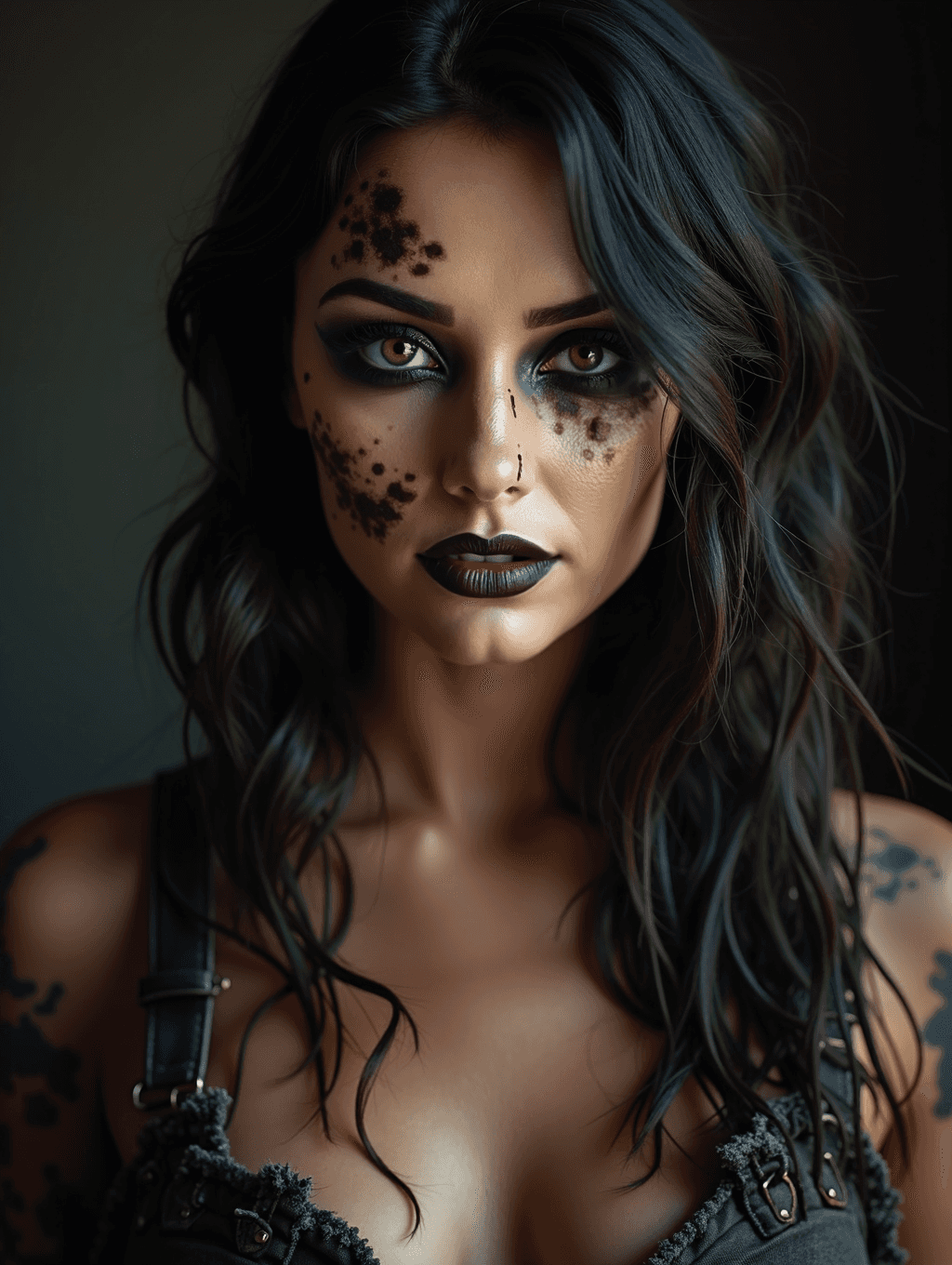
Input: A close portrait photo of a woman with long dark hair, facing the camera under moody indoor lighting, wearing a plain tank top. The result looks similar to the image at the top of this page.
What changed
The skin gets purple, bruise-like blotches across the forehead, one cheek and under one eye, and similar dark patches appear on the shoulders. The eyes are ringed in smudged dark shadow and the lips are a deep plum, near-black shade. The top becomes a low-cut, torn corset-style piece with buckled straps, and the lighting stays low and shadowed.
Things to check
- It reads more glam than undead. Despite the default instruction's "decayed skin and wounds" and "menacing expression", this result is closer to a styled horror makeup look: smooth skin, sculpted brows, full lips. For real decay, ask for "gray rotting skin, open wounds, cloudy eyes" in the instruction.
- The outfit changed. The plain top became a revealing, torn corset. If you want your own clothes kept, say so.
- The face is idealized. Compare the eyes, nose and jaw with the original before posting it as you.
- Heavier requests get graphic fast. If you ask for gore, check the result before sharing it anywhere public.
How it works
- 1
Upload a clear, front-facing photo
A photo with an unobstructed face and visible clothing gives the AI the most to work with when adding wounds, skin texture, and torn fabric.
- 2
Set the horror level in the instruction
Describe how intense you want it, for example a subtle undead look for a profile picture or heavy decay and wounds for a Halloween poster.
- 3
The AI rebuilds the photo as a zombie
It adds discolored, damaged-looking skin, dark shadowing around the eyes, torn or dirtied clothing, and a moodier expression, while keeping the general face shape and hair from your photo.
- 4
Check the face and any text
Look closely at facial features and skin texture near the eyes and mouth, and make sure any added props or marks land where you expect, since generative edits can shift small details.
Use cases
Halloween social posts
Turn a regular selfie into a zombie photo for Halloween without applying real makeup or prosthetics.
Horror content thumbnails
Generate a zombie-style face quickly for a horror video thumbnail, stream overlay, or spooky invite.
Costume planning
Preview a few levels of zombie makeup intensity in the instruction before committing to a real costume look.
Party invites and group photos
Apply the effect to a group photo for a themed Halloween party invite or after-photo.
Tips for better results
- Use a well-lit, front-facing photo so the AI has a clear face to work with before adding decay and shadowing.
- Say how strong you want the effect, from a light undead tint to heavy wounds and torn clothing.
- Mention specific details like exposed teeth, glowing eyes, or a particular wound location if you want them included.
- Avoid photos where the face is partly covered by hair, hands, or objects, since that limits where the effect can be applied.
- Check the finished face closely; horror effects can distort proportions more than a subtler style change would.
Frequently asked questions
Will it still look like me?
The general face shape and hair usually carry over, but the AI changes skin texture and color enough that the result reads as a costume-style character rather than a straight photo of you.
Can I control how gory or intense the result is?
Yes, describe the level you want in the instruction, from a subtle horror tint to heavy wounds and decay, and the AI adjusts accordingly.
Is this appropriate to post publicly?
It's a stylized horror effect meant for entertainment, similar to a costume filter, but review the result yourself before sharing since generated wounds and skin texture can look more graphic than intended.
Can I use a photo of a friend or family member?
Only upload photos of people who are fine with being turned into a zombie image, since the result can look unsettling and shouldn't be shared without their okay.
Does it work on group photos?
You can upload a photo with more than one person, but the effect applies across the whole image in a single result rather than letting you target one person only.
What if the result adds wounds I didn't ask for?
The AI decides some details on its own, like wound placement, skin texture and even clothing, so run it again with a more specific instruction (each run uses credits) if the first result goes further than you wanted, or not far enough.
Can I combine the zombie effect with a costume or outfit?
Describe the clothing you want alongside the horror details in the instruction, for example torn military gear or a ripped wedding dress, and the AI works both into the same result.
Plans start at $9 a month. See pricing