AI Face Swap
Put one face onto another photo while keeping the lighting and angle believable.
What the Face Swap does
Face swap takes a face from one photo and places it into another, matching skin tone, lighting, and head angle so the result doesn't look pasted on. Upload a source photo with the face you want to use and a target photo you want it placed into, and the tool blends the two, adjusting color and shadow so the swapped face sits naturally in the new scene. People use it for costume photos, meme templates, imagining a friend in a movie poster, or just playing around with a group photo. The output is a single blended image, not a side-by-side, so the swap should read as one photo rather than an obvious edit.
See a sample result
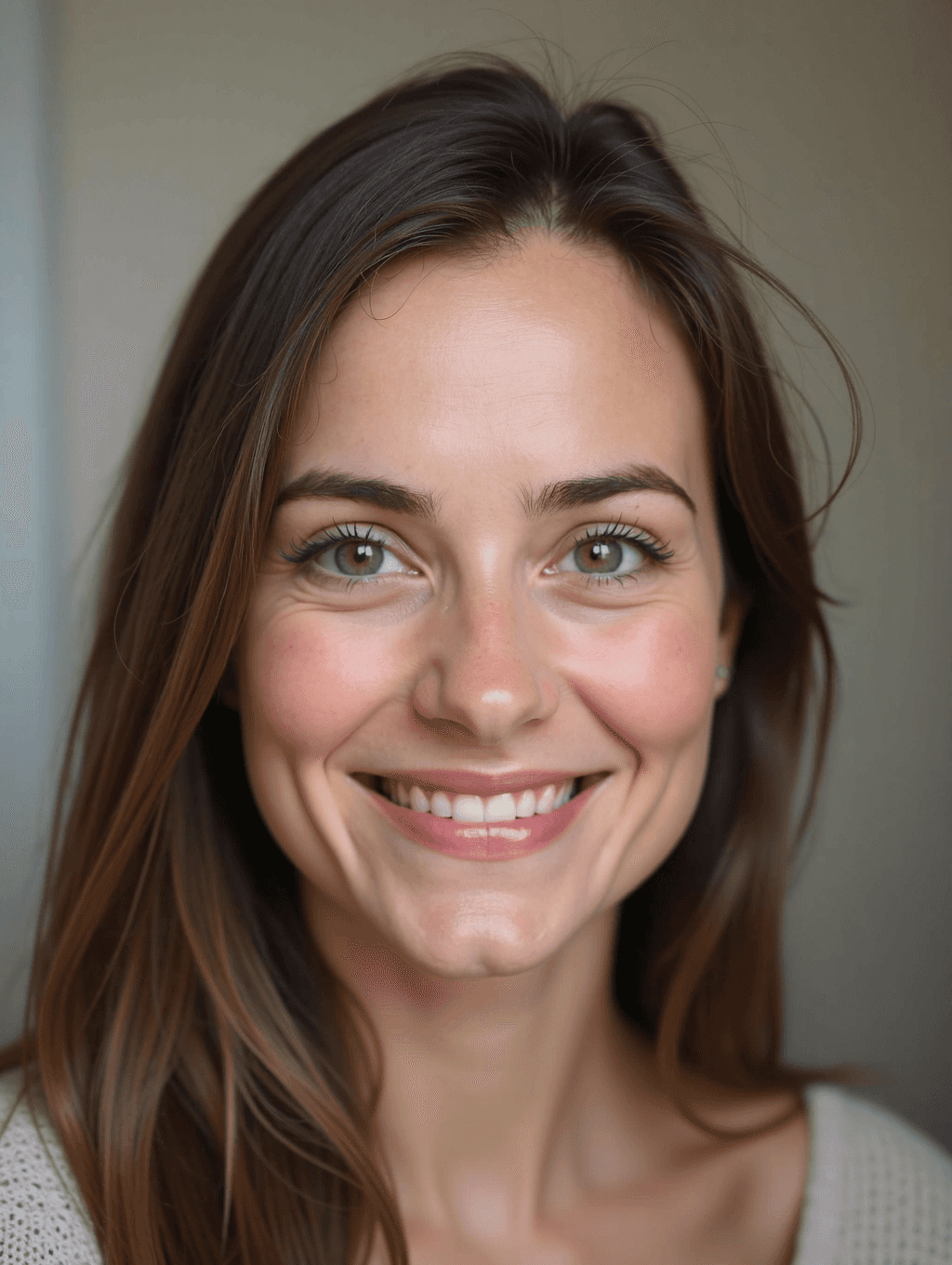
Input: Two uploads: a target portrait of a woman with long brown hair and a cream knit sweater, shot in soft, warm indoor light, and a clear, front-facing, smiling source photo of a different person taken in bright daylight. The blended result looks similar to the image at the top of this page.
The blend
The source face was rotated slightly to match the tilt of the target photo's head, and the daylight-bright skin tone from the source was warmed and softened to match the indoor light so it doesn't look like a cutout dropped onto the scene.
What holds up
The jawline and hairline blend into the target photo's loose hair convincingly, and the eye and mouth position line up with where the original face was, so the swap doesn't shift the pose.
What to watch
Because the source photo was shot in brighter light than the target, the swapped face reads very slightly cleaner and less grainy than the rest of the image, a common giveaway when the two source photos differ a lot in lighting quality.
How it works
- 1
Upload a source face and a target photo
The source photo should show the face clearly, front-on if possible. The target photo is the scene or body the face will be placed into.
- 2
The AI matches the face to the new head position
It looks at where the eyes, nose, and mouth sit in both photos and generates the source face at the angle and scale of the target's head, rather than pasting it flat.
- 3
Skin tone and lighting are matched
Color and shadow from the target photo are applied to the swapped face so it doesn't look like a different exposure or a different light source was used.
- 4
You get one blended photo back
The result is a single image with the new face in place. If the angle or expression is too different between the two photos, the blend may look less convincing.
Use cases
Costume and party photos
Swap a friend's face into a costume photo for a laugh, or see how a group photo looks with everyone's faces shuffled around.
Meme and template photos
Popular meme templates and reaction images get a personal twist when a familiar face replaces the original one.
Imagining a different look
Curious how you'd look in a different era's photo or a movie scene style image? A face swap gives a rough, fun idea.
Group photo experiments
Combine faces from separate photos into one shot when getting everyone together for a real photo wasn't possible.
Tips for better results
- Use a source photo where the face is lit evenly and facing mostly forward, since extreme angles are harder to blend convincingly.
- Try to match the lighting style between source and target photos as closely as you can before uploading, for a more natural result.
- Avoid source photos where the face is partly covered by hair, glasses glare, or shadow, since the tool needs a clear view of the features.
- If the first result looks off around the hairline or jaw, try a source photo taken at a closer, more direct angle.
Limitations
Face swap results depend heavily on how similar the lighting, angle, and image quality are between the source and target photos. Faces with unusual angles, heavy shadow, or low resolution tend to blend less convincingly. This tool is meant for entertainment, memes, and creative experimentation, not for creating images meant to deceive someone about a real person or event, and swapped images should always be shared with that in mind. Only use faces of people who have agreed to it, and never create sexual or humiliating images of a real person.
Frequently asked questions
Will the face swap look realistic?
How natural it looks depends a lot on how closely the lighting and head angle match between your source and target photos. Similar lighting and a forward-facing source face give the most convincing results.
Can I swap a face onto a photo of a group?
Yes, though the tool works best when it's clear which face in the target photo is being replaced, so a photo where faces are well separated works better than a tightly packed crowd.
What makes a good source photo?
A clear, well-lit, mostly front-facing photo of the face, without sunglasses, heavy shadow, or motion blur, gives the tool the most detail to work with.
Is face swap appropriate for any photo?
It's built for entertainment and creative use. Avoid using it to make a photo that could mislead people about a real person or event.
Why does the swapped face sometimes look slightly different in tone from the rest of the photo?
That usually happens when the source and target photos were shot in very different lighting. Matching lighting style beforehand reduces this effect.
Plans start at $9 a month. See pricing