AI Product Photo Analyzer
Checks lighting, composition, and styling in a product shot, then tells you what to fix before it goes live.
What the Product Photo Analyzer does
A product photo does a lot of quiet work: it either builds trust in half a second or gives a shopper a reason to click away. This tool looks at a product photo the way a photography reviewer would, breaking down lighting, composition, background choices, and overall polish, then scoring how ready the shot is for a storefront or marketplace listing. It's built for sellers, small brands, and marketers who don't have a photography background but want to know whether a shot is good enough to publish or needs another pass. The result names specific issues rather than a generic thumbs up or down.
See a sample result
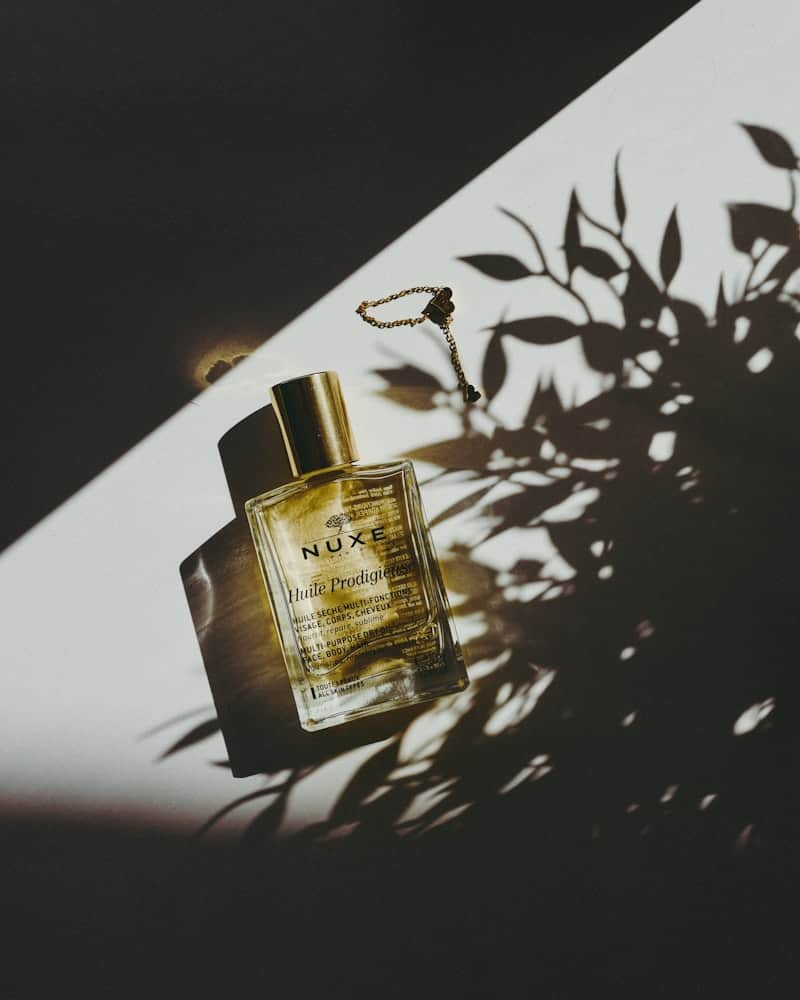
Input: A perfume bottle with a gold cap sits on a diagonal line between a dark shadowed surface and a bright white background, with a plant's leafy shadow cast across the white section. Warm directional light hits the bottle from one side.
- lighting82%
- composition78%
- background60%
- ecommerce readiness55%
Lighting: Strong directional light creates a warm highlight along the glass and cap, giving the bottle real dimension. The shadow-and-light split across the frame is intentional and dramatic, though it does darken the bottle's label slightly on the left edge.
Composition: The diagonal line dividing dark and light halves the frame in an interesting way, and the bottle sits close to that boundary, drawing the eye immediately. The leaf shadow adds texture without crowding the product.
Background: The stark black-to-white transition is stylish for a lifestyle or social post but may read as too moody for a marketplace thumbnail, where flat, bright backgrounds tend to perform better.
Overall read: This shot works well for a brand page or social feed. For a marketplace listing, pair it with a second, more neutral shot so the product reads clearly at thumbnail size.
How it works
- 1
Upload the product photo you want checked
Use the exact image you're considering for a listing, ad, or catalog page, not a cropped or filtered preview, so the analysis matches what shoppers will actually see.
- 2
It reads lighting and technical quality first
The tool checks for even lighting, harsh shadows, blown highlights, and focus, flagging anything that would look unpolished at full size.
- 3
Then it looks at composition and styling
It evaluates framing, background choice, and how much the product stands out from its surroundings, noting anything competing for attention.
- 4
You get scores and specific suggestions
The output breaks quality into categories and suggests concrete changes, like reshooting with softer light or swapping to a plain background, rather than vague feedback.
Use cases
Pre-publish quality checks
A seller runs a new product shot through the tool before uploading it to a storefront, catching harsh shadows or a busy background before the listing goes live.
Comparing shots from a photoshoot
After a batch shoot, a small brand checks several angles side by side to decide which one to use as the primary listing image.
Freelance photographer feedback
A photographer building a product photography portfolio checks their own shots for technical issues before sending a batch to a client.
Training new team members
A marketing team uses the scores and notes as a teaching tool, showing new hires what separates a passable product shot from a strong one.
Tips for better results
- Upload the full-resolution image, not a compressed thumbnail, so lighting and focus issues show up accurately.
- Check both a lifestyle-style shot and a plain background version if you're deciding between the two for a listing.
- Fix lighting issues before composition ones; even a well-framed shot looks weak under harsh or uneven light.
- Run a competitor's listing photo for the same product category through the tool too, then compare the two sets of scores.
Frequently asked questions
Does this tool edit or retouch the photo?
No. It analyzes the photo and describes what to fix; use a separate editing tool to apply lighting or background changes.
What counts as a good score for a marketplace listing?
Higher scores across lighting, composition, and background generally mean fewer distractions and clearer product visibility at thumbnail size, but check your specific marketplace's photo requirements too.
Can it tell me if my background violates a marketplace's photo rules?
It flags background issues from a photography standpoint, but marketplace-specific rules (like requiring pure white backgrounds) should still be checked against that platform's guidelines.
Will it work on photos of services or non-physical products?
It's built for physical product photos. Service-related or abstract images may get feedback, but the scoring criteria are tuned for product shots.
How many photos can I check at once?
Upload one photo per analysis so the feedback stays specific to that shot's lighting and composition.
Plans start at $9 a month. See pricing