Cubist Effect
Turn a photo into geometric, Picasso-inspired cubist art with fragmented shapes and bold color blocks.
What the Cubist Effect does
Cubism breaks a face or scene into flat geometric pieces instead of showing it the way a camera would, and that's the look this tool aims for. It takes a photo and rebuilds it with angular shapes, fragmented forms, and blocks of bold color layered over the original subject, drawing on the same visual language as Picasso-era cubist portraits. You get one reworked image per run, and the instruction box lets you push the geometry further, from a light overlay of shapes to a heavily fragmented, multi-angle composition. Portraits and single-subject photos tend to give the clearest results.
See a sample result
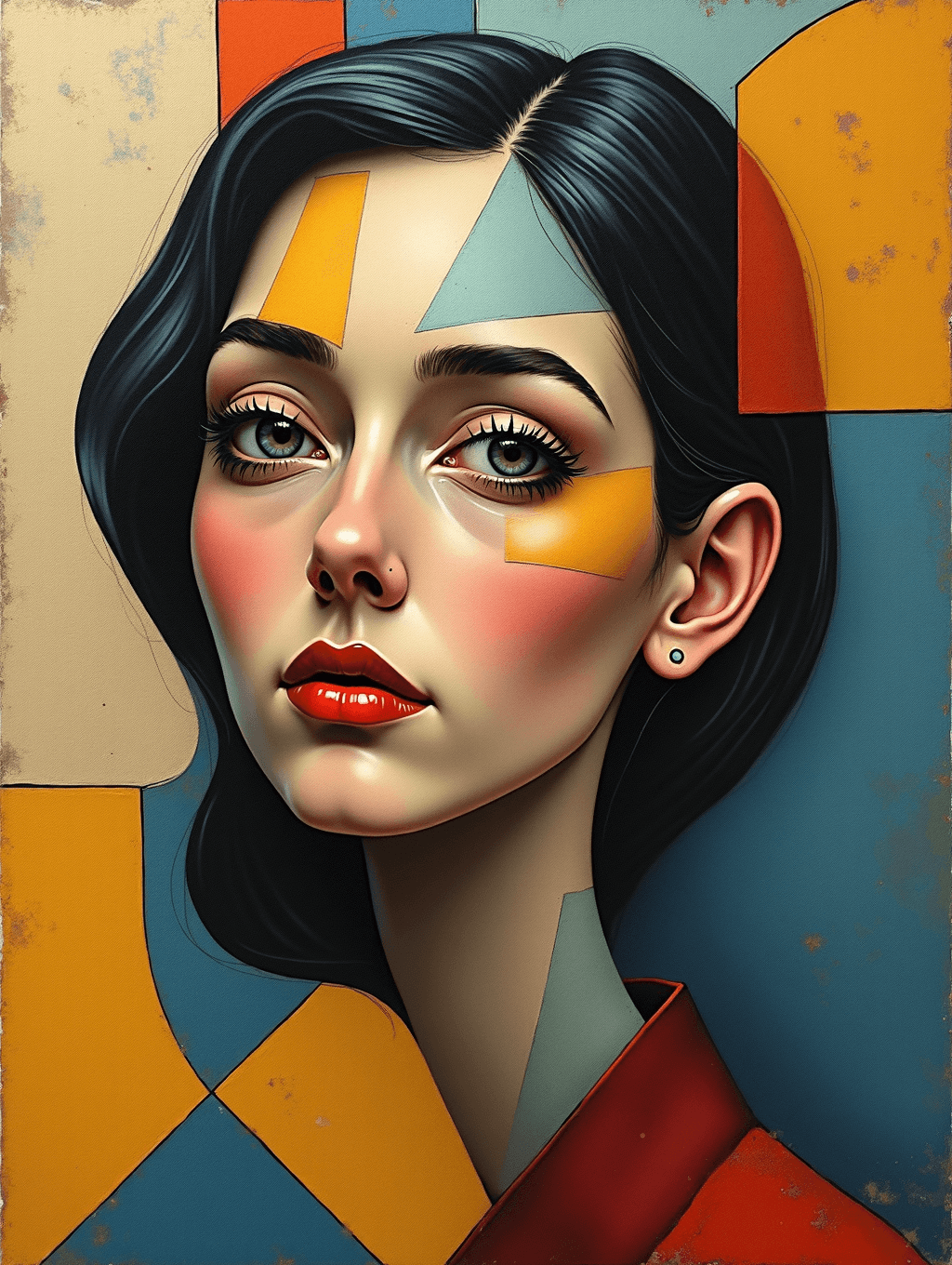
Input: A close portrait photo of a woman with straight, shoulder-length dark hair and a red top, facing the camera against a plain background, similar to a simple headshot. The result looks similar to the image at the top of this page.
What changed
The portrait keeps its overall pose but gains flat geometric shapes layered across the forehead, cheek, and neck, in mustard yellow, pale teal, and terracotta red. The background splits into angular color blocks in the same palette instead of staying a plain wall, and a rough, weathered texture runs across the whole image, giving it the look of aged canvas rather than a clean photo.
Style notes
- The face stays mostly intact, with geometric shapes applied as an overlay rather than truly fragmenting the features or showing several viewpoints at once, so this is a light, decorative take on cubism. Ask for "fragmented features seen from multiple angles" for something closer to Picasso.
- The features are restyled: larger eyes, a longer neck, sharply painted red lips and flushed cheeks. Don't expect a likeness-accurate portrait.
- Bold, flat color blocks replace smooth gradients and natural shading in the background, while the face keeps soft shading.
How it works
- 1
Upload a photo with a clear main subject
A portrait or a photo with one obvious focal point gives the AI a clean shape to fragment; busy scenes with many objects get harder to read once broken into geometry.
- 2
Describe the geometry and color in the instruction
Say how strong you want the fragmentation, and mention a color scheme, like bold primary colors or a muted earth-tone palette, to guide the composition.
- 3
The AI rebuilds the photo as cubist art
It overlays angular shapes and color blocks onto the subject, breaking up smooth surfaces into flat geometric planes while keeping enough of the original pose and features to stay recognizable.
- 4
Check the overall composition
Cubism intentionally distorts proportion and perspective, so look at the result as a whole rather than expecting exact facial or body accuracy.
Use cases
Gallery-style wall art
Turn a portrait or favorite photo into cubist-style art for a printed canvas or framed piece with a more artistic, less literal look.
Album covers and posters
Use a fragmented, geometric version of a photo as bold cover art or poster art that stands out from a straight photograph.
Distinct profile and avatar images
Turn a headshot into a cubist-style avatar for a portfolio, gaming profile, or social account that wants a more artistic identity.
Art class or style reference
Generate a quick cubist reinterpretation of a photo to study how geometry and color replace realistic shading in this style.
Tips for better results
- Use a portrait or a photo with one clear subject; cluttered scenes with many objects fragment into a harder-to-read result.
- Name a color palette in the instruction, like bold primaries or muted earth tones, for a more intentional-looking composition.
- Say how strong you want the fragmentation, from a light geometric overlay to a heavily broken-up, multi-angle look.
- Expect proportions to shift; cubism distorts shape on purpose, so this isn't the tool for a likeness-accurate portrait.
- Try a plain or simple background in the source photo so the geometric shapes read clearly against it.
Frequently asked questions
Will the person in my photo still be recognizable?
Usually the general pose and face shape carry over, but cubism intentionally fragments and distorts features with geometric shapes, so don't expect a precise likeness.
Can I control the colors used?
Yes, name a color palette in the instruction box, like bold primary colors or a softer muted scheme, and the AI builds the composition around it.
Does this work on landscapes or objects, not just portraits?
It can, but a single clear subject fragments more clearly than a busy scene with many objects competing for attention.
How strong can the effect be?
Describe the intensity you want in the instruction, from a light geometric overlay to a heavily fragmented, multi-perspective composition.
Can I upload more than one photo at once?
You can add more than one image, for example merging two photos into one composition, but they combine into a single cubist result. Each run uses credits.
What size does the result come out in?
The output follows the shape of your uploaded photo rather than a fixed canvas size, so crop or resize it afterward for printing or framing.
Is this actual cubist painting, or just a filter?
It's a generated reinterpretation rather than a traditional painting technique, built to echo the flat shapes and fragmented perspective of cubist art, not a stroke-by-stroke recreation of a specific artist's process.
Plans start at $9 a month. See pricing