Dialog Generator
Upload a photo of people and get a realistic conversation written for the scene.
What the Dialog Generator does
A candid photo of two people talking always makes you wonder what they're actually saying. This tool takes a guess, and a good one: it reads the expressions, posture, and setting in your photo and writes dialogue that fits the mood it sees. Upload a photo with one or more people in it, add a detail in the notes box if you want a specific angle (funny, tense, romantic), and get back a short exchange that reads like it belongs to that exact moment. It's built for captions, writing prompts, comic panels, or just for fun when a photo begs the question of what was actually said.
See a sample result
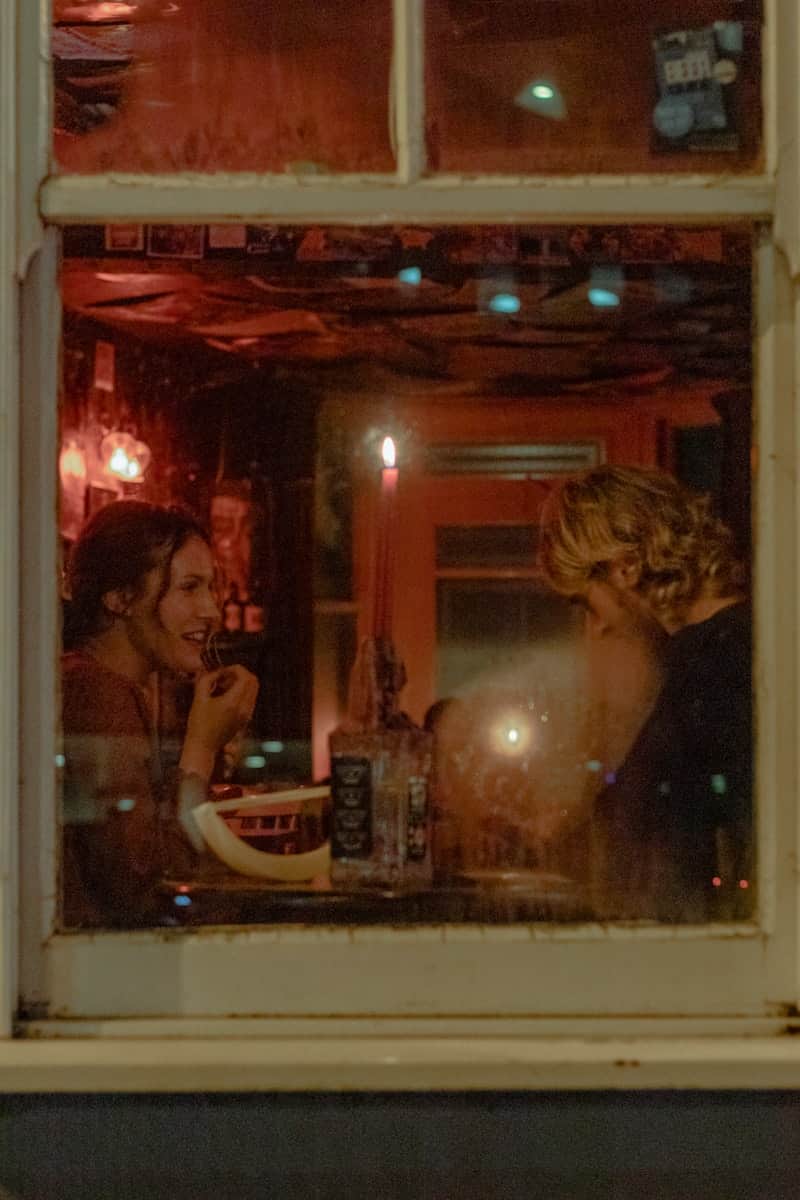
Input: A nighttime photo shot through a pub window from the street: a young woman with dark hair pulled back, smiling while she eats from a white bowl, and a man with shoulder-length curly blond hair and a beard leaning toward her across a small table. A lit candle stuck in a bottle stands between them, and the room behind them glows red.
- Mood match84%
- Tone fit79%
Scene read
A relaxed late-night meal between two people who know each other well. She is laughing mid-bite, he is leaning in, and the candle and the empty room behind them suggest the evening is winding down rather than just starting.
Dialogue
Her (mid-bite, laughing): "You cannot tell that story with a straight face. I was there."
Him (leaning in): "I'm telling it the way it should have happened."
Her: "The way it should have happened involves you not falling into the canal."
Him: "Details. Are you finishing that?"
Her (pulling the bowl closer): "Order your own. They close in twenty minutes."
Him: "Then we'd better order two."
How it works
- 1
Upload a photo with visible people
Photos where faces and body language are clear give the best results. Group shots, candid moments, and photos with visible expressions work especially well.
- 2
Add a direction if you want one
Use the details box to steer the tone: 'make it funny,' 'they just had an argument,' or 'first date nerves.' Leave it blank and the AI reads the mood from the photo alone.
- 3
The AI reads the scene
It looks at expressions, body language, setting, and any visible context (a candle, a drink, a phone) to build a conversation that matches what's happening.
- 4
Get your dialogue
You'll get a short exchange written in each person's own voice, along with 0 to 100 scores for traits like mood match and how well the tone fits the scene.
Use cases
Captions for candid photos
Turn a photo of friends or a couple into a caption-worthy exchange instead of a generic quote.
Comic or storyboard drafts
Use a reference photo to get a starting line of dialogue for a panel or scene before refining it yourself.
Writing prompts
Feed in a photo of strangers or an ambiguous scene and use the generated dialogue as a jumping-off point for a short story.
Fun with group photos
Run an old group photo through the tool and see what conversation it imagines was happening in that exact frame.
Tips for better results
- Photos with clear facial expressions give more specific, better-matched dialogue than distant or blurry ones.
- Use the details box to set a genre or tone if you want something other than the default read of the scene.
- Photos with two or three people work better than large groups, where it's harder for the AI to assign distinct voices.
- If the dialogue feels generic, add a detail about who the people are or what just happened before the photo.
- Try the same photo with a different tone request to see a completely different take on the same scene.
Frequently asked questions
Does the dialogue reflect what the people actually said?
No. It's a creative guess based on expressions, body language, and setting, not a transcript or lip-reading of the actual conversation.
Can I set the mood or genre of the dialogue?
Yes, use the details box to ask for something specific, like a funny tone, a tense argument, or a romantic exchange, and the AI writes toward that direction.
Does it work with photos of just one person?
It works best with two or more visible people since it needs separate voices to write a conversation. A single-person photo will get more of an internal-thought style response.
What do the scores next to the result mean?
They're the AI's own read on how well the mood and tone of the dialogue match what it saw in the photo, on a 0 to 100 scale, not a measure of accuracy against real speech.
Can I use this for a comic strip I'm working on?
Yes, many people use it to get a starting line or exchange for a panel, then edit it into their own voice and format.
Will it identify who the people in the photo are?
No, it doesn't try to recognize or name anyone. It only reads visible expressions and context to write plausible dialogue.
Plans start at $9 a month. See pricing