Foundation Shade Finder
Photograph your skin in natural light and get a shade and undertone read to shop by.
What the Foundation Shade Matcher does
Picking a foundation shade from a screen or a store swatch is guesswork most of the time, especially with undertone. This tool looks at a photo of your skin and works out where you likely sit on the warm-to-cool spectrum and how deep your shade is, then gives you language to use when you're comparing bottles or shopping online. It's aimed at anyone who has ended up with a foundation that oxidizes orange, sits gray, or just never quite disappears into their skin. The result names an undertone, a depth range, and a few practical notes rather than a single guaranteed bottle.
See a sample result
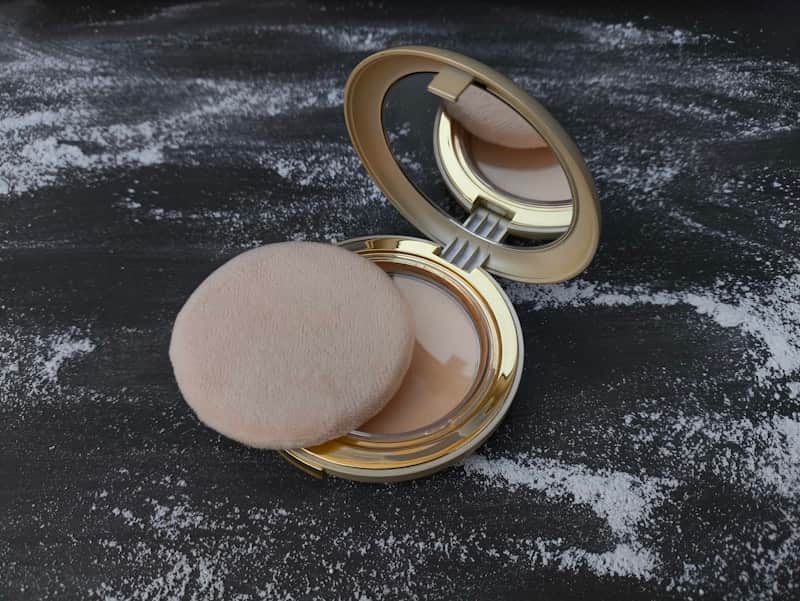
Input: A close-up product photo of an open pressed powder compact with a mirror, a powder puff resting beside it, and loose powder dusted across a dark surface.
- Warm undertone fit78%
- Neutral undertone fit45%
- Cool undertone fit15%
- Light depth fit72%
There's no skin in this photo, so this read is of the powder in the compact, which is still useful if you're deciding whether this shade could work for you.
Powder shade: Light, warm beige with a soft golden cast
Undertone it suits: Warm to neutral-warm
Depth it suits: Light to light-medium
The pan reads peachy-beige rather than pink or ashy, so it will sit most naturally on light skin with golden or peach undertones. On cool, pink-toned skin it would likely look slightly yellow along the jaw, and on medium or deeper skin it would read chalky. As a reference point, this is the range many brands label "light warm" or mark with a W.
Application tip: Pressed powder builds up fast, so press it on with the puff over foundation instead of sweeping it, and check the jawline in daylight.
For a match to your own skin, upload a bare-face photo taken by a window.
How it works
- 1
Photograph your bare face in daylight
Natural window light with no foundation, filter, or heavy color correction on gives the clearest read. Indoor bulbs and flash both shift how skin tone appears in a photo.
- 2
The tool reads undertone and depth
It looks for warm, cool, neutral, or olive undertones and places your depth on a light-to-deep scale, along with any visible texture or oiliness that affects finish.
- 3
You get a shade profile back
The result names your likely undertone and depth range, flags anything distinctive about your coloring, and translates that into shade language brands commonly use.
- 4
Use it to narrow your search
Take the undertone and depth description into a store or an online shade finder to shortlist a few bottles, rather than testing dozens at random.
Use cases
Shopping for foundation online
Get an undertone and depth description to compare against a brand's shade finder before you buy something you can't test in person first.
Switching to a new foundation brand
Translate your usual shade into undertone language so you can find the closest match in a line you've never worn.
Figuring out why a shade keeps looking off
If your current foundation always seems to sit wrong, a fresh read on undertone can point out whether you've been buying the wrong direction entirely.
Building a seasonal shade range
Skin depth shifts with sun exposure, so checking your undertone and depth at different times of year helps you keep a summer and winter shade on hand.
Tips for better results
- Take the photo with a bare face, no foundation, tinted moisturizer, or color-correcting primer on.
- Use daylight near a window rather than indoor bulbs, which tend to shift color warmer or cooler.
- Avoid heavy photo filters or auto-enhance features on your phone camera before uploading.
- Photograph your jawline and neck too if you can, since face and neck depth sometimes differ.
- Check the shade in store lighting once you narrow it down, since screens don't render color perfectly.
Limitations
This reads undertone and depth from a photo, and camera sensors, screen calibration, and lighting all shift how skin color renders, so treat the result as a starting shade range rather than an exact match. Skin tone also changes with the season and with tanning, so recheck if it's been a while since your last shade purchase. It isn't a skin health or medical assessment of any kind.
Frequently asked questions
How accurate is a photo-based foundation match?
It's a strong starting point for undertone and depth, but screen and camera differences mean you should still test the actual shade on your skin before buying a full-size bottle.
What if my undertone comes back different from what I expected?
Undertone is genuinely easy to misjudge on your own, especially between neutral and olive. Try the photo again in different daylight and see if the read stays consistent.
Does this tell me an exact foundation shade number?
It gives you undertone and depth, like warm-golden and light-medium, and often suggests example shades from well-known lines. Treat those as a shortlist to swatch, since shade names and formulas change and brands don't match each other one to one.
Can I use this for powder, liquid, or stick foundation?
Yes, the undertone and depth read applies across formulas, though the tips note where a formula like powder tends to shift once applied and oxidized.
Will lighting in my photo throw off the result?
Yes, indoor bulbs and flash both shift how skin tone appears, which is why natural daylight near a window gives the most reliable read.
Does skin tone change enough to need a recheck?
Yes, tanning and seasonal changes can shift your depth by a shade or two, so it's worth rechecking if you haven't updated your foundation in a while.
Plans start at $9 a month. See pricing