AI Gender Swap
Upload a portrait and get a version of the same person styled as the opposite gender.
What the Gender Swap Generator does
People ask this out of plain curiosity more often than anything else: what would I look like with a different jawline, different hair, different presentation entirely? This tool takes a portrait and generates an opposite-gender version of the same face, adjusting features, hairstyle, and styling while trying to keep the person recognizable underneath the changes. You can add an instruction if you want a particular hairstyle, outfit, or setting kept or changed. The output is a single edited image, built for fun, for character concepts, or for testing a look before committing to it in real life.
See a sample result
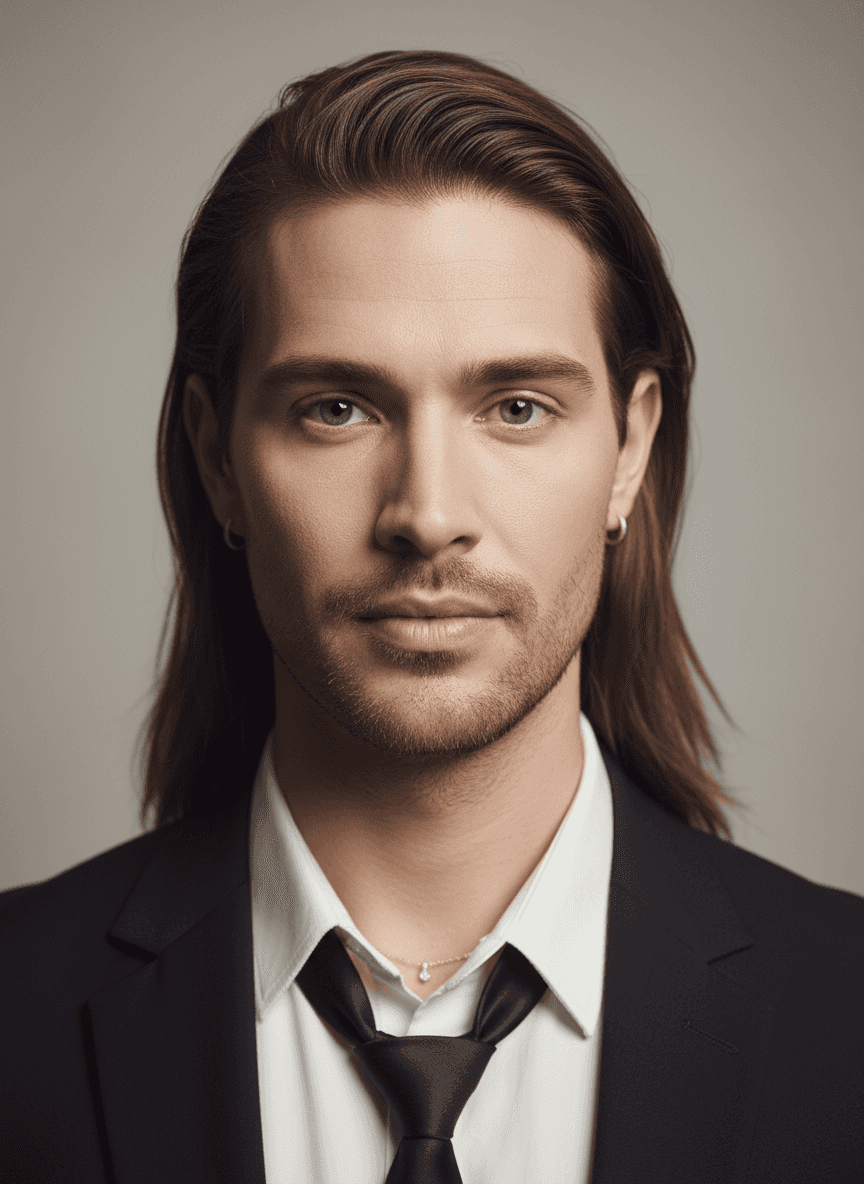
Input: A straight-on studio portrait of a woman with light eyes and long, center-parted light-brown hair, wearing small hoop earrings, a thin pendant necklace, and a white collared shirt against a plain gray backdrop. The result looks similar to the image at the top of this page.
Transformation applied: Facial structure shifted toward a squarer jaw and heavier brow, with the nose and cheekbones adjusted to read as masculine. Eye color and the overall face shape stay close to the source photo.
Styling: The long hair was kept but pushed back behind the ears, light stubble was added along the jaw and upper lip, and the gray backdrop stayed neutral.
Outfit: The model added a black suit jacket and a black tie over the white shirt, which the original didn't have. The hoop earrings and pendant necklace carried through.
Consistency notes: Eye color, skin tone, and head angle match the source, so the result reads as a variation on the same person. The unrequested jacket and tie are a reminder that the edit is generative: if you want the original outfit kept, say so in the instruction.
How it works
- 1
Upload a clear, front-facing portrait
Even lighting and a face that isn't turned too far to the side gives the model the most to work with. Group photos or heavy shadows make the result less reliable.
- 2
Add an instruction if you want control
Type a note naming a hairstyle, era, or outfit, or leave the field blank and let the tool make its own styling choices for the swapped version.
- 3
The model reworks facial structure and styling
It adjusts jawline, brow, hairline, and other features associated with the opposite gender, then applies plausible hair and clothing to match.
- 4
You get back one generated image
The result is a new image you can download or compare side by side with your original. Running it again with a different instruction gives a different take, and each run uses credits.
Use cases
Character concepts for stories or games
Writers and game designers use a gender-swapped version of a character portrait as a quick visual reference before commissioning real artwork.
Curiosity about a different presentation
Someone wonders what a different hairstyle, jaw, or overall presentation would look like on their own face without any commitment involved.
Costume and cosplay planning
Cosplayers preview how a cross-gender version of a costume character might translate onto their own features before building the look.
Social content and party photos
Friends generate swapped versions of each other's photos for a laugh at a party or for a themed post, using the instruction field to set a specific style.
Tips for better results
- Use a photo where your whole face is visible and not partly covered by hair, glasses glare, or a hand.
- Keep the background simple; busy backgrounds sometimes get reworked along with the face.
- Name a specific hairstyle or era in the instruction field if you want more control over the final look.
- Try more than one photo of yourself if the first result doesn't keep enough of your features to feel like you.
- Avoid heavily filtered or edited source photos, since the model works from what it can actually see in the image.
Limitations
This is a generative image edit, not a scientific prediction of how you'd actually look. The model is applying learned patterns about facial features and styling, not simulating hormones, aging, or genetics. Results vary with the source photo's lighting, angle, and expression, and small details like text, jewelry, or background objects can shift unexpectedly between the original and the result. Treat it as a fun visual guess, not an accurate forecast, and expect to run it more than once to get a version you like. Only upload photos of people who agreed to it, and don't use the result to mock, out, or harass anyone.
Frequently asked questions
Will the result actually look like me?
It aims to keep recognizable features like eye color, skin tone, and face shape, but the changes to jaw, brow, and hair are significant enough that it reads as a styled variation rather than a perfect match.
Can I control the hairstyle or outfit in the result?
Yes. Type a note in the instruction field naming a hairstyle, clothing style, or setting, and the tool will try to work that into the generated image.
Does it work on photos of other people, like celebrities?
It can process any clear portrait, but use photos you have the right to edit, and be thoughtful about generating images of other identifiable people.
Why did the background or outfit change so much?
Generative edits sometimes rework more of the image than expected, especially clothing and backgrounds, since the model is generating a new image rather than only masking one feature.
Can I upload more than one photo at once?
Yes, the tool accepts multiple images in a single run, which is useful for comparing angles or trying the same instruction on different source photos.
Does this cost credits every time I run it?
Each generation uses credits, so it's worth writing a clear instruction the first time rather than running the same photo repeatedly with small tweaks.
Plans start at $9 a month. See pricing