What the Punk Style Generator does
Safety pins, studded leather, a shaved or spiked head of hair dyed something loud: punk fashion has stayed recognizable for decades because it was built to be. This tool takes a photo you upload and reworks it into that look, swapping in punk clothing, hair, and accessories while trying to keep the person underneath recognizable. It's aimed at anyone who wants to see themselves in the aesthetic before committing to a real haircut or a leather jacket covered in patches: someone prepping a costume, building a themed photo set, or just curious what a mohawk and a battle vest would look like on their own face. You upload a photo, the AI does the restyling, and you get one image back.
See a sample result
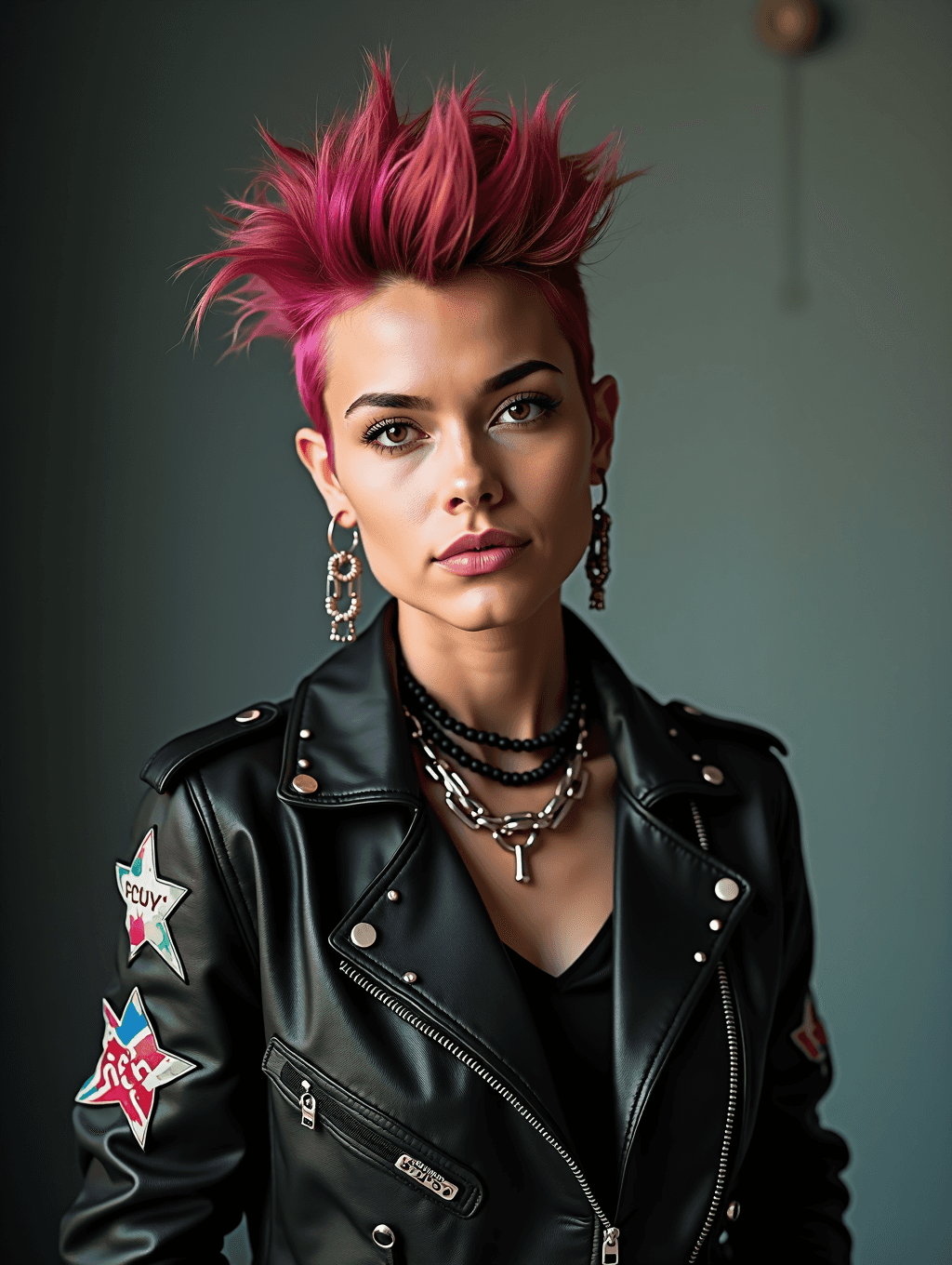
Input: A studio headshot and shoulders photo of a young woman with straight brown hair, wearing a plain sweater against a neutral background. The result looks similar to the image at the top of this page.
Her hair is restyled into a spiked, two-tone mohawk running from pink at the roots to deeper magenta at the tips, with the sides shaved close. The plain sweater is replaced with a black faux-leather biker jacket covered in metal studs along the collar and two star-shaped patches on the sleeve, worn open over a dark top. The patches carry garbled lettering the AI made up on its own, so check any text before you post. Layered chain and beaded necklaces sit at the throat, and dangling chain-link earrings replace the simple studs from the original. Her expression reads more direct and unsmiling than the source photo, which fits the aesthetic but is worth knowing about if you wanted to keep your original smile. The background stays close to the original, muted and out of focus, so the styling change is the whole story here.
How it works
- 1
Upload a clear photo of your face and upper body
A front-facing or slightly angled shot with decent light gives the tool the most to work with when it reshapes hair and adds clothing details.
- 2
The AI applies punk hair and styling
Expect spiked, shaved, or dyed hair (pink, green, or bleached blond are common choices), heavier eyeliner, and a more confrontational expression than a typical portrait.
- 3
Clothing and accessories shift to punk staples
Studded or patch-covered leather jackets, chain necklaces, safety-pin details, and band-style pins are typical additions, layered over or replacing whatever you were wearing.
- 4
You get back a single styled photo
Compare it against your original, and if the hair color, jacket style, or intensity isn't what you wanted, edit the instruction and run it again.
Use cases
Costume planning before a real transformation
See roughly how a mohawk, hair color, or studded jacket would look on you before booking a salon appointment or buying the actual pieces.
Themed party or Halloween photos
Get a punk-styled photo for an invite, a costume-party profile picture, or a themed photo booth without assembling the outfit yourself.
Band, zine, or music project artwork
Musicians and zine creators can use a styled photo for cover art or promo images that fit a punk visual identity.
Character or roleplay reference images
Writers and game masters building a punk-styled character can turn a reference photo into a visual stand-in for the character.
Tips for better results
- Use a photo where your hair isn't covering your face, since the tool needs to see your hairline to restyle it convincingly.
- Simple, solid-colored clothing in the original photo tends to restyle more cleanly than busy patterns.
- If you want a specific hair color or jacket detail, name it directly in the instruction instead of relying on the default punk look.
- A slightly higher-resolution photo helps the AI render small details like studs, patches, and piercings more clearly.
- If the result feels too subtle or too extreme, rerun it with a more specific instruction rather than the same default prompt.
Frequently asked questions
Will it change my face, or just my hair and clothes?
The goal is to keep you recognizable while changing hair, clothing, makeup, and accessories. It's a generative edit though, so small changes to your expression, pose, or features can happen. If the likeness drifts too far, try a clearer, more front-facing photo.
Can I choose the hair color or jacket style myself?
Yes. The instruction is editable, so you can ask for a specific color, like bleached blond or green, or a particular jacket style instead of the default mix the AI picks.
Does it work on photos where I'm not looking at the camera?
It works best with a front-facing or slightly angled face, since that gives the AI the clearest view for restyling hair and adding accessories. Profile shots and photos with your face partly turned away tend to produce less consistent results.
Can I use a full-body photo instead of a headshot and shoulders?
Yes, and a full-body photo often gives a more complete look, since the AI has more of your outfit to restyle into punk clothing rather than just what's visible above the shoulders.
Will the patches or logos in the result be real bands or brands?
Sometimes. The AI can add text, patches, or logo-like graphics on its own, and they're not guaranteed to be accurate or original. Check any text or graphics closely before using the image publicly.
How many photos can I upload at once?
You can add more than one image, but they all feed into a single result, for example your photo plus a picture of a jacket you want copied. Say in the instruction what each image is for. To compare different source photos, run them one at a time; each run uses credits.
Plans start at $9 a month. See pricing