AI Action Figure Generator
Turn any photo into a collectible action figure design, packaging pose and all.
What the AI Action Figure Generator does
Everyone who grew up with a shelf of action figures has wondered what they'd look like as one. This tool takes a photo, whether it's you, a friend, a pet, or a character sketch, and reworks it into a collectible action figure: molded plastic texture, a dynamic standing pose, a painted display base, and the kind of sculpted detail you'd see through a toy box window. You can describe the character angle you want in the instruction box, a superhero, a fantasy warrior, a sci-fi guardian, and the result adjusts around that. It's a fast way to see a photo reinterpreted as a physical collectible rather than another filter pass.
See a sample result
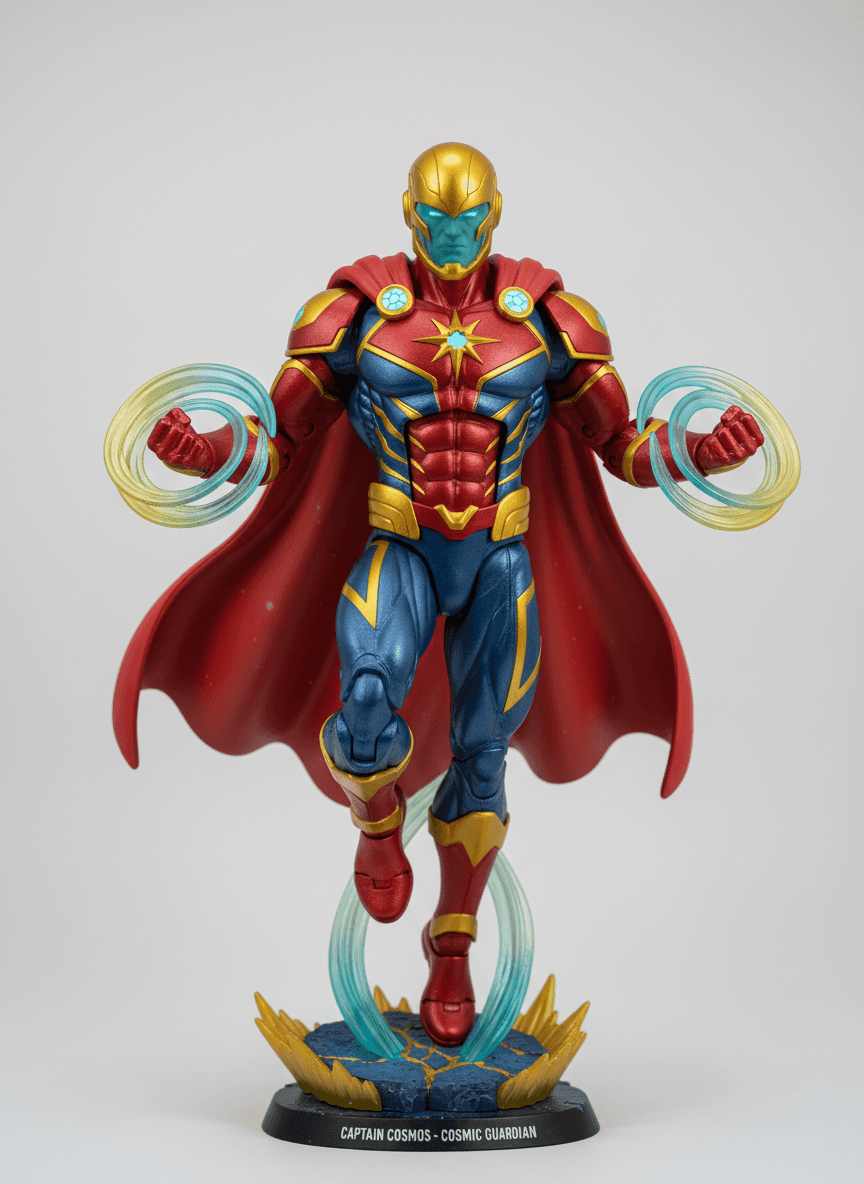
Input: A plain, front-facing photo of a man standing in jeans and a t-shirt against a neutral wall, arms relaxed at his sides, taken in even indoor lighting, with the instruction edited to 'cosmic superhero'. The result looks similar to the image at the top of this page.
The photo becomes a sculpted collectible figure in a red and blue suit with gold trim, a star emblem on the chest, and a long red cape. Both fists are clenched with translucent yellow and teal energy rings around them, and the figure hovers above its base on a column of sculpted energy, a common trick on real statues. The base is a molded patch of cracked ground with gold crystal shards and a black plinth whose nameplate reads "CAPTAIN COSMOS - COSMIC GUARDIAN", a title the AI made up. It's lit like a studio product shot against a soft gray backdrop.
What to know: A full gold helmet and teal face paint replaced the man's face and hair, so the figure doesn't look like him at all. If you want to be recognizable, ask for an unmasked face in the instruction. The costume also lands close to well-known comic heroes, so don't use a result like this for merchandise.
How it works
- 1
Upload a clear photo of a person, pet, or character
A well-lit, front-facing shot gives the tool the most to work with when building a recognizable figure.
- 2
Add an instruction to steer the design
Name a theme, like 'cosmic superhero' or 'medieval knight,' or a color scheme, and the figure design will follow it.
- 3
The AI rebuilds the subject as a sculpted figure
It reworks proportions, surface texture, and pose into the look of a painted plastic collectible, then adds a display base and accessories that fit the theme.
- 4
Download the finished figure design
You get an image styled like a product photo of the figure on its stand, ready to share or use as a mockup.
Use cases
A novelty gift or profile picture
Turn a photo of yourself or a friend into a toy-style figure for a birthday card, group chat, or social profile picture that stands out from a regular photo.
Concept art for a character idea
Writers, game designers, and hobbyists use the figure look to visualize a character concept as if it were already a produced collectible.
Fan art for a favorite franchise style
Recreate the packaging-photo aesthetic of a favorite toy line using your own photo or sketch as the starting point.
Pet portraits with a playful twist
Upload a photo of a pet and see it reimagined as an action figure with its own pose, accessories, and display base.
Mockups for a personal toy line or brand
Indie creators use the figure look to mock up how a character might read as a physical collectible before committing to sculpting or manufacturing costs.
Tips for better results
- Use a photo where the subject faces the camera; side profiles are harder for the tool to rework into a clear figure pose.
- Name a specific theme or color palette in the instruction box instead of leaving it blank, since specific direction gives more consistent results.
- Keep the background simple in your source photo so the tool focuses its changes on the subject rather than the surroundings.
- Try a couple of different instructions on the same photo, like swapping 'superhero' for 'fantasy warrior,' to compare styles.
- Check the face and any text on the base after generating, since generative edits can shift small details like facial features or lettering.
Frequently asked questions
Can I upload a photo of a pet or an object instead of a person?
Yes, the tool can rework pets, characters, or objects into a figure-style design, though results are most detailed with a clear subject facing the camera.
Will the figure actually look like me?
It aims to keep recognizable features like face shape and hair color, but the generative process changes proportions, texture, and pose, so treat it as a stylized reinterpretation rather than a likeness copy.
Can I choose what the figure's accessories or base look like?
Yes, describe the theme, props, or base style you want in the instruction box, such as 'sci-fi with a rocky base' or 'medieval knight with a sword.'
Does it create a 3D model I can print?
No, it generates a styled image of a figure, not a 3D file, so it isn't set up for 3D printing on its own.
Can I upload more than one photo at once?
Yes, the tool accepts multiple images, which is useful if you want to combine a subject photo with a reference for a specific pose or costume.
Why did the figure's face or text on the base come out distorted?
Generative edits can occasionally warp fine details like faces or lettering; if that happens, try a clearer source photo or regenerate with a more specific instruction.
Can I try a different theme on the same photo if the first one misses?
Yes, each run uses a credit, so change the instruction, for example swapping 'superhero' for 'fantasy warrior,' and run it again on the same source photo.
Plans start at $9 a month. See pricing