AI Cat Girl Generator
Upload a photo and get a cute, anime-style cat girl version with ears, a tail, and pastel styling.
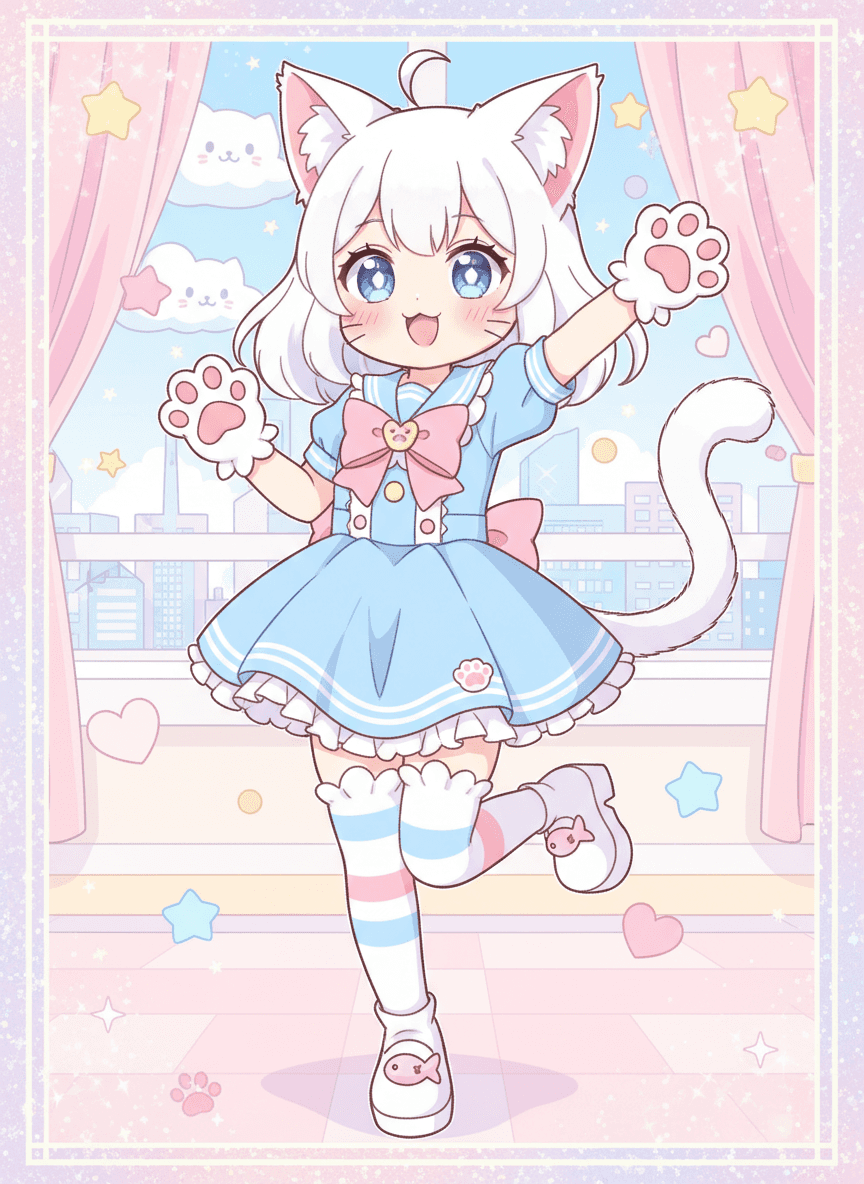
What the Cat Girl Generator does
Catgirl art is a specific corner of anime style: big expressive eyes, cat ears and a tail, pastel colors, and an overall kawaii feel that reads as playful rather than realistic. Upload a photo and the AI turns it into that style, adding ears, a tail, paw-shaped gloves or socks, and a stylized outfit. Pose, hair color and face are reinterpreted freely, so expect a character inspired by the photo rather than a likeness. It's built for anime fans who want a fun avatar, gift art for a friend who's into the aesthetic, or a lighthearted profile picture for gaming or social platforms. It's for adults only, using your own photo or one you have permission to use.
See a sample result
Input: A plain, front-facing selfie of an adult with light hair pulled into a loose ponytail, wearing a simple blue top, taken indoors against a neutral wall. The result looks similar to the image at the top of this page.
The result redraws the photo entirely as flat anime-style illustration rather than a photo edit. White cat ears with pink inner detail sit on top of the head, echoing the original light hair color, and a matching tail curls at the side. The blue top becomes a sailor-style dress with a large bow at the chest, paired with paw-shaped gloves and striped thigh-high socks in soft blue and pink. The background shifts to a pastel bedroom scene with sparkles, stars, and small cloud shapes, and the eyes become large and expressive in an exaggerated anime style. The whole scene sits inside a sparkly pastel frame, with a city skyline outside the window and cat-faced clouds in the sky.
What the AI decided on its own: the hair turned white, the selfie became a full-body dancing pose on one leg, and the character came out with a very young, chibi-like face and proportions. If you want an adult-looking character, say "adult woman" or "older anime style" in the instruction. Resemblance to the original selfie is loose at best.
How it works
- 1
Upload a clear photo of an adult
A front-facing photo with your face and hair visible gives the model a hairstyle and coloring to base the catgirl design on. Use your own photo or one you have clear permission to edit.
- 2
Edit the instruction for a specific style
The default aims for a soft, pastel kawaii look, but the instruction is editable, so you can ask for a different outfit color, a different pose, or a bolder anime style instead of the pastel default.
- 3
The model redraws the photo as anime-style art
It adds cat ears and a tail, restyles clothing into a stylized outfit, and reworks the whole image into flat, anime-style illustration rather than a photorealistic edit.
- 4
Download the result
You get back a full anime-style catgirl illustration, ready to use as an avatar or share for fun.
Use cases
A gaming or social media avatar
Get a distinct, on-theme profile picture for platforms where anime and kawaii avatars are common, without commissioning custom art.
Gift art for an anime fan
Turn a photo of a friend into a personalized catgirl illustration as a lighthearted gift for someone into the aesthetic.
Cosplay or costume planning
Preview a catgirl-styled look before deciding on an actual costume, wig, or accessory set for a convention or themed event.
Fan content and art practice
Use the result as a reference or starting point for fan art, character concepts, or your own drawing practice.
Tips for better results
- Use a well-lit, front-facing photo so hair color and face shape carry through into the illustration clearly.
- Name a specific outfit color or theme in the instruction if you want something other than the pastel default.
- Try a bolder or darker style keyword if the soft kawaii palette isn't the look you're after.
- Expect a full illustration, not a light filter; the entire image is redrawn in anime style.
- Only use your own photo or one from someone who has agreed to it; this tool is for adults, not children.
Limitations
This is a generative, stylized redraw, not a photo filter, so it changes far more than color or texture: pose, proportions, outfit, and background are all reinterpreted in anime style, and resemblance to the original photo is loose rather than exact. It's intended for adults only and for non-sexualized, playful anime-style art; don't upload photos of minors or use it to generate sexualized content. Use your own photo or one you have clear permission to edit.
Frequently asked questions
Will the result actually look like me?
It keeps a loose connection to your hair color and general features, but this is a full anime-style redraw, so expect a stylized character rather than a realistic likeness.
Can I ask for a specific outfit or color scheme?
Yes, edit the instruction and name a color, outfit style, or theme. The default uses a pastel kawaii look if you don't specify anything else.
Can I use a photo of someone else?
Only with their clear permission. Don't upload a photo of someone, especially a minor, without their consent.
Is this appropriate for kids to use?
No. This generator is built for adult use only, producing non-sexualized character art, and isn't intended for photos of minors.
Can I get a more serious anime style instead of a cute one?
Yes, describe the style you want in the instruction, such as a sharper or more dramatic anime look, instead of the soft, pastel default.
Can I upload more than one photo?
You can upload more than one, but they are combined into one illustration rather than converted one by one. To compare photos, run each separately; each run uses credits.
Plans start at $9 a month. See pricing