Car Identifier
Upload a photo of a car and get an AI estimate of its make, model, and notable features.
What the Car Identifier does
Spotting an unfamiliar car in a parking lot or a listing photo and wanting a name for it is a common enough itch. This tool looks at a photo you upload and gives its best read on the make, model, and probable year, along with body style, visible modifications, and general condition. It's built for curious spotters, buyers scanning listings, and sellers who want a second opinion on how their car reads in photos, not for anything requiring a definitive VIN-level identification. You get back a written breakdown and a set of scores showing how confident the read is on different fronts, based only on what's visible in the frame.
See a sample result
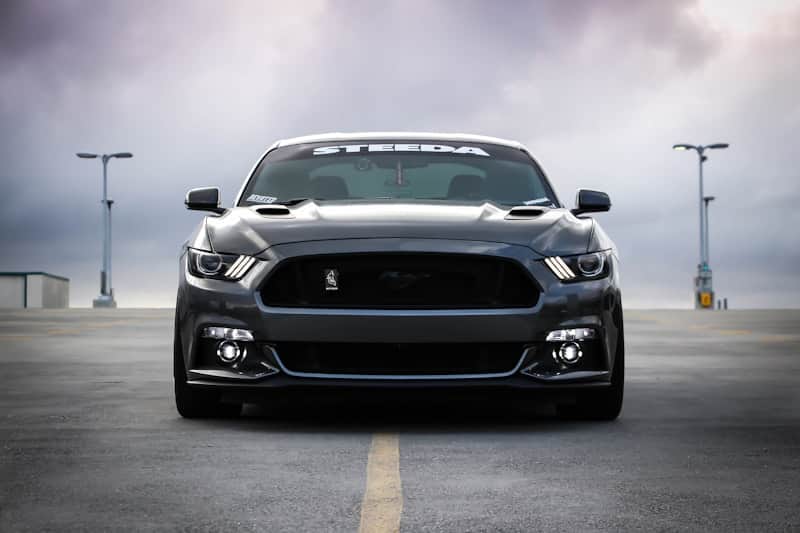
Input: A straight-on front shot of a dark gray coupe with a wide mouth grille, three vertical LED bars in each headlight, twin hood vents, a low stance, and a white 'STEEDA' banner across the top of the windshield, parked on an empty rooftop lot under an overcast sky.
- Model Match Confidence78%
- Visible Exterior Condition84%
- Modification Level65%
Make and model: Ford Mustang, sixth-generation body style (roughly 2015 to 2017 based on the headlight and grille shape).
Trim and modifications: The three-bar LED lights are the stock design for this generation, so they don't point to a mod. What does look non-stock is the grille: a small emblem sits off-center where the factory running-horse badge would normally be centered. The 'STEEDA' windshield banner names a Mustang aftermarket parts brand, which fits the low ride height, though a banner alone doesn't prove which parts are installed.
Condition: The paint shows a clean, even dark gray finish with no visible scratches or panel misalignment in this shot. Fog lights and headlight housings look factory-clear with no fading.
Not visible: Interior condition, mileage, engine bay, and any rear-end modifications are not visible from this angle.
How it works
- 1
Upload a clear photo of the car
A straight-on or three-quarter angle shot showing the grille, headlights, and body lines gives the AI the most to work from. Side or rear shots work too but may narrow down the model less precisely.
- 2
The AI reads badges, body shape, and details
It looks at grille shape, headlight and taillight design, badge placement, wheel style, and proportions to narrow down make, model, and approximate model year.
- 3
It notes condition and modifications
Visible paint condition, panel gaps, aftermarket parts like body kits, wheels, or exhaust tips, and any obvious damage or wear all get called out separately from the identification.
- 4
You get a written breakdown and scores
The result includes a description plus 0 to 100 scores for things like how confident the model match is and how the visible condition looks, and you can add a note in the details box if you already know part of the answer.
Use cases
Identifying a car you spotted
Snap a photo of an interesting car at a show, a parking lot, or in traffic and get a starting point on what it is before you go digging further.
Checking a listing photo before you dig deeper
Buyers scanning classifieds can get a quick second read on a car's likely model and generation, then verify details with the seller or a VIN check.
Documenting condition before a sale
Sellers can run their own listing photos through the tool to see what a first-glance read on visible condition and modifications looks like.
Enthusiast and spotting communities
Car spotters building a photo log can use the tool to get a quick model and generation guess for cars they didn't recognize on sight.
Tips for better results
- Use a straight-on or three-quarter front angle, since grille and headlight shape carry most of the identifying detail.
- Include the whole car in frame rather than a tight crop, so body proportions and stance are visible.
- Daylight or even lighting helps the AI read paint color and condition accurately, since deep shadows can hide damage or wear.
- If you already know the year or trim, add it in the details box so the AI can focus on the details you're actually asking about.
- Photograph the badge or emblem up close as a second image if the model name isn't legible from farther away.
Limitations
This is a visual estimate, not a database lookup or VIN decode. The AI can misidentify similar-looking generations, aftermarket badges can be misleading, and it has no way to check mileage, mechanical condition, accident history, or anything not visible in the photo. Treat the result as a starting point, not a substitute for a proper vehicle history check or in-person inspection before buying or selling.
Frequently asked questions
How accurate is the car identifier?
It tends to do best on common, distinctive models and can mix up similar generations of the same car or confuse close competitors from different brands, especially in unusual angles or heavily modified cars. Use it as a starting point, then confirm with a badge, VIN, or manufacturer resource.
Can it tell me the exact year of the car?
It can usually narrow a car down to a generation or a small range of years based on styling cues, but automakers often carry the same body style across several model years, so an exact single year isn't always possible from photos alone.
Will it catch modifications like body kits or aftermarket wheels?
Yes, it calls out visible aftermarket parts, lowered stances, and styling changes separately from the base identification, though it can't tell you which specific brand of part is installed unless a badge or logo is visible.
Can I use it to check a car's value?
No, it identifies what the car likely is and describes its visible condition, but it doesn't estimate market value. Pair it with a pricing or valuation tool if that's what you need.
Does it work on classic or rare cars?
It can attempt an identification on older or rare models, but confidence tends to drop compared to common modern cars, since there's less common visual reference for the AI to draw on.
Can I add a note about what I already know?
Yes, the details box lets you mention a suspected model, year, or specific question, and the AI will factor that in when it writes the analysis.
Plans start at $9 a month. See pricing