Recipe Generator
Photograph what's in your kitchen or a dish you liked, and get a recipe to cook from.
What the Recipe Generator does
Skip typing ingredients into a search box: take a photo instead. Point your camera at whatever is on the counter, cherry tomatoes, eggs, a couple of mushrooms, some greens, and it works out a realistic recipe you can actually cook with those ingredients. It also works the other way: photograph a finished dish, at a restaurant or from a cookbook, and it reads what's in it and writes out a version you could recreate at home. Either way you get a full recipe: an ingredient list with estimated quantities, step-by-step instructions, and rough prep and cook times, not just a name.
See a sample result
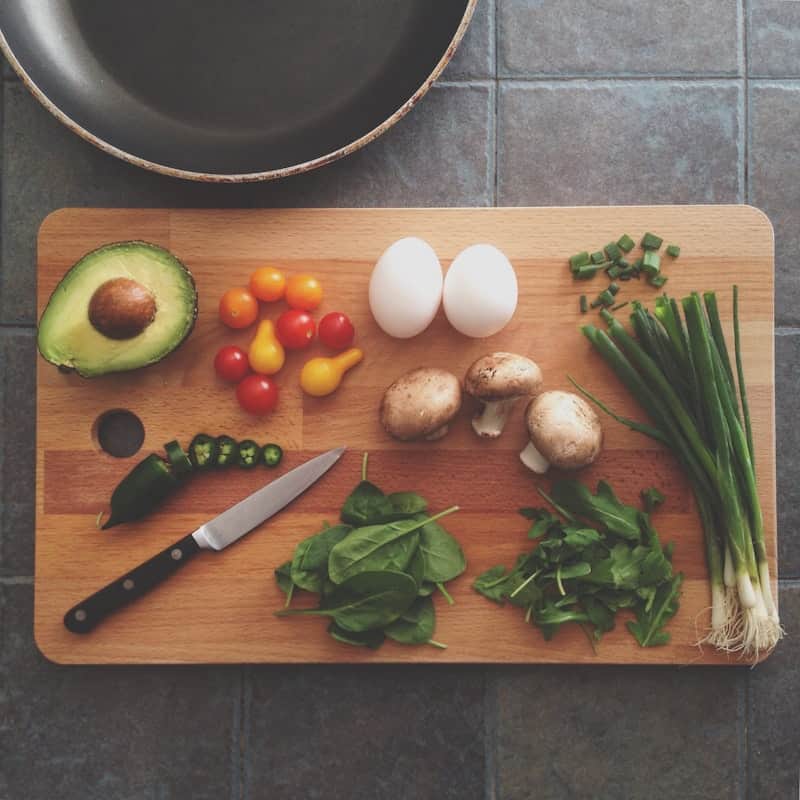
Input: An overhead photo of a wooden cutting board on a tiled counter, holding a halved avocado, a small pile of yellow and red cherry tomatoes, two whole eggs, three brown mushrooms, chopped chives, a sliced jalapeno, fresh spinach and arugula, whole scallions, a paring knife, and the edge of a nonstick pan in the corner of the frame.
- Ingredient identification confidence88%
- Recipe feasibility with visible ingredients90%
- Vegetarian-friendly100%
Suggested recipe: Loaded Veggie and Egg Skillet
Serves 2 | Prep: 10 minutes | Cook: 12 minutes
Ingredients identified
- 1 avocado, halved
- 8 to 10 cherry tomatoes (mixed yellow and red)
- 2 eggs
- 3 cremini mushrooms, sliced
- A handful of spinach and arugula
- 2 scallions, sliced
- 1 jalapeno, sliced
- Fresh chives, chopped
Instructions
- Heat the pan shown in the photo over medium heat with a little oil.
- Add the sliced mushrooms and cook 3 to 4 minutes until softened.
- Add the halved cherry tomatoes and jalapeno, cooking another 2 minutes until the tomatoes start to blister.
- Push the vegetables to one side, crack in the eggs, and cook to your preferred doneness.
- Fold in the spinach and arugula just until wilted.
- Top with sliced scallions and chives, and serve with the avocado half on the side.
Serving suggestion Good with toasted bread or over rice for a heartier plate. The jalapeno adds mild heat; leave it out for a milder version.
How it works
- 1
Photograph your ingredients or the finished dish
Lay out what you have on a counter or cutting board, or photograph a plated dish you want to recreate. Good lighting helps the model tell ingredients apart.
- 2
Add notes if you have preferences
Mention dietary restrictions, a cuisine style, or an ingredient you want to skip in the details box, and the recipe will work around it.
- 3
The model reads what's in the photo
It identifies each visible ingredient, estimates rough quantities and portions, and infers likely cooking methods if it's reading a finished dish rather than raw ingredients.
- 4
Get a full recipe back
You receive an ingredient list, step-by-step instructions, suggested cooking methods, serving ideas, and estimated prep and cook times.
Use cases
Using up what's already in the fridge
Photograph whatever produce and staples you have left before a grocery run and get a recipe idea instead of letting ingredients go to waste.
Recreating a dish you had at a restaurant
Snap a photo of a plate you enjoyed and get a starting-point recipe to try making a version of it at home.
Cooking with a dietary restriction in mind
Note a restriction like dairy-free or low-carb in the details box, and the recipe will suggest substitutions or skip ingredients that don't fit.
Planning a meal with kids or beginners
Get simple, step-by-step instructions from a photo of ingredients, useful when you want a straightforward recipe without hunting through a cookbook.
Getting inspiration when you're not sure what to cook
If you're staring at the fridge with no ideas, a quick photo can turn into a concrete recipe faster than scrolling recipe sites.
Tips for better results
- Spread ingredients out so each item is visible rather than piled on top of each other.
- Good, even lighting helps the model tell similar ingredients apart, like different leafy greens or herbs.
- Mention quantities you actually have if they matter, since the tool can only estimate portions from what's visible.
- For a finished dish, a clear top-down or angled photo works better than one taken from far away or in dim restaurant lighting.
- Add dietary notes or ingredients you want to skip in the details box rather than editing the recipe after the fact.
Limitations
This generates a plausible recipe based on what the model can see and infer, not a verified, tested recipe from a cookbook or database. Estimated quantities, cook times, and cooking methods for a finished dish are educated guesses, especially for photos where key ingredients might be hidden inside the dish. Always use your own judgment on food safety, like cooking meat and eggs to a safe temperature, since the tool doesn't verify that for you.
Frequently asked questions
Does it work if I just photograph raw ingredients, not a finished dish?
Yes, that's one of its main uses. Lay out what you have and it will suggest a recipe built around those ingredients rather than requiring a finished plate.
Can it guess a recipe from a photo of food at a restaurant?
Yes, it reads the visible ingredients and likely preparation method and writes a home-cookable version, though hidden ingredients inside a sauce or filling can only be guessed at.
What if I don't have all the ingredients it suggests?
Treat the recipe as a starting point. You can swap ingredients you don't have, or mention what you're missing in the details box before generating.
Can it account for allergies or dietary restrictions?
Mention them in the details box and the recipe will try to work around them, but always double-check the final ingredient list yourself if an allergy is serious.
How accurate are the estimated quantities and cook times?
They're reasonable estimates based on what's visible in the photo, not exact measurements. Use them as a starting guide and adjust to taste as you cook.
Does it work for baking, not just savory cooking?
It can suggest baked recipes from ingredients like flour, eggs, and butter, but baking is less forgiving of estimated quantities, so measure carefully rather than relying on the estimate alone.
Will it identify a dish I already know the name of?
It focuses on generating a recipe from what it sees rather than naming the dish, though it will often mention what the dish appears to be as part of the result.
Plans start at $9 a month. See pricing