80s Filter: 1980s Photo Generator
Upload a portrait and get it restyled with 1980s fashion, hair, and studio lighting.
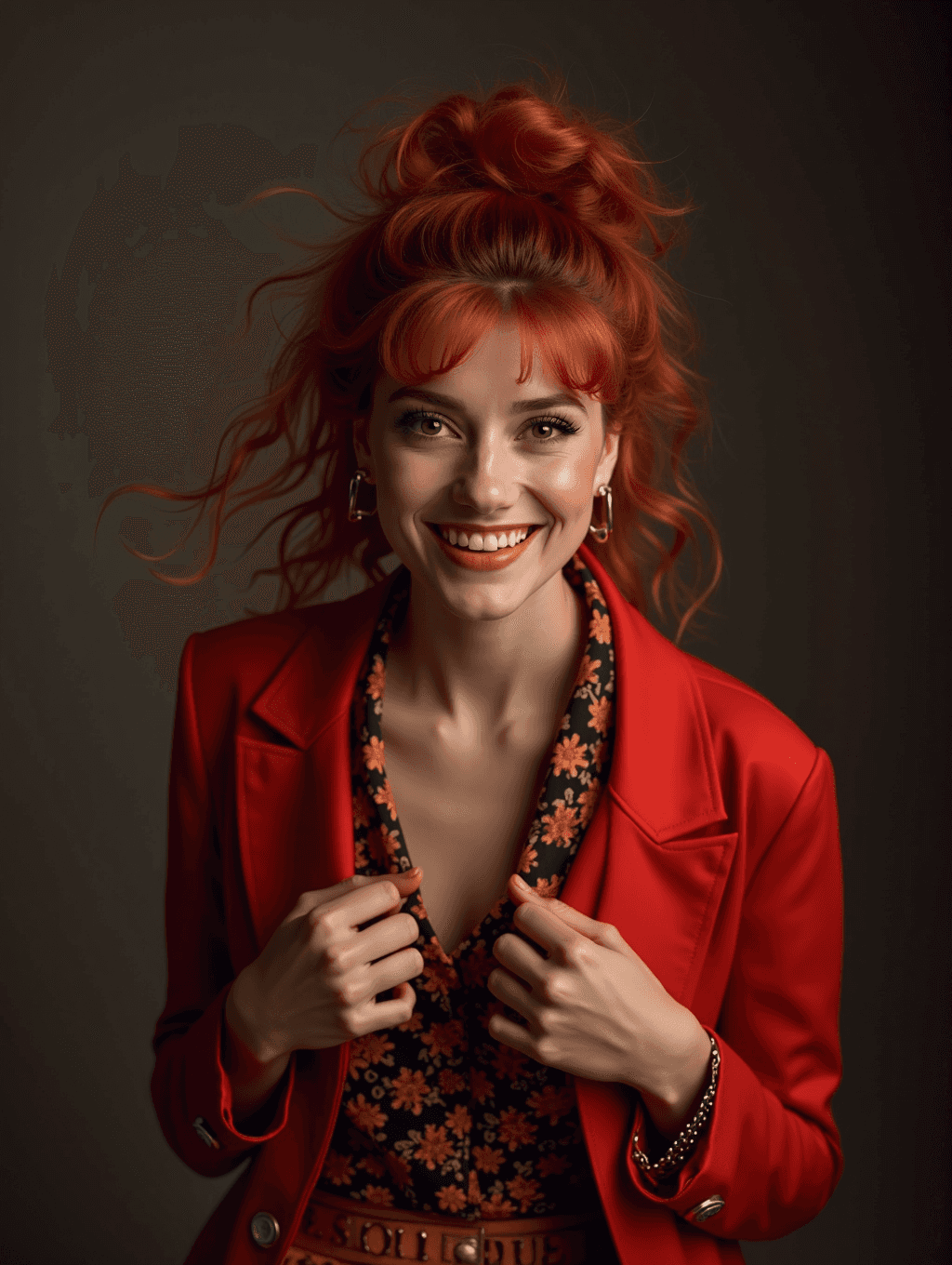
What the 1980s Photo Generator does
Mall glamour shots, feathered hair, bold blazers, warm studio backdrops: the 1980s had a photo aesthetic all its own, and it's having a moment again. Upload a portrait and this 80s filter reworks it with period-appropriate clothing, styling, and lighting so it reads like it was actually shot in an 80s studio. It's built for anyone who wants a themed photo for fun, a nostalgic gift, or a costume-party profile picture, without needing to track down actual vintage wardrobe or lighting gear.
See a sample result
Input: A casual phone photo of a smiling woman with long, straight red hair worn down, in a plain gray t-shirt, standing in a bright kitchen.
The t-shirt becomes a bold red blazer with strong shoulders over a busy floral blouse, and the kitchen is replaced by a plain dark studio backdrop. Her hair is piled up into a big, teased updo with loose curls and bangs, and the lighting shifts to a warmer, higher-contrast setup with a soft glow, closer to a mall-studio glamour portrait than a natural daylight shot. Hoop earrings and a beaded bracelet were added, plus a belt with lettering the AI made up, which you may want to remove with an instruction. The overall color grading leans warmer and slightly softened, similar to film photography from the era. The result looks similar to the image at the top of this page.
How it works
- 1
Upload a clear portrait
A front-facing or three-quarter shot with your face and shoulders visible gives the model the most to work with when adding period clothing and styling.
- 2
Add an instruction for a specific 80s look
The prompt is editable, so you can ask for a specific angle, like a bold power-blazer office look, a mall-glamour soft-focus portrait, or a punk or new-wave styling instead of the default.
- 3
The model restyles hair, clothing, and lighting
It adds period-appropriate fashion and hairstyling, shifts the lighting toward the warm, high-contrast studio look common in 80s portraits, and boosts color the way film stock from the era often did.
- 4
Download the result
You get back a portrait styled in the 1980s aesthetic, ready to share or print.
Use cases
A themed profile picture
Swap a plain headshot for an 80s-styled portrait for a nostalgic or costume-themed profile across social platforms.
A gift for someone who grew up in the decade
Turn a current photo of a parent, aunt, or friend into an 80s-style portrait as a personalized, playful gift.
Costume or theme party prep
Preview what an 80s look might feel like on you before committing to an actual costume for a themed party or event.
Retro content for a blog or social feed
Create a set of 80s-styled portraits for a nostalgia-themed post series or a decade-throwback social campaign.
Tips for better results
- Use a portrait with your shoulders and hair visible so there's more area for the model to restyle convincingly.
- Name a specific 80s subgenre in your instruction (power dressing, punk, prom, mall glamour) if you want something other than the general default look.
- Simple, plain backgrounds let the studio-lighting effect read more clearly than busy or outdoor backgrounds.
- Try more than one source photo if your first result doesn't land on the styling you had in mind.
- Expect hair and clothing to change substantially since that's the core of the effect, not a minor filter.
Limitations
This is a generative restyling, not a simple color filter, so it can change clothing, hairstyle, jewelry, and background details well beyond the original photo, and it may alter small facial details like eyebrows or teeth while it works. It's meant for fun, nostalgic, and creative use, not as a historically accurate recreation of any specific person, photographer, or studio's work from the actual decade.
Frequently asked questions
Will it change my face, or just my clothes and hair?
The main changes are clothing, hairstyle, and lighting, but because this is a generative edit rather than a filter, small facial details can shift slightly too. Check the result before using it somewhere exact likeness matters.
Can I ask for a specific 80s style, like punk or business attire?
Yes, the instruction box is editable. Naming a specific look, such as new-wave, punk, or power-suit office style, steers the result away from the general default.
What kind of source photo works best?
A clear, well-lit portrait with your face and shoulders visible gives the model the most to restyle. Busy backgrounds and low light make the result less convincing.
Is this trying to recreate a specific decade look accurately for historical purposes?
No, it's a stylized, fun interpretation of common 1980s photo trends, not a historically verified recreation. Treat the result as a creative portrait, not a documentary reference.
Can I upload more than one photo?
You can, but the images in one run are combined into a single result, so a second image works best as a style reference, like a real 80s photo whose outfit you like. To compare different shots, run each one separately.
Is this like the 80s filters in photo apps?
The idea is the same, but most app filters only add grain and color. This one regenerates the photo, so clothes, hair and backdrop change too. If you only want the film look, write "keep my outfit and hair, add 80s film color and grain" in the instruction.
Plans start at $9 a month. See pricing