Y2K Photo Editor
Turn a regular photo into an early 2000s bedroom, complete with the fashion and clutter that defined it.
What the Y2K Aesthetic Generator does
The Y2K aesthetic is the look of the late 1990s through the mid-2000s coming back around: low-rise jeans, butterfly clips, frosted lip gloss, chrome and metallic finishes, bubblegum pink next to gunmetal gray, and bedrooms cluttered with CD towers, lava lamps, and boy band posters. It's less a single style than a mood, equal parts bubblegum pop and clunky early-internet tech optimism. This tool takes your photo and pushes it into that world: it restyles the fashion, swaps in period-accurate props and lighting, and gives the whole scene the slightly grainy, flash-lit look of a photo actually taken back then. Upload a photo of yourself and get back an image that reads like it was pulled from a Y2K time capsule.
See a sample result
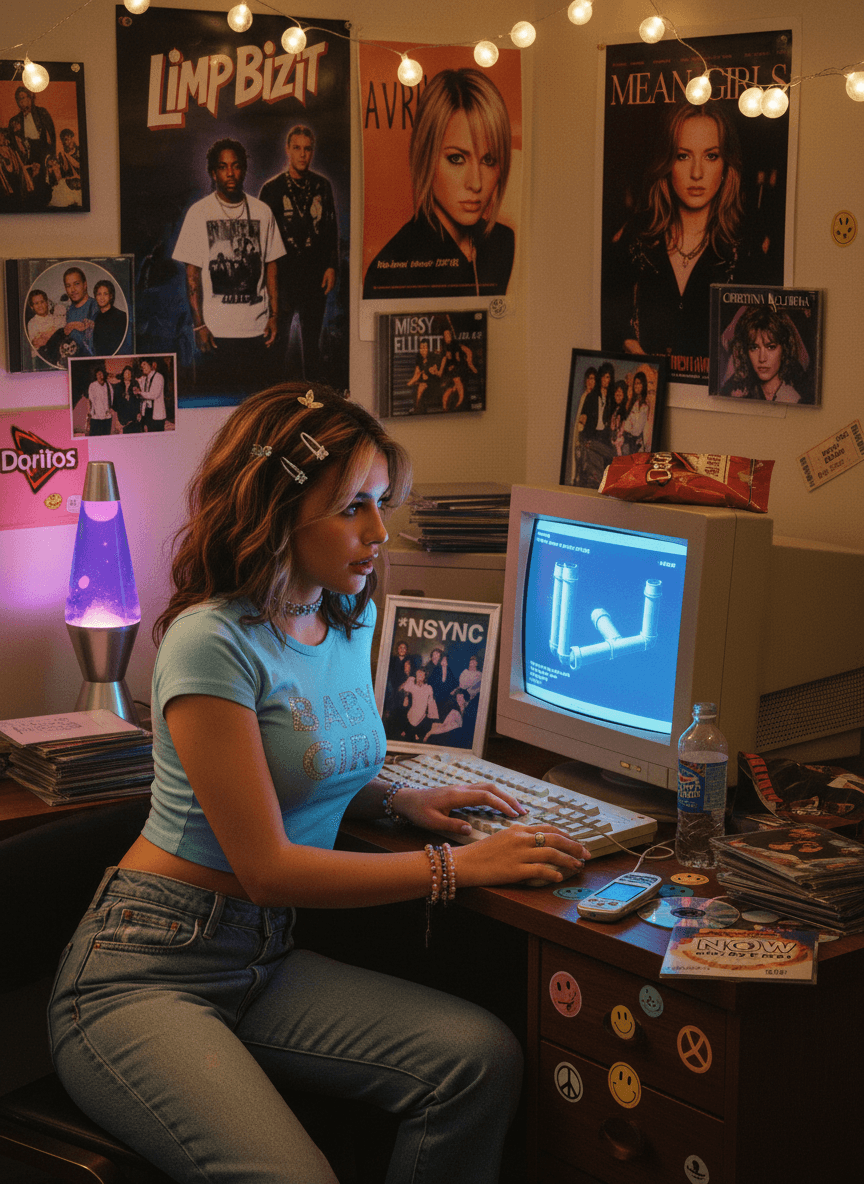
Input: A casual photo of a young woman with wavy light brown hair in a plain blue t-shirt and jeans, sitting at a modern desk with a laptop. The result looks similar to the image at the top of this page.
The photo now sits inside a cluttered, warmly lit bedroom scene built out of Y2K signatures: a boxy CRT monitor glowing blue on the desk, a purple lava lamp mid-bubble beside it, string lights strung along the wall, and a wall of taped-up posters and CD sleeves behind the subject. The laptop becomes a beige CRT and keyboard, and the outfit shifts to a fitted baby-blue baby tee, low-rise jeans, a choker, layered bracelets, and butterfly hair clips pinned into the hairline. Skin tone and color are pushed slightly warm and saturated, the way an on-camera flash from that era tended to blow out mid-tones, and a light grain sits over the whole image instead of a clean, modern-camera finish. Her pose changed to side-on, typing at the keyboard, and some posters show real bands and brand logos the AI added on its own, which is worth knowing before you post it commercially.
How it works
- 1
Upload a photo with a visible face and upper body
A clear, front-on or slightly angled photo works best, since the tool needs to see enough of you to restyle hair, clothing, and pose convincingly.
- 2
The AI applies Y2K fashion and setting details
Expect low-rise silhouettes, cropped tops, butterfly clips or chunky accessories, and a background built from period props: CRT monitors, lava lamps, CD cases, and poster-covered walls.
- 3
Lighting and color get pushed toward the era
Y2K photography leaned on flash-lit color, slightly oversaturated skin tones, and a soft digital-camera grain rather than the crisp, high-dynamic-range look of a modern phone photo.
- 4
You get back one styled image
The output is a single photo in the Y2K look, ready to post or compare against your original. If a detail feels off, a fresh upload with a clearer photo usually helps.
Use cases
Nostalgia and throwback posts
Post a Y2K version of yourself for a throwback series, a themed feed, or just to see how you'd have looked at a 2001 mall.
Themed party or profile photos
Use it to get a costume-ready look for a Y2K-themed party or event without pulling together the actual outfit and props.
Understanding the aesthetic before designing with it
If you're building a moodboard, a set design, or a fashion concept around the Y2K look, seeing your own photo transformed shows the fashion and prop choices in context.
Content for a retro or vintage-styled account
Creators running a nostalgia or 2000s-themed page can use it to generate consistent Y2K-styled images without a full physical shoot.
Tips for better results
- Use a photo with even lighting and a plain background so the tool has a clean base to build the scene around.
- A front-facing or slightly turned pose keeps the face recognizable once the styling and background change.
- Avoid photos where your current outfit is very busy or patterned, since simpler starting clothing tends to restyle more cleanly.
- If the props or colors feel too subtle, try a version with a closer crop so the room detail reads more clearly.
- If the first result leans the wrong way, edit the instruction to steer it, for example toward chrome futurism or pastel pop, rather than rerunning the default.
Frequently asked questions
What exactly counts as the Y2K aesthetic?
It's the visual style of roughly 1998 to 2005: low-rise jeans, crop tops, butterfly clips, chrome and metallic accents, bubblegum colors, flip phones, and bedrooms filled with CDs, lava lamps, and posters. It mixes teen pop culture with early-2000s tech optimism.
Will it change my face or just my clothing and background?
It aims to keep you recognizable while restyling clothing, accessories, lighting, and the room. It's a generative edit, though, so your face, pose, and even your hair can shift. If the likeness drifts too far, rerun it with a clearer front-facing photo.
Can I use a full-body photo instead of a headshot?
Yes, a full-body photo gives the tool more to work with for the outfit and pose, and often produces a more complete Y2K look.
Does it work on photos of more than one person?
It's built around a single subject. Group photos may still get restyled, but the result is more consistent with one clear person in frame.
Why does the result look grainy or slightly oversaturated?
That's intentional. Photos from the Y2K era were often taken on early digital cameras or with on-camera flash, which produced a warmer, grainier look than modern phone cameras, and the tool matches that on purpose.
Can I request a specific part of the Y2K look, like more tech or more fashion?
Yes. The instruction is editable, so you can ask for 'silver chrome and futuristic tech' or 'pastel pink, glitter, and a flip phone' instead of the general Y2K treatment. Without changes, each run picks its own mix.
Plans start at $9 a month. See pricing