Travel Inspiration
Upload a travel photo and get a destination read, an itinerary starting point, and practical tips.
What the Travel Inspiration does
A saved photo of turquoise water framed by mountains is a start, not a plan. This tool looks at a travel photo, whether it's yours from a past trip or one you saved for later, and reads the terrain, architecture, and light to suggest what kind of destination it is and how to plan around it: best season, nearby activities, photo spots, and a rough itinerary shape. It's an inspiration and planning starting point built from what the image actually shows, not a geolocation lookup, so it works even for photos with no visible landmark or caption.
See a sample result
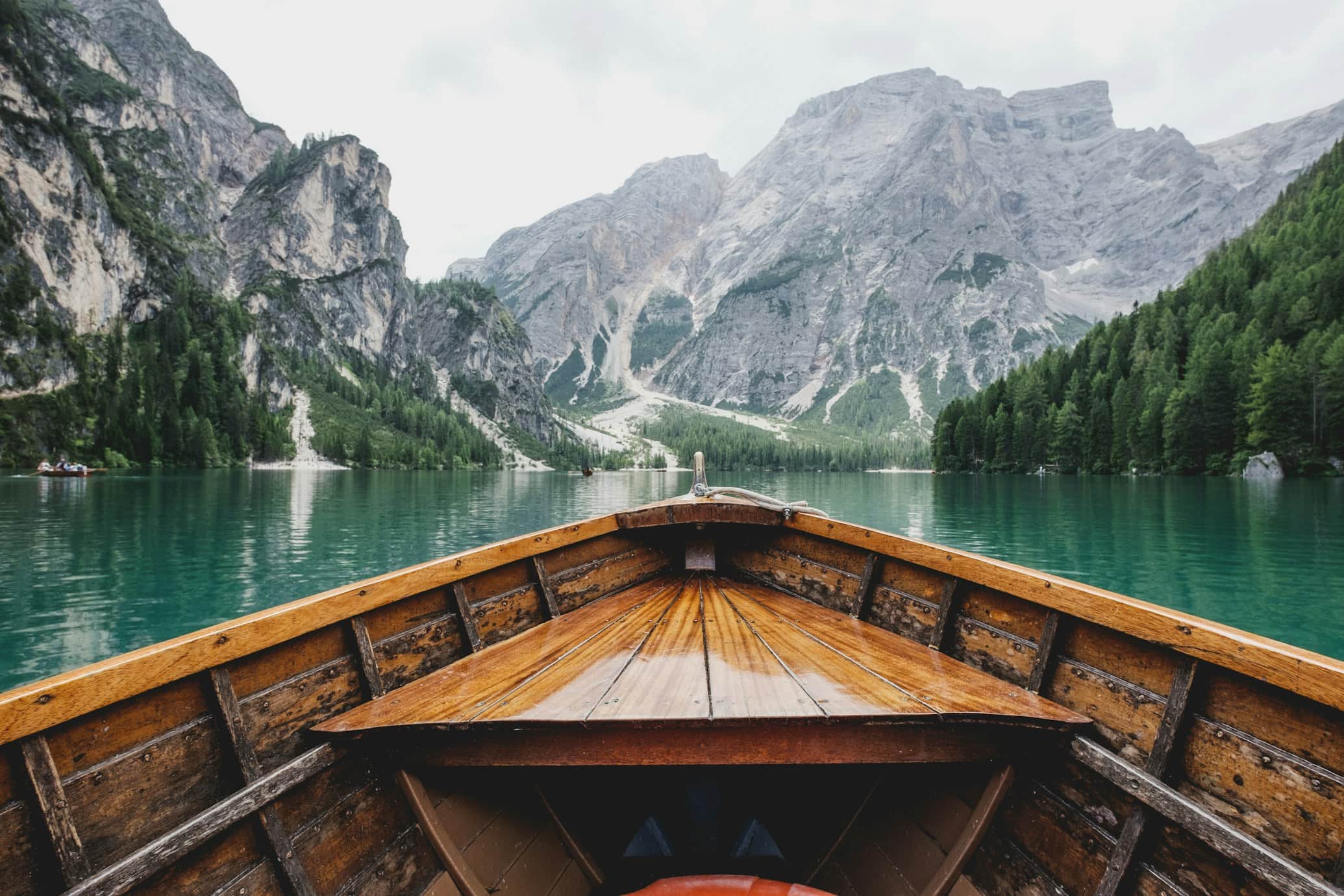
Input: A photo taken from the bow of a wooden rowboat gliding across a turquoise-green alpine lake. Steep gray limestone peaks rise behind dense pine forest on both shores, the sky is overcast, and a small boat is visible near the far left shore.
- Lago di Braies, Italy72%
- Königssee, Germany15%
- Moraine Lake, Canada13%
Likely destination: Lago di Braies (Pragser Wildsee) in South Tyrol, in the Italian Dolomites. The emerald water, the pale limestone massif rising straight behind the lake, the pine-covered shores, and the classic wooden rowboat all match one of the most photographed views in the Alps.
Other possible matches: Königssee in Bavaria also has steep rock walls and wooden boats, but its water is darker and its cliffs drop straight into the lake. Moraine Lake in the Canadian Rockies has similar color, though its boats are canoes and its peaks are more jagged.
Best time to visit: Late spring to early autumn, when the ice is gone and boat rental is running. Go early in the morning for calm water; the lake gets very busy by midday in July and August, and road access and parking can be restricted in peak season, so check the current rules before you go.
Nearby activities: The flat loop trail around the lake (about an hour), a rowboat hour on the water, and longer hikes up toward the mountain huts above. Cortina d'Ampezzo and the Tre Cime di Lavaredo are within day-trip range.
Photo tip: Overcast light like this flattens glare on the water and saturates the green-blue color, so an early morning with light cloud cover often beats full sun for this kind of shot.
How it works
- 1
Upload a travel photo
A wide shot showing terrain, water, architecture, or sky gives the AI more to work with than a tight close-up of one object or person.
- 2
The AI reads the visual cues
It looks at water color, rock and vegetation type, building style, and light quality to estimate the kind of region and climate the photo was likely taken in.
- 3
You can add a question in the details box
Ask something specific, like whether the trip suits a weekend, what season the photo looks like, or what to pack, and the response addresses it directly.
- 4
You get a destination read and itinerary ideas
The result names the likely region or destination type, notes the best time to visit, and sketches out activities, nearby spots, and a rough day-by-day shape.
Use cases
Turning a saved photo into a real trip
You saved a photo from social media months ago with no location tag; this gives you a destination type and a starting itinerary instead of an endless caption search.
Deciding where an old photo was taken
Revisit a photo from a past trip or a family album and get a read on the likely region when the original memory of the location has faded.
Building a moodboard into an actual plan
Travel bloggers and planners can turn a collection of inspiration images into rough itineraries and seasonal notes before doing deeper research.
Getting unstuck on where to go next
Upload a photo that captures the mood you want for a trip and use the suggested region and activities as a jumping-off point for booking.
Tips for better results
- Use a wide shot that shows terrain, water, or architecture rather than a close crop of a single detail.
- Skip heavy filters or edits, since shifted colors can throw off the read on water and sky tones.
- Ask a specific question in the details box, like trip length or season, to get a more useful itinerary shape back.
- If the destination read feels off, try a second photo from the same trip with a different angle for comparison.
- Treat the destination guess as a lead to research further, not a confirmed location, especially for lookalike landscapes.
Limitations
This is a visual read of terrain, color, and style, not a GPS or database lookup, so many landscapes around the world share a similar look and the named destination may not be the exact one in your photo. Use it as a starting point for planning and research rather than a confirmed identification.
Frequently asked questions
Can it tell me the exact location in my photo?
It gives its best read based on terrain, water color, architecture, and light, but it's an estimate rather than a location lookup, so similar-looking places can get mixed up.
Does it work on photos without famous landmarks?
Yes, it works from general visual cues like terrain type, vegetation, and building style, so a photo of an unnamed beach or forest still gets a destination-type read.
Will it build a full day-by-day itinerary?
It sketches a rough itinerary shape and suggests nearby activities and timing, which works well as a planning starting point before you fill in specifics.
Can I ask about a specific trip length or budget?
Add that detail in the details box, such as a weekend trip or a lower-budget style, and the suggestions will adjust to fit.
What if the photo shows an indoor scene or a person, not a landscape?
It works best with visible outdoor scenery; indoor or close-up portrait photos give it much less to read and produce a weaker or more general result.
Why did it list more than one possible destination?
Many regions share similar water color, rock type, or architecture, so listing the closest matches is more honest than forcing a single confident guess.
Plans start at $9 a month. See pricing