AI Photo Quality Analyzer
Get a technical read on sharpness, exposure, and noise before you use or print a photo.
What the Photo Quality Analyzer does
A photo can look fine on a small phone screen and fall apart the moment you zoom in, print it, or send it somewhere the quality actually matters. This tool gives you a technical read on a photo the way a photography instructor would look at it: is it in focus where it needs to be, is the exposure holding detail in the shadows and highlights, is there visible noise, and does the color look accurate. Instead of a single vague verdict, you get scores across each of these areas plus notes on what likely caused any weak points, whether that's low light, a moving subject, or a compression artifact from resaving the file too many times.
See a sample result
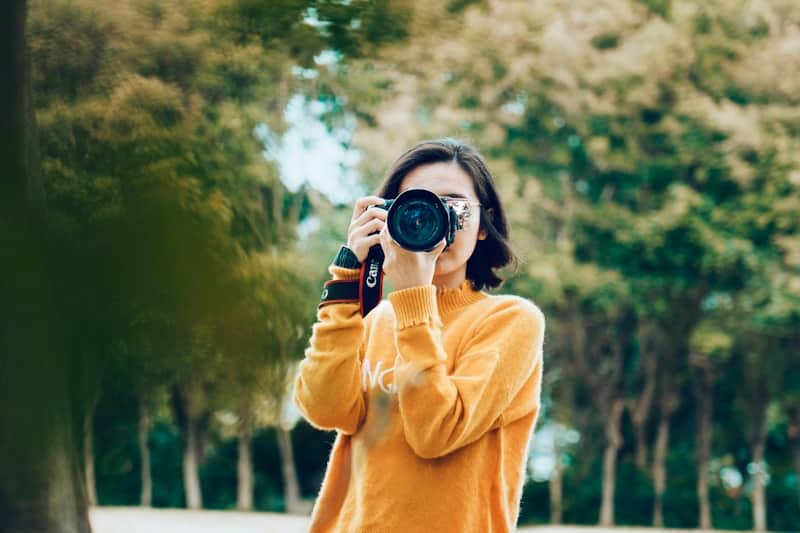
Input: A daytime outdoor photo of a woman in a mustard sweater holding a DSLR up to her eye, against a softly blurred park of trees, with an out-of-focus tree trunk in the left foreground.
- Sharpness88%
- Exposure84%
- Color accuracy62%
- Noise control90%
Sharpness: Focus sits on the camera, hands and sweater, the intended subject. Background falloff is smooth and looks intentional, consistent with a wide aperture. The blurred trunk in the left foreground frames the shot but takes up a lot of the frame; crop it tighter if it distracts.
Exposure: Well balanced. The sweater keeps its knit texture, and the shaded areas don't block up into solid black; in fact the blacks look lifted, part of a deliberate matte grade.
Color accuracy: The colors have been edited: muted greens, faded shadows and a warm push on the sweater suggest a film-style preset. That's a style choice rather than an error, but it means the colors aren't neutral, and the greens have gone a little murky.
Noise: Minimal, consistent with a low ISO setting and good available light. No visible grain in the shadow areas of the sweater.
Compression: No obvious blocky artifacts at this size, though a graded web copy like this has almost certainly been resaved at least once.
Suggestions: If you want cleaner color, ease off the fade and restore some green saturation in editing. Focus and exposure are already doing the heavy lifting here.
How it works
- 1
Upload the photo you want checked
Use the original file if you have it rather than a screenshot or a copy that has already been resaved, since recompression adds artifacts the analysis will pick up.
- 2
The AI examines sharpness, exposure, and noise
It looks at focus accuracy, brightness across shadows and highlights, color balance, visible grain or noise, and signs of compression.
- 3
Add context in the details box if you have it
Mention the camera or phone used, the lighting conditions, or what the photo is for, and the feedback will be more specific to your situation.
- 4
Get scores and a plain-language breakdown
The result covers each technical area with a score, calls out what's working, and explains what likely caused any softness, noise, or color shift.
Use cases
Checking a photo before printing large
Softness that's invisible on a phone screen shows up fast at poster size, so run a check before you send a file to print.
Reviewing a batch from a shoot
Photographers can run individual shots through to get a second, technical opinion on focus and exposure before choosing which to deliver.
Diagnosing a camera or lens problem
If your photos have looked consistently soft or grainy lately, a breakdown can point toward focus, low light, or a lens issue rather than you guessing.
Learning photography basics
New photographers can upload their own shots to understand, in plain terms, what exposure and sharpness actually look like in a real photo.
Vetting a photo for a listing or profile
Before uploading a product photo or profile picture somewhere image quality matters, check whether it holds up to a closer look.
Tips for better results
- Upload the original, uncompressed file when you have it, since repeated saving and resharing degrades quality the analysis will detect.
- Mention your camera settings or lighting conditions in the details box for more specific feedback.
- Check a photo at the resolution you plan to use it at; a shot fine for social media may not hold up printed large.
- If a photo scores low on sharpness, check whether the subject or camera moved rather than assuming the lens is at fault.
- Compare a few shots from the same shoot to see which technical issues repeat, since that points to a settings problem rather than a one-off mistake.
Frequently asked questions
Can it tell me exactly what camera settings to use next time?
It can suggest likely causes for issues like noise or blur, such as a slow shutter speed or high ISO, but it can't read your camera's actual settings from the image alone.
Does it work on phone photos or only DSLR shots?
It works on any digital photo, phone or camera, since it's analyzing the resulting image rather than the equipment used to take it.
Will it tell me if a photo is good enough to print?
It gives you sharpness and exposure scores that indicate how a photo will hold up at larger sizes, though final print quality also depends on your printer and paper.
Can it detect if a photo has been edited or filtered?
It can note color shifts or compression that suggest editing, but it isn't built to determine what specific edits were applied.
Why did two similar photos get different scores?
Small differences in focus, light, or file compression between shots can produce noticeably different scores, even if the photos look alike at a glance.
Does it check composition too, or only technical quality?
This tool focuses on technical execution: sharpness, exposure, noise, and color. For composition and framing feedback, a dedicated composition tool is a better fit.
Plans start at $9 a month. See pricing