AI Anime Style Generator
Turn your photo into a stylized anime character with bold color and expressive line art.
What the Anime Style Generator does
Anime art has a specific look: clean outlines, oversized expressive eyes, saturated color, and dramatic composition. This tool takes a photo and rebuilds it in that style, keeping a loose sense of the pose and coloring while redrawing everything else as illustrated anime art. It's aimed at people who want a fun avatar, a gift for a friend who's into anime, or a starting point for a character concept. You control the details through the instruction box: hair color, outfit, magical effects, or a specific setting like a cherry blossom courtyard. One image comes back per run, and it's worth a close look at the face and hands before you use it anywhere, since generative art can shift small details.
See a sample result
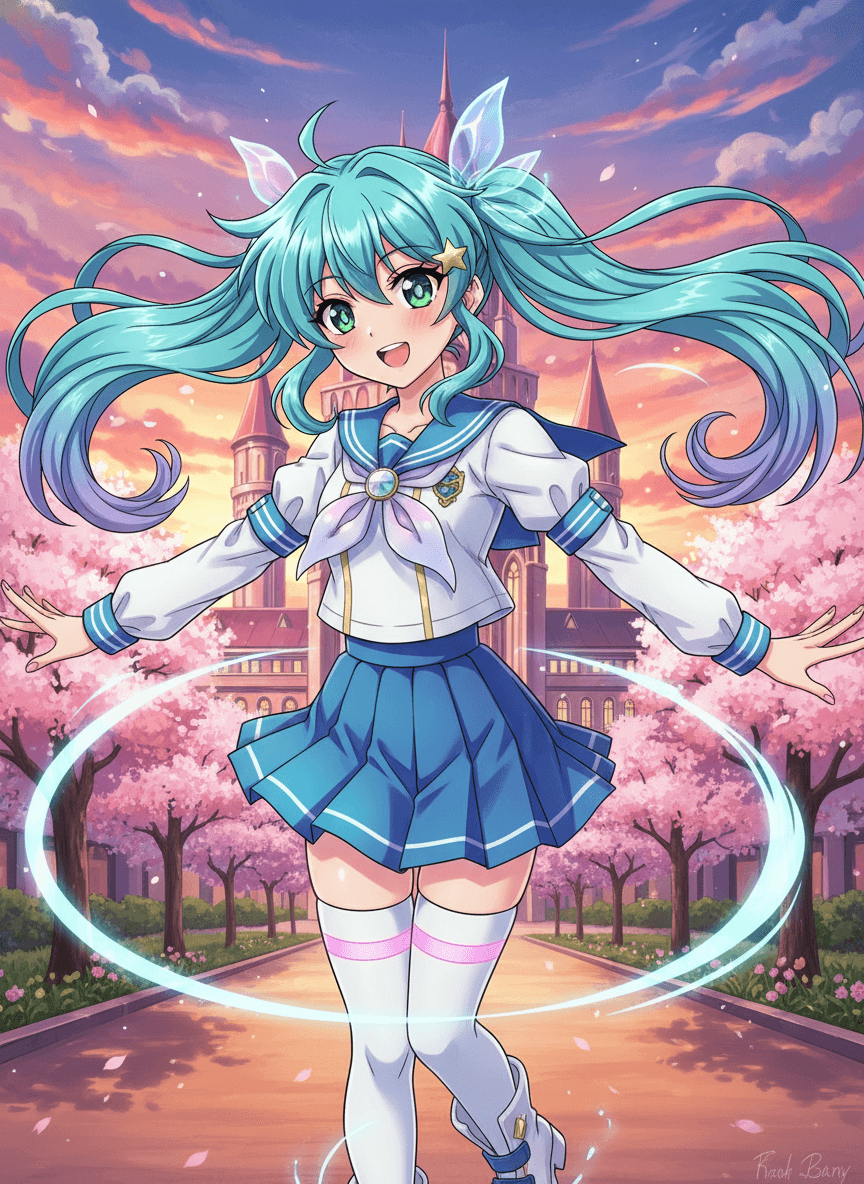
Input: A full-length photo of a young woman with a dark ponytail, arms held out, standing on a park path in a white blouse and a blue skirt. The instruction was edited to ask for teal twin tails, a sailor uniform and a cherry-blossom castle backdrop. The result looks similar to the image at the top of this page.
Style applied: anime character art
The subject is redrawn with anime proportions: enlarged, expressive eyes with detailed highlights, a smaller nose and mouth, and clean, confident linework outlining the hair and face. Hair is restyled into long, flowing twin tails in a bright teal-to-purple gradient, with translucent ribbon bows and a small star clip at the crown.
The outfit becomes a stylized school-uniform sailor top and pleated skirt in blue and white, with thigh-high socks, matching a classic magical-girl aesthetic. A glowing ring effect swirls around the character's legs, and the background is an illustrated courtyard with a fantasy castle and blooming cherry blossom trees under a pink-and-orange sunset sky.
Color is flat and saturated in the way cel-shaded anime uses light and shadow blocks rather than photographic gradients. Because this is a generative redraw, the face won't be a literal likeness of the uploaded photo, just an anime-style interpretation of it, and small details like finger count on the open hands or the exact ribbon shapes are worth checking before you share the image. The AI also added a scribbled, unreadable signature in the bottom corner; crop it out or ask for "no signature or text" in the instruction.
How it works
- 1
Upload a clear photo
A photo with a visible face and a simple pose works best. Portraits and half-body shots translate more predictably than busy group photos.
- 2
Describe the anime look you want
Use the instruction to set hair color, outfit style, era (like a magical-girl look or a modern school uniform), and any props or background you want included.
- 3
The AI redraws it as anime art
It restyles the face and body with anime proportions and expression, applies flat cel-shaded coloring, and builds an illustrated background around the subject.
- 4
Check the result and adjust
Review the face, hands, and any text in the image. If something's off, tweak the instruction (simpler outfit, different pose description) and generate again.
Use cases
Custom avatars for gaming and social profiles
Turn a personal photo into a stylized anime avatar for Discord, a forum, or a social media profile picture.
Fan art and character concepts
Use your own photo or a friend's as a base pose and let the tool suggest an anime interpretation you can refine into a fuller character concept.
Gifts and fun prints
Generate an anime-style portrait of a friend or family member as a lighthearted, personalized gift or desk print.
Cosplay and costume planning
Describe a specific anime archetype or outfit in the instruction to visualize how a costume idea might look before building it.
Tips for better results
- Name a specific hair color, outfit, and setting in the instruction; "anime style" alone leaves a lot up to chance.
- Use a photo with a clear, well-lit face; heavy shadows or extreme angles are harder to translate into clean anime linework.
- If you want a specific anime subgenre (magical girl, mecha pilot, shonen action), name it directly in the instruction.
- Check hands, weapons, and text in the result closely, since these are the most common spots for small AI errors.
- Try a simpler background description first if the result looks cluttered, then add detail once the character style looks right.
Limitations
This is a generative restyle of your photo, not a literal cartoon trace of it: faces, hair, and proportions are reinterpreted in anime style, so the output won't be an exact likeness. It can invent details in hands, accessories, and background elements, so check those before using the image publicly. It isn't meant to copy a specific anime character, but popular looks (teal twin tails, sailor uniforms) can land close to well-known designs. Describe a general style rather than naming a particular show, and don't use a result that looks like someone else's character commercially.
Frequently asked questions
Will the anime character look exactly like me?
It keeps a loose sense of your pose and coloring but redraws the face in anime proportions, so it reads as an anime interpretation rather than a literal likeness.
Can I choose a specific anime style, like shonen or magical girl?
Yes, describe the subgenre, outfit, or era you want in the instruction box and the AI will lean the art style and costume toward that.
Can I turn a photo of my pet into anime style?
You can upload any photo. Results are most predictable on human portraits, but stylized pet art is a reasonable use of the same tool.
Can I add multiple people to one anime scene?
You can upload more than one image and the tool uses them all as references for a single result (credits are charged per image). Say in the instruction who goes where. Group scenes are less predictable than a single-subject portrait.
Why does the hair color not match what I typed?
The instruction guides the result but doesn't guarantee an exact match every time. Rerunning with a more specific color name (like "teal to purple gradient" instead of "blue") usually helps.
How many images does one run produce?
One anime-style image per run. Change the instruction or photo and run again for a different version, and each run uses credits.
Plans start at $9 a month. See pricing