AI Mood Analyzer
Upload a photo and get a written read on its mood, lighting, and color palette.
What the Mood Analyzer does
A photographer trying to explain why a shot feels moody, a marketer picking images for a moodboard, or someone curious why an old photo hits differently than a new one: they're all asking the same question, what mood does this image actually give off. This analyzer looks at color, light, composition, and setting, then describes the atmosphere in plain language, from calm and airy to tense and dramatic. Upload a photo and add a note in the details box if you want it to focus on something specific, like whether a shot fits a particular campaign tone. You get back a written breakdown and a set of scores for the moods it detects.
See a sample result
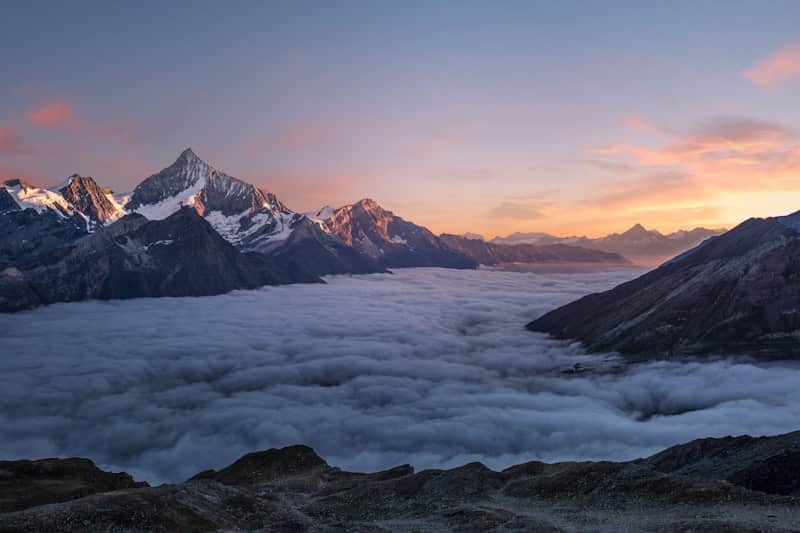
Input: A wide landscape photo taken from a high ridge at dawn or dusk: snow-capped mountain peaks catch pink and orange light while a thick sea of clouds fills the valley below, with a darker foreground of bare rock.
- serene82%
- awe-inspiring70%
- melancholic24%
- energetic12%
Overall tone: Serene and awe-struck, with a quiet sense of scale.
Color palette: Warm pink and orange tones along the peaks and horizon contrast with cool blue-grey shadows and the white cloud layer, giving the frame a soft, dawn-or-dusk warmth without feeling harsh.
Light: Low, directional light grazes the mountain faces and rim-lights the cloud tops, which reads as either early morning or early evening and adds a gentle, fleeting quality.
Composition: The high vantage point and the cloud sea flattening the valley create distance and stillness. The dark foreground rock grounds the shot and adds a touch of weight against the airy sky.
Setting cues: Alpine peaks and a cloud inversion suggest a remote, high-altitude location, which reinforces a feeling of isolation and calm rather than energy or urgency.
This is a read of what the image visually conveys, not a claim about anyone's actual state of mind or the true conditions on the mountain that day.
How it works
- 1
Upload the photo you want read
Any image works: a landscape, a portrait, a product shot, or a screenshot from a film. The tool reads the whole frame, not just a subject in it.
- 2
Add context in the details box if it helps
If you're checking a photo against a specific brief, like 'does this feel cozy or cold', typing that into the details box points the analysis at what matters to you.
- 3
The model reads color, light, and composition
It looks at the palette (warm or cool, saturated or muted), the quality of the light, the framing, and any visible setting or subject matter that sets a tone.
- 4
Get a written mood breakdown and scores
You get a short description of the atmosphere, mood descriptors like serene or melancholic, and a set of 0 to 100 scores showing how strongly each mood registers.
Use cases
Checking a shot against a moodboard brief
If a creative brief calls for 'warm and cozy' or 'stark and cold', run candidate photos through the analyzer to see which ones actually land on that tone before you commit to them.
Picking a cover image or thumbnail
Compare two or three options for a blog post, album, or video thumbnail and see which one scores higher on the mood you're going for.
Understanding your own photography
If you shoot a lot and want to notice patterns, running a batch of your photos through the tool can surface a recurring tone you didn't consciously plan for.
Writing about a photo or scene
Use the descriptive language as a starting point when you need to write captions, artist statements, or copy that talks about a photo's feel rather than just what's in it.
Tips for better results
- Upload the full, uncropped frame when possible; cropping out sky, shadow, or background can change the read significantly.
- If you're comparing several photos for the same brief, run them one at a time so the scores are easier to compare side by side.
- Mention what you're trying to achieve in the details box (an ad, a wedding album, a horror-story cover) so the description leans toward language useful for that context.
- Screenshots and heavily compressed images can shift color and lose shadow detail, which changes how the mood reads compared to the original file.
- Filters and heavy edits are part of what gets analyzed, so a warm Instagram filter will visibly push the result toward a warmer, cozier read.
Limitations
This tool reads what's visible in the frame: color, light, and composition. It has no way to know how the photographer, subject, or anyone in the photo actually felt, and it isn't reading facial expressions as a lie-detector or emotion-recognition test. Two people can disagree with any mood description, since tone reading is inherently subjective, and heavy compression or unusual color grading can push the scores in ways a human viewer might not agree with.
Frequently asked questions
Can it tell how the person in the photo actually feels?
No. It reads what's visually present, like color, light, and setting, and if a face is visible it can note a visible expression, but it can't know anyone's actual internal state.
What kinds of photos work best?
Any photo with clear color and lighting works: landscapes, portraits, interiors, product shots, and film stills. Very dark, blown-out, or heavily cropped images give a thinner read.
What do the scores actually mean?
Each score from 0 to 100 shows how strongly a particular mood descriptor registers based on the visual cues in your photo, not a certainty percentage or a scientific measurement.
Can I ask it to focus on a specific question, like whether a photo feels professional?
Yes. Type your question or context into the details box before running the analysis, and the written breakdown will address it directly.
Does it work on illustrations and paintings, not just photos?
Yes, the same color, light, and composition cues apply to digital art, paintings, and screenshots, though very abstract or minimal images give the model less to work with.
Will editing the color grading change the result?
Yes, noticeably. Since the analysis is built on color and light, warming or cooling a photo, adjusting contrast, or adding a filter will shift the mood scores.
Plans start at $9 a month. See pricing