AI Interior Design Advice
Send a photo of a room and get a written breakdown of its style, layout, and what to change.
What the Interior Design Analyzer does
You just moved a couch, or you're staring at a rental living room wondering why it feels off, and you want a second opinion before you spend money. This tool looks at a photo of your actual space and reads it the way a design-minded friend would: what style it already leans toward, how the color scheme holds together, whether the furniture placement helps or blocks the room's flow, and where the lighting falls short. It's built to work with the room you have, not to generate a new one, so the feedback is grounded in what's really on the floor. The output reads like notes from someone who looked closely, not a generic style quiz.
See a sample result
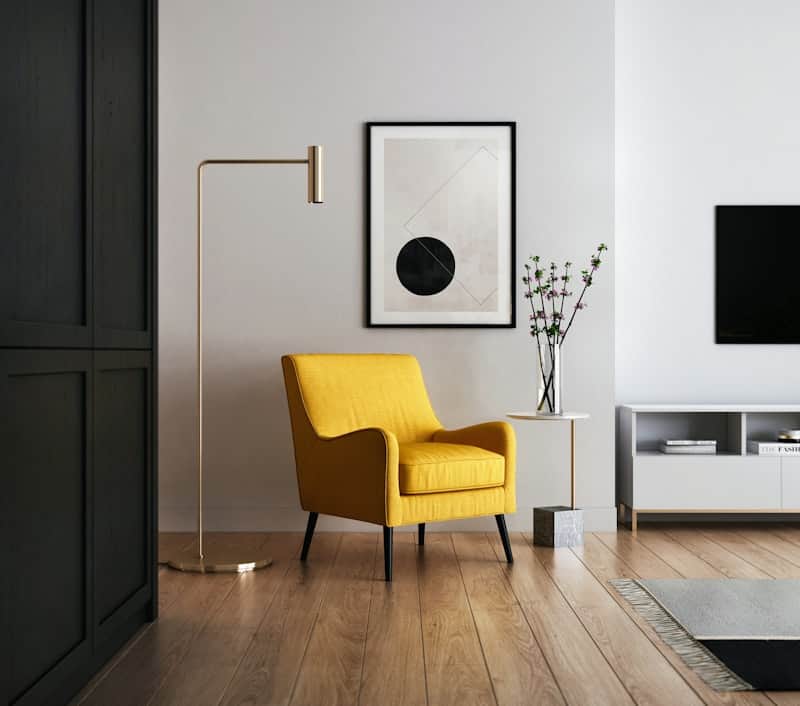
Input: A small, bright living room corner: a mustard yellow armchair beside a brass floor lamp, a black-framed abstract print on a white wall, a slim side table on a stone base holding a vase of flowering branches, a low white TV console with a wall-mounted TV, a gray rug at the lower right, and warm wood flooring, shot with a dark paneled door on the left edge of the frame.
- Color Harmony68%
- Furniture Placement61%
- Lighting55%
- Style Consistency74%
Current style: Modern minimalist with a mid-century accent, built around one bold color moment (the yellow chair) against a mostly neutral backdrop.
What's working: The white walls and wood floor give the room breathing room, and the brass floor lamp and marble table introduce warmth without crowding the corner. The abstract print's black frame echoes the chair's black legs and the dark door panel, tying the vignette together.
Color scheme: Strong but narrow. The mustard chair is the only saturated color in the frame; a second small accent (a throw pillow or a runner) in a complementary tone like deep teal or terracotta would keep it from reading as an isolated pop.
Layout and flow: The chair and side table are angled toward the walkway rather than toward each other, which can make the corner feel like a photo set rather than a spot someone would actually sit. Angling the chair slightly toward the room's center would fix that.
Lighting: The floor lamp's arm reads decorative more than functional here; if reading or working in the chair matters, a warmer-temperature bulb and a lower shade angle would help.
Suggested next steps: Add one more low-saturation accent color, angle the seating toward the room, and consider extending the rug, or adding a small one under the chair, so the reading corner feels anchored rather than floating on the wide-plank floor.
How it works
- 1
Photograph the room as a whole
Stand in a corner or doorway so most of the room, including the floor and ceiling line, fits in one frame. Turn on the lights you'd normally use.
- 2
The AI reads the room's current style and layout
It looks at furniture shapes, color palette, spacing between pieces, and how light and sightlines move through the room.
- 3
Add context in the details box if you want
Mention your budget, a style you're drawn to, or a piece you can't move, and the analysis will factor that in.
- 4
Get a written breakdown and next steps
You receive scores across a few design dimensions plus specific, room-appropriate suggestions: what to reposition, what to swap, and what's already working.
Use cases
Renters redecorating without renovating
You can't move walls or repaint everything, so you want feedback on furniture, color, and layout changes that work within a rental's limits.
Getting a second opinion before buying furniture
Upload a photo before you order a new sofa or rug, so you know whether the color and scale actually fit the room instead of guessing from a store photo.
Staging a room before photos or a showing
A homeowner or agent checks how a room reads to a stranger's eye, catching layout or color issues that are easy to miss when you see the space every day.
Learning interior design basics hands-on
Students or hobbyists compare the AI's read of color balance and flow against their own instincts, using real rooms instead of textbook examples.
Refreshing one room on a limited budget
Rather than a full redesign, you get targeted suggestions, like repositioning existing pieces or adding one accent color, that don't require new purchases.
Tips for better results
- Shoot the room in daytime with your usual lights on, so the analysis sees true colors, not a flash-washed version.
- Include the floor and at least one full wall in the frame; cropped shots hide layout problems the AI would otherwise catch.
- Mention your budget or a piece you're keeping in the details box so the suggestions stay realistic.
- Photograph from a corner rather than head-on to a single wall, since corners show more of the room's actual flow.
- If a suggestion mentions a color or fabric, treat it as a direction to search, not an exact swatch match.
- Run it again after making a change to see whether the score on that dimension actually moved.
Frequently asked questions
Does this tool generate new room designs for me?
No, it analyzes the photo you upload and describes your room's existing style, layout, and color scheme rather than creating a new image of a redesigned space.
Can it tell me exactly what furniture to buy?
It suggests directions, like a color family or a furniture type that would fill a gap, but it doesn't pull from a live product catalog or recommend specific SKUs.
Will it work on a messy or cluttered room photo?
It can still comment on color and general layout, but clutter makes it harder to judge furniture placement and flow accurately, so a tidied room gives cleaner feedback.
How does it score things like color harmony or lighting?
The scores are a visual estimate based on what's in the photo, comparing color relationships, spacing, and light quality against common interior design principles, not a lab measurement.
Can I use it for a whole apartment, not just one room?
Run one photo per room for the clearest results, since the analysis works best when it can see a full space rather than several rooms stitched into one frame.
Does it account for a specific design style I want, like Scandinavian or industrial?
Yes, if you name the style you're aiming for in the details box, the suggestions will be framed around getting closer to that look.
Plans start at $9 a month. See pricing