Military Aesthetic Photo Generator
Upload a photo and get it restyled with a military uniform, gear, and a disciplined, professional setting.
What the Military Photo Generator does
Game characters, costume mockups, a war-film fan's novelty portrait: a military aesthetic shows up in a lot of creative projects. This tool takes your photo and restyles it with a uniform, tactical gear, and a set that reads as a briefing room or operations center, aiming for the disciplined, confident look of a professional military photo. It's a costume and creative styling tool, not a way to fake an ID, a service record, or proof that someone served. You upload a photo, describe any specifics you want in the instruction (branch-style uniform, rank insignia, indoor or outdoor setting), and the AI generates one restyled image. Treat the output as a stylized portrait for fun or fiction, and never present it as a real photo of an actual service member or unit.
See a sample result
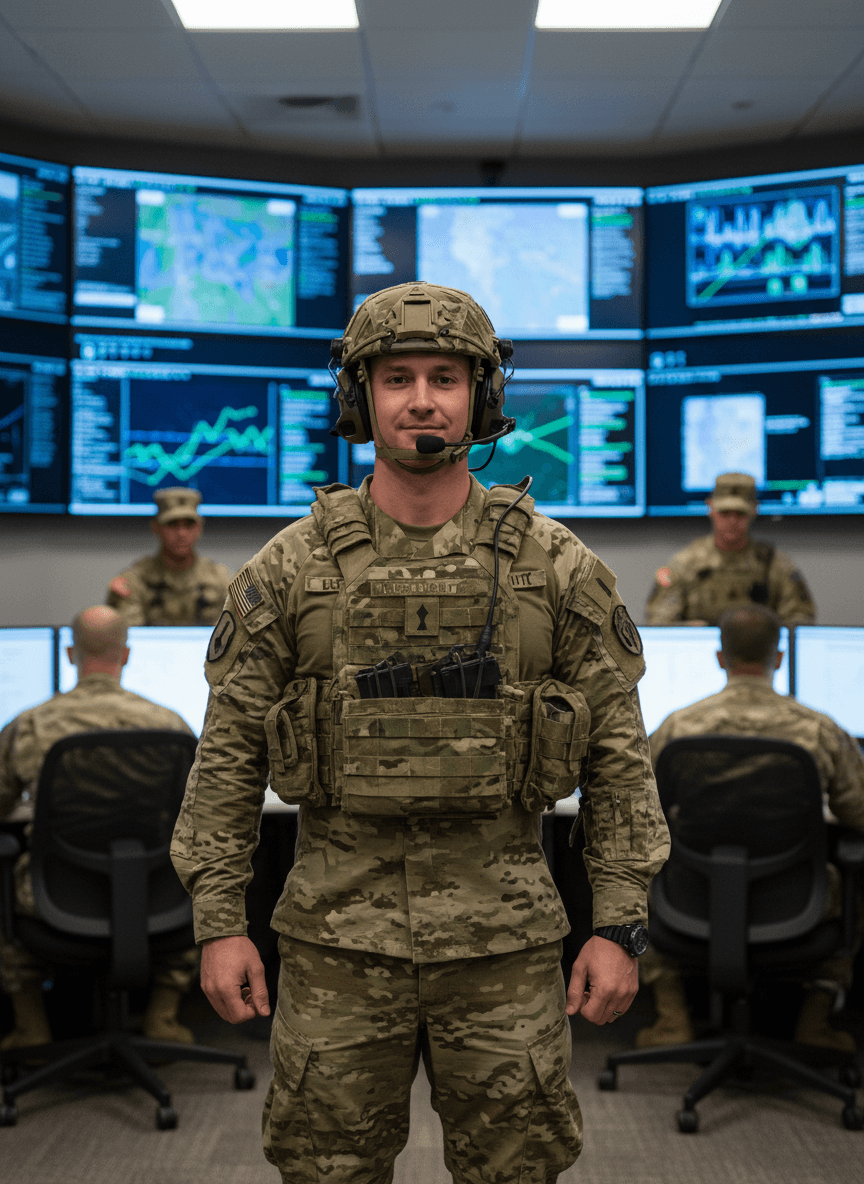
Input: A full-length photo of a man with short brown hair and light stubble, standing indoors against a plain wall in a T-shirt and jeans, arms at his sides, in even lighting. The result looks similar to the image at the top of this page.
Style applied: military aesthetic, uniform and command-center setting
The plain wall becomes a room lined with wall-mounted monitors showing maps and data feeds, and his casual clothes are replaced with a camouflage uniform, a plate-carrier vest with pouches, a wristwatch, and a helmet with an attached headset microphone. Uniformed figures are added at desks and standing in the background to suggest a working operations room. He still stands square to the camera with arms at his sides, and the expression is adjusted to a composed half-smile.
The AI added a national flag patch on the shoulder, a name tape with unreadable lettering and a chest insignia on its own. None of it is tied to a real service record, unit, or rank; they can come out blurred, misspelled, or inconsistent with actual military insignia, so don't treat them as accurate. This is a styled portrait for costume, gaming, or creative use, not documentation of military service.
How it works
- 1
Upload a clear, front-facing photo
A head-and-shoulders or half-body shot with decent lighting gives the AI a clean subject to dress and pose. Group photos or awkward angles make the uniform harder to fit convincingly.
- 2
Describe the specific look you want
Mention setting (command center, field, outdoor training area), gear (helmet, headset, vest), or expression through the instruction box. If you leave the default instruction, the AI picks a generic uniform and setting for you.
- 3
The AI restyles the photo
It replaces your clothing with a uniform and gear, adjusts the background to a military-style setting, and aims for a composed, confident expression, while trying to keep your general likeness and pose.
- 4
Check the result closely
Look at insignia, patches, and any text on the uniform, since the AI can generate garbled or made-up markings. Rerun with a clearer instruction if something looks off.
Use cases
Gaming and roleplay avatars
Players building a military-themed character for a game profile or tabletop campaign use it to visualize a look before committing to a full costume or 3D model.
Costume and cosplay planning
See roughly how a uniform silhouette and gear would sit on your body shape before buying or building the real thing for an event.
Fiction and story mood boards
Writers working on military-adjacent fiction use restyled portraits as visual references for characters, separate from any real person or unit.
Novelty portraits for fun
Some people just want to see a stylized version of themselves in a different setting, the same way a themed photo booth filter works.
Tips for better results
- Use a plain background so the AI has less to reinterpret and more room to build a convincing set.
- Name a specific setting or gear detail in the instruction rather than leaving it generic.
- Don't rely on the uniform, rank, or insignia in the result for anything factual; they're generated, not researched.
- If the face looks off after restyling, try a sharper source photo with even, front-facing lighting.
- Skip this tool if your goal is to represent yourself as having served; it's a styling effect, not a credential.
Limitations
This tool is for costume, gaming, and creative styling. It doesn't verify military service, rank, or unit affiliation, and the uniforms, insignia, and settings it generates are AI approximations, not accurate representations of any real branch, unit, or regulation. Don't use the output to claim military service or affiliation you don't have, or to depict a real, identifiable person as a service member without their consent. Faces and gear details can come out altered, so review the result before sharing it anywhere it might be taken at face value.
Frequently asked questions
Can I use this to make a fake military ID or proof of service?
No. It generates a stylized portrait for creative and costume use, not a document. It has no connection to real service records, and using it to impersonate a service member misrepresents both the tool and the person shown.
Will the uniform and insignia be accurate to a real branch?
Not reliably. The AI approximates a military look based on your instruction, so patches, rank, and uniform details can be generic, inconsistent, or simply invented rather than matching any real branch's regulations.
What photo works best as a starting point?
A clear, front-facing or half-body photo with even lighting and a plain background gives the most consistent result, since the AI has to replace clothing and rebuild the scene around you.
Can I pick the setting, like indoors versus outdoors?
Yes, describe it in the instruction box. Mentioning a specific setting, like a field exercise or a command room, gives you more control than the default wording.
Will my face look exactly the same?
It usually keeps your overall look, but restyling can shift facial details and expression. Check the result before using it anywhere your actual appearance matters.
Is this appropriate for a professional profile photo?
It's built as a stylized, creative image rather than a professional headshot, so it's better suited to gaming, costume, or fiction use than a resume or workplace profile.
Plans start at $9 a month. See pricing