AI Skincare Consultant
Upload a skin photo and get notes on what's visible plus routine suggestions to consider.
What the Skincare Consultant does
Standing in front of a drugstore shelf trying to guess which serum matches your skin is nobody's idea of a good time. This tool looks at a photo of skin, whether that's a face, shoulder, or another visible area, and describes what it can see: texture, tone, visible sun exposure, freckling, and other surface details. From there it suggests a general routine direction and product categories worth looking into. You can add a note about a specific concern, like dryness or sensitivity, and the answer will lean toward that. It's a starting point for thinking about your routine, not a clinical skin exam.
See a sample result
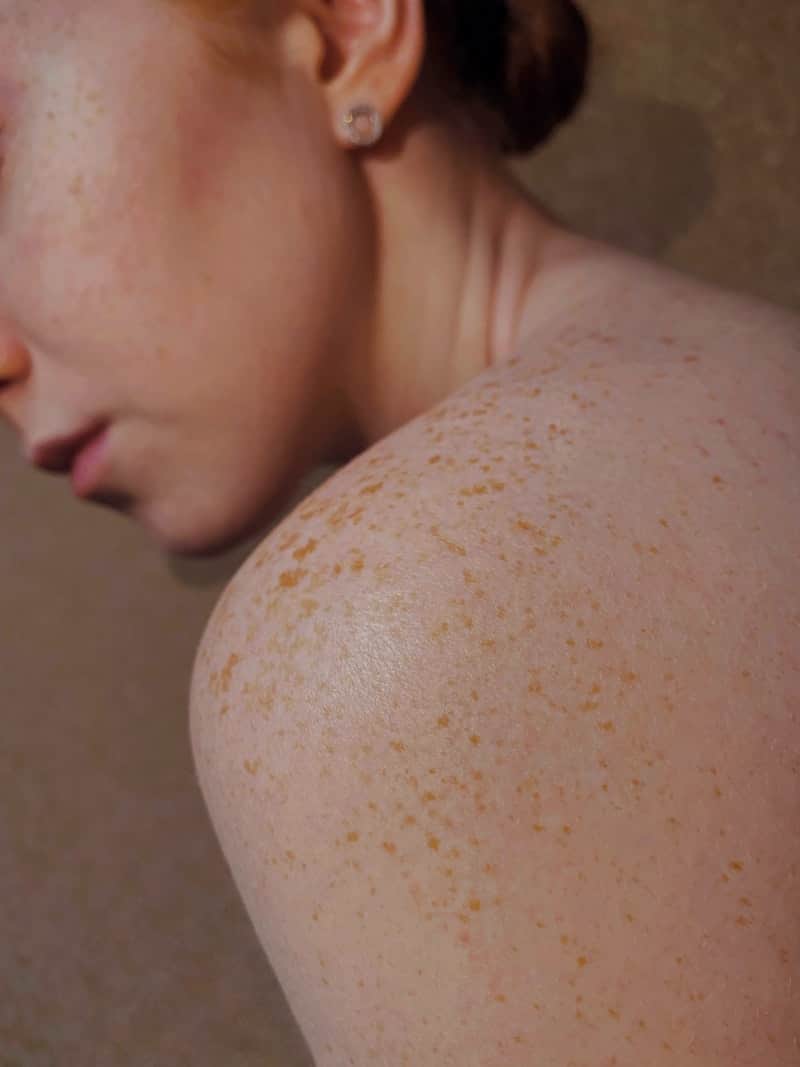
Input: A close-up of a bare shoulder and the side of a neck, with the lower half of a face in profile, a small stud earring, and hair pulled back into a bun. The skin shows scattered light freckling across the shoulder, warm indoor lighting, and a soft, slightly glossy finish suggesting recently applied lotion or natural oil.
- Visible Sun Exposure40%
- Texture Evenness78%
- Hydration Appearance65%
What's visible: This photo shows shoulder and neck skin rather than a facial close-up, so this reading focuses on that area. The scattered freckling pattern points to accumulated sun exposure over time rather than a recent reaction, and the skin surface looks smooth with even texture and no visible irritation.
Tone and sun exposure: The freckling is a normal response to UV exposure and isn't a concern on its own, but it's a useful reminder that this area gets sun and could benefit from a broad-spectrum sunscreen if it's regularly uncovered, especially on shoulders that catch sun during outdoor activities.
Routine suggestions: For body skin like this, a light daily moisturizer and mineral or chemical sunscreen on exposed days cover the basics. If new dark spots appear quickly or change shape, that's worth a dermatologist visit rather than a routine adjustment.
For a fuller consult: Upload a front-facing photo of your face if you want notes on pore size, oil balance, or facial texture, since this angle only covers the shoulder and neck.
How it works
- 1
Upload a clear photo of the skin area
Natural daylight without heavy filters gives the most useful read. A close, in-focus shot works better than a full-body photo from a distance.
- 2
Add a note about your concern
Mention dryness, breakouts, sensitivity, or a goal like evening out tone, and the recommendations will be shaped around that note.
- 3
The model reads visible surface details
It looks at texture, visible pores, tone variation, sun exposure signs like freckling, and general condition based only on what's in the photo.
- 4
You get routine suggestions and next steps
The result names general product categories and habits worth considering, along with a plain note on what a photo can't tell you.
Use cases
Building a first routine
Someone new to skincare uploads a face photo to get a starting point of product categories before wading through hundreds of options online.
Checking in after a routine change
A person who switched products a few weeks ago photographs the same area to see if the tool's notes on texture or tone shifted.
Traveling and away from your usual products
Someone on a trip photographs their skin to get a temporary routine suggestion using whatever's available at a local pharmacy.
Writing down questions for a dermatologist
Someone uses the notes to put words to what they see, like uneven tone or dry patches, before an appointment. It never rules out a visit: a new or changing spot deserves a professional look whatever the result says.
Tips for better results
- Use natural daylight near a window rather than yellow indoor bulbs, which shift how tone and redness appear.
- Skip filters and heavy makeup on the area you're photographing so the read reflects your actual skin.
- Photograph the same angle and lighting each time if you're comparing results over weeks.
- Mention your main concern in the notes field so the routine suggestions aren't too generic.
- Photograph the specific area you're asking about; a shoulder photo won't give facial skincare notes.
Limitations
This is not medical advice and not a diagnosis. It's a visual read of what's in a photo, and it can't detect anything beneath the skin's surface, run tests, or replace a professional exam. Lighting, camera quality, filters, and skin tone all affect what the model reports, and it can miss or misread conditions that need a trained eye. If you notice a new or changing mole, persistent irritation, or anything that concerns you, see a dermatologist rather than relying on this tool.
Frequently asked questions
Is this a real skincare diagnosis?
No. It's a visual read based on a photo, meant as a starting point for thinking about your routine, not a medical diagnosis or professional skin exam.
Can it recommend specific product brands?
It mostly suggests product categories and ingredients, and it may name example products. Treat any product it names as a shortlist to research, not an endorsement, and patch-test anything new.
Does it work on body skin, not just the face?
Yes, you can upload a photo of any visible skin area, and the notes will describe what's in that specific photo.
What if I have a specific skin concern like acne or eczema?
Add a note describing the concern, and the suggestions will lean toward that. For an ongoing or worsening condition, see a dermatologist rather than relying on the tool alone.
Why does lighting matter so much for the result?
Warm or dim lighting can make skin look more red, dry, or uneven than it is, so natural daylight gives the model a more accurate picture to work from.
Can I ask a follow-up question about the result?
Not as a chat. Put your question in the details box when you upload the photo and the answer will address it. For a follow-up, run it again with a new question, which uses credits.
Plans start at $9 a month. See pricing