AI Story Generator
Drop in a photo and get back a short story built around what's actually in the frame.
What the Story Generator does
Most writing prompts start from a blank page. This one starts from a picture. Upload any photo, a messy desk, a street corner, a pet mid-jump, and the tool reads the setting, the lighting, the objects and the mood, then writes a short story that grows out of those details instead of ignoring them. You can nudge it toward mystery, romance, adventure or something quieter, and it will still tie the plot back to what's visible in the frame: the color of a room, the time of day, a small detail in the corner. It's built for writers stuck on where to start, teachers running a creative exercise, or anyone who wants to see their photo turned into a scene.
See a sample result
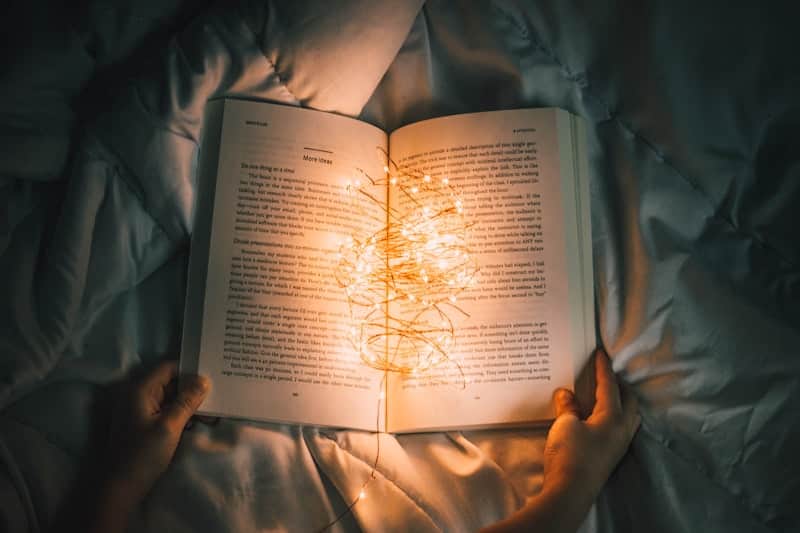
Input: An overhead photo of someone lying on a bed at night, reading an open paperback. A string of warm fairy lights is coiled loosely on the pages, glowing against the dim room, with both of the reader's hands visible holding the book open.
The Light Between the Pages
Mara had stopped reading the words twenty minutes ago. It was the lights that held her now, a tangle of warm gold coiled across the spine of the book like something that had grown there on its own.
Her grandmother used to say that some stories glowed if you read them at the right hour of the night, and Mara had always assumed it was a saying, nothing more, the kind of thing older women said to make ordinary evenings feel important. But the string of lights had been packed inside the box of books left to her, tucked between the pages of this exact paperback, as if someone had marked a place and never come back for it.
She pressed her palm flat against the open page, feeling the small warmth radiating up through the paper. Outside, the rest of the house was dark and silent, but here, in this pool of light no bigger than her two hands, something in the story finally seemed to be waiting for her to keep reading.
How it works
- 1
Upload a photo with some visual texture
Pictures with a clear setting, an object, an animal or a person tend to produce richer stories than a plain, empty background. Interesting light or an unusual angle gives the model more to build a mood around.
- 2
The model reads the scene before it writes anything
It identifies the setting, time of day, colors, objects and any people or animals present, then infers a mood from lighting and composition before drafting a single sentence.
- 3
It builds a narrative around those details
Using what it found in the image, it invents characters, a setting and a small arc of tension or discovery, weaving in the actual visual details so the story reads as if it were written for that exact photo.
- 4
You get a complete short story back
The result is a self-contained piece with a beginning, a turn and an ending, written in descriptive language rather than a plot outline.
Use cases
Breaking through writer's block
When a blank page feels impossible, starting from a photo gives you concrete details, a setting, an object, a mood, to react to instead of inventing everything from nothing.
Classroom creative writing exercises
Teachers can hand students a shared photo and compare the different stories the tool generates, or have students write their own version after reading the AI's take.
Turning travel or event photos into keepsakes
A photo from a trip or a family gathering can become a short narrative to pair with a photo album or scrapbook page, adding a bit of storytelling to an otherwise plain caption.
Generating seeds for longer fiction
Writers looking for a scene, a character sketch or an opening line can use the output as raw material to rewrite, extend or fold into a bigger project.
Social media captions with more personality
Instead of a one-line caption, pull a paragraph from the generated story to give a photo post a narrative hook.
Tips for better results
- Choose photos with a clear focal point rather than a busy, cluttered frame, so the story has something specific to center on.
- Photos with strong lighting, whether golden hour or dim and moody, tend to produce a stronger sense of atmosphere in the result.
- If the first story feels generic, try again. Each run reads the image slightly differently and can land on a different angle.
- Photos of people, animals or objects mid-action usually generate more plot movement than static, empty scenes.
- Use the generated story as a first draft. Trim, rewrite dialogue and adjust pacing to match your own voice.
Frequently asked questions
Does the AI story generator only work with photos of people?
No, it works with landscapes, objects, animals, food and everyday scenes just as well; it looks at setting, color and mood rather than requiring a human subject.
Can I pick a genre for the story?
You can describe the tone you want, such as mystery, romance or something lighthearted, and the tool will shape the plot around your photo while leaning into that direction.
How long is the story it generates?
Expect a short, complete piece, usually a few paragraphs with a beginning, a turn and an ending, rather than a full chapter or novella.
Will two people uploading the same photo get the same story?
Not exactly. The model draws different characters, angles and details each time it reads an image, so results vary even from an identical photo.
Can I use the generated story for a school assignment?
You can use it as inspiration or a starting draft, but check your teacher's rules on AI-assisted writing before submitting generated text as your own finished work.
What kind of photo gives the best result?
Photos with a clear setting, some visual detail and a hint of mood, like unusual lighting or an interesting object, tend to give the model more to build a narrative around than plain, empty shots.
Plans start at $9 a month. See pricing