What the Glamour Photo Generator does
A glamour shot used to mean a studio, a lighting rig, and a stylist charging by the hour for that polished, magazine look. This tool works from a photo you already have instead. Upload a portrait, describe any specific styling you want in the instruction, like a certain color or a jewelry piece, and the AI reworks the lighting, hair, and wardrobe toward a sophisticated, high-end glamour aesthetic. The default instruction also asks for an "alluring" look, so expect bare shoulders, a sultry expression, smoothed skin and dramatic shadow. It usually keeps your overall look, but faces and figures get idealized.
See a sample result
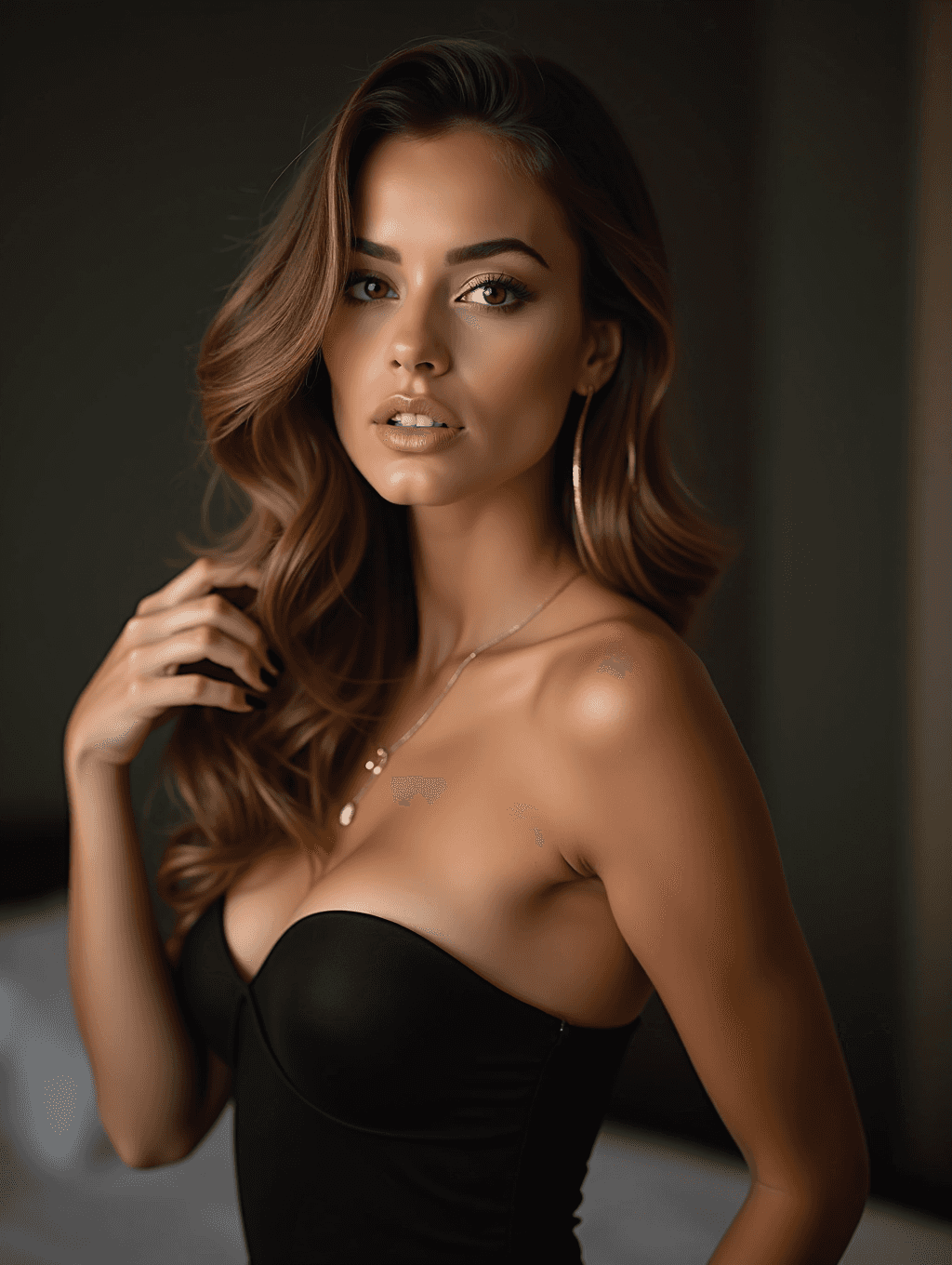
Input: A casual waist-up portrait of a woman with long brown hair worn down, in a plain gray top, taken in flat daylight with no specific pose or styling. The result looks similar to the image at the top of this page.
Glamour aesthetic result
The flat daylight has been replaced with dramatic, low-key studio-style lighting, with one side of the face lit and the other falling into soft shadow. Hair is now styled in loose, voluminous waves swept to one side, and the plain top has been replaced with a strapless black bustier with a low neckline. A thin gold necklace and large hoop earrings have been added, and the background became a dim bedroom.
Makeup is polished and defined, with sculpted brows and glossy lips parted in a sultry expression. The pose has changed, with one hand raised into the hair and the body turned, giving a sensual, magazine-style feel. The skin is airbrushed and the face idealized, so compare it with your original. For a more covered, classic look, ask for "a high-neck evening dress, studio backdrop" in the instruction.
Before using this image, check the jewelry shape, the edge of the hairline near the shoulder, and the fabric of the top, since generated details in those areas can come out slightly uneven.
How it works
- 1
Upload a clear portrait
Use a photo where your face and shoulders (or more) are visible in decent lighting; the AI works from what it can see clearly.
- 2
Name any specific styling you want
Mention a color, fabric, or jewelry piece in the instruction if you have something in mind, like a black dress or gold earrings.
- 3
The AI applies the glamour look
It adjusts lighting toward dramatic highlight and shadow, restyles hair and makeup toward a polished look, and adds wardrobe suited to a magazine-style shot.
- 4
Review before you use the photo
Check the face, jewelry, and fabric details for small inconsistencies, since generated styling can shift slightly from what you asked for.
Use cases
A profile photo that stands out
A polished glamour-style portrait works well for a dating profile, a personal website, or a social account when your other photos are casual snapshots.
A personal styling test
See how dramatic lighting or a particular jewelry and wardrobe combination might look on you before booking a real photographer.
A gift or personal print
Some people turn a favorite photo into a glamour-style portrait to print and frame as a personal keepsake.
Content for a personal brand
Creators who want a consistent, high-end look across their photos can generate a glamour-styled version without a studio session each time.
Tips for better results
- Start with a sharp, well-lit photo; the AI has less to work with when the source is blurry or dark.
- Name a specific color or jewelry style in the instruction rather than leaving it general.
- A slight head turn or raised hand in your source photo tends to translate well into an editorial pose.
- If the fabric or jewelry looks uneven, try again with a higher-resolution source photo.
- Ask for a specific mood, like warm and soft or dramatic and moody, to steer the lighting style.
Limitations
This is a generative style edit with an alluring, sensual default; it isn't built for explicit nudity, but results can be more revealing than you expect. It's for adults editing their own photo, or a photo of an adult who has agreed to it. Never upload a photo of anyone under 18. Faces, jewelry, and fabric are generated based on your instruction and photo, so small details can come out different from what you pictured, and results vary with your source photo's lighting and resolution. Don't upload a photo of someone who hasn't consented to this kind of edit, and check the result closely before printing or sharing it.
Frequently asked questions
Will it keep my face looking like me?
It usually keeps your overall look while changing lighting, hair, and wardrobe, but it smooths skin and sculpts features toward a glamour ideal, so compare the result with your photo.
Can I ask for a specific dress color or jewelry?
Yes, edit the instruction before running it and mention the color, fabric, or jewelry you want in the result.
Is this an explicit photo generator?
It isn't built for explicit content. The default is a sensual, magazine-style glamour look that often includes bare shoulders and low necklines; ask for more coverage in the instruction if you want it.
What kind of source photo works best?
A clear, well-lit photo where your face and shoulders are visible, without heavy cropping or motion blur, gives the most consistent result.
Can I upload a photo of someone else?
Only with that person's clear permission. Upload photos of yourself or of people who have agreed to have this kind of edit made.
Does each run use credits?
Yes, each run uses credits, so it helps to pick your best source photo and describe the styling clearly before trying it.
Plans start at $9 a month. See pricing