AI Alien Generator
Upload a photo and describe the alien look you want; get back a portrait styled to match.
What the Alien Generator does
A costume party invite, a sci-fi themed profile picture, or just an afternoon of curiosity can all end at the same question: what would I look like as an alien? Upload a photo of a person and the AI reworks it into an extraterrestrial version, with unusual skin tone or texture, altered proportions, and a moody, otherworldly lighting style. It works from one uploaded photo plus a short instruction, so you can ask for something reptilian, ghostly pale, or covered in bioluminescent markings instead of getting a single fixed look. Expect it to take liberties beyond the face too, such as a new outfit or headpiece, so check the result before you share it.
See a sample result
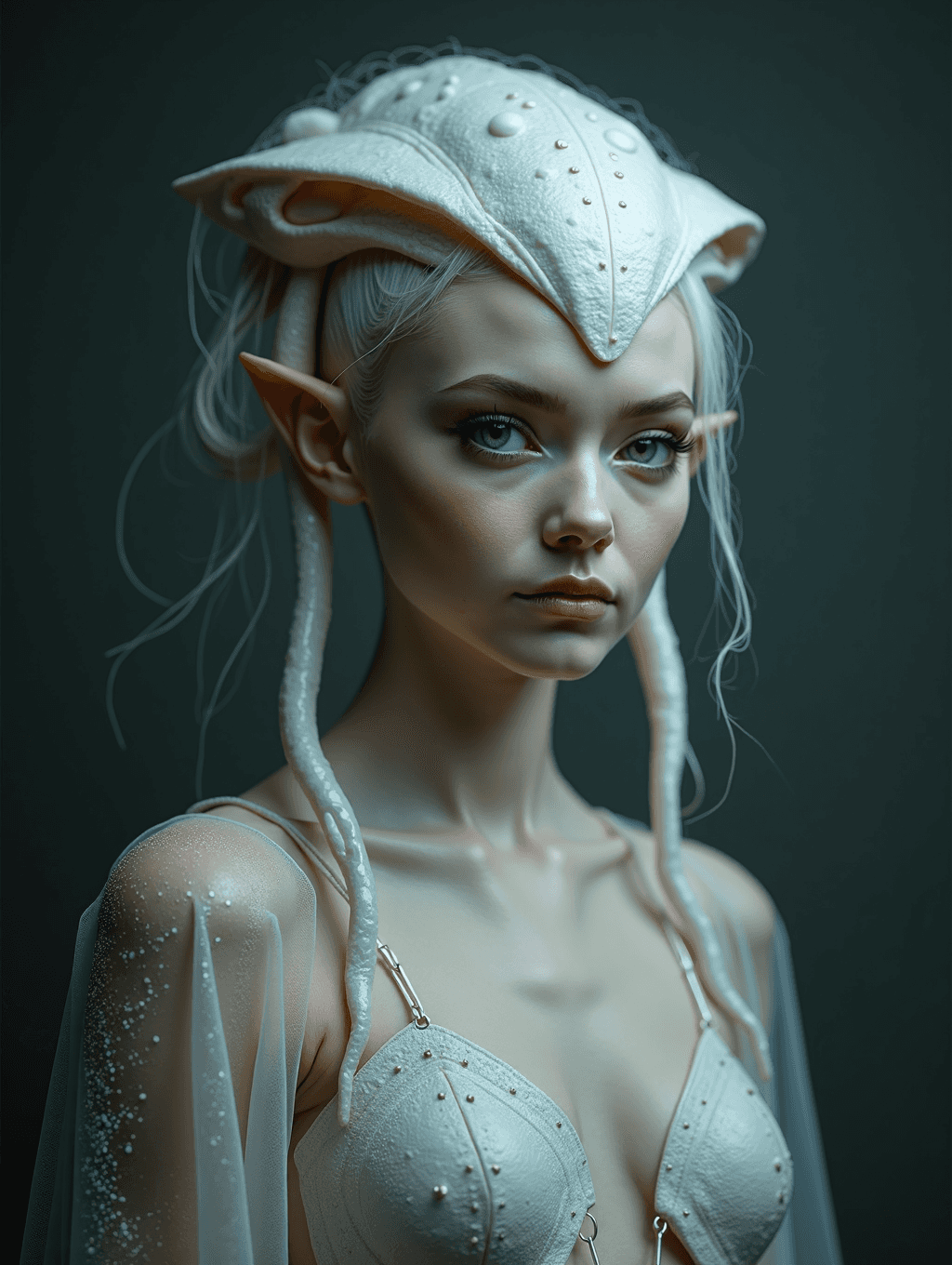
Input: A phone portrait of a young woman with light blonde hair tied back, facing the camera in a plain white T-shirt against a dark wall, with the instruction left at its default. The result looks similar to the image at the top of this page.
The transformation turns her skin a pale, pearly white and her hair almost silver. A smooth, domed headpiece studded with small beads sits over her head like a shell, long pointed ears extend from the sides, and thick pale tendrils hang from beneath the headpiece down past her shoulders. The T-shirt is replaced by a sheer, sparkling wrap over a studded, shell-like bra top, and the dark background with soft side light gives it the feel of a studio portrait of something not quite human.
What the AI chose on its own: the outfit is far more revealing than the original T-shirt, the ears read more elf than alien, and the face was smoothed and slimmed. If you want a covered costume or a more alien face (larger eyes, textured skin), say so in the instruction and check the face against your original.
How it works
- 1
Upload a clear, front-facing photo
Choose a photo where the face and shoulders are visible and well lit. Busy backgrounds or extreme close-ups make it harder for the AI to reshape the face convincingly.
- 2
Describe the alien style you want
The instruction box is where you steer the result: mention skin color or texture, eye shape, whether you want visible antennae or ridges, and any setting like a spaceship interior or alien landscape.
- 3
The AI reworks skin, features, and setting
It restyles skin tone and texture, adjusts facial proportions toward something less human, and can add a background or costume element consistent with the look you asked for.
- 4
Download the result
You get back one image that follows the shape of your upload. Run it again with a different instruction if the first pass leans too subtle or too extreme for what you had in mind.
Use cases
Halloween or costume party pictures
Get an alien look without buying prosthetics or makeup. Use it as a preview for a costume idea or as the photo itself for an invite or social post.
Sci-fi themed profile pictures and avatars
Gamers and forum users on sci-fi communities often want a profile picture that fits the theme. This gives you a personalized one instead of a stock alien image.
Creative writing and character concept references
Writers building an alien character can turn a real face into a rough visual reference to describe in a story or share with an illustrator.
Just for fun with friends
Group chats and photo threads are a common place this shows up: everyone uploads a selfie and compares who got the strangest or most convincing alien look.
Tips for better results
- Name a specific skin tone, texture, or feature (scales, ridges, glowing markings) in the instruction rather than just saying "make me an alien."
- Front-facing photos with even lighting hold up better than side angles, since the AI reshapes the face around what it can clearly see.
- If the first result looks too close to the original photo, ask for a more dramatic change in skin and eye shape and run it again.
- Mention a background or setting, like a spaceship corridor or alien desert, if you want the scene to change along with the face.
- Keep hair pulled back or tied up if you want the alien features around the ears and forehead to show clearly.
Limitations
This is a generative edit, not a simulation of anything real. The AI can change small details it wasn't asked to, including hands, background objects, and any text in the frame, so check the result before using it somewhere the details matter. It works best on a single clear face; group photos or heavily obscured faces may come back looking uneven.
Frequently asked questions
Can I control what kind of alien I look like?
Yes. Describe the specific look in the instruction box, such as reptilian skin, a grey alien style, or bioluminescent markings, and the AI will build the transformation around that description.
Will it keep my facial expression and pose?
Not reliably. The overall framing usually carries over, but the edit is generative and can change the expression, slim the face and swap your clothing for something the AI picks. Ask to keep your expression and clothing in the instruction if that matters.
Does it work with photos of more than one person?
It can process group photos, but results are more consistent with a single, clearly visible face since the AI is reworking facial detail for each person in the frame.
Can I upload more than one photo?
You can, but all uploaded images are combined into one result, so extra images work as references (a costume idea, a color palette), not as a batch. To transform several photos, run each one separately; each run uses credits.
Why does the result sometimes look more human than I expected?
A vague instruction like "alien" without detail can produce a subtle result. Adding specifics about skin, eyes, or features usually pushes the transformation further.
Is this the same as a costume or makeup design?
No, it generates a finished image rather than a step-by-step makeup guide. Treat it as a preview of a look or a standalone image, not instructions for physical prosthetics.
Plans start at $9 a month. See pricing