Eye Color Analyzer
Upload a clear eye photo and get a detailed read of your eye color plus makeup colors that flatter it.
What the Eye Color Analyzer does
Most people describe their own eyes as just "brown" or "blue" and stop there, missing the flecks, rings, and undertones that actually make an eye color distinctive. Upload a close-up photo of your eye and the AI names the primary color, any secondary tones or patterns, and whether it leans warm or cool, then turns that into specific eyeshadow, eyeliner, and mascara suggestions. It's built for anyone shopping for makeup, curious about their own coloring, or trying to figure out why a certain shadow shade never quite works for them.
See a sample result
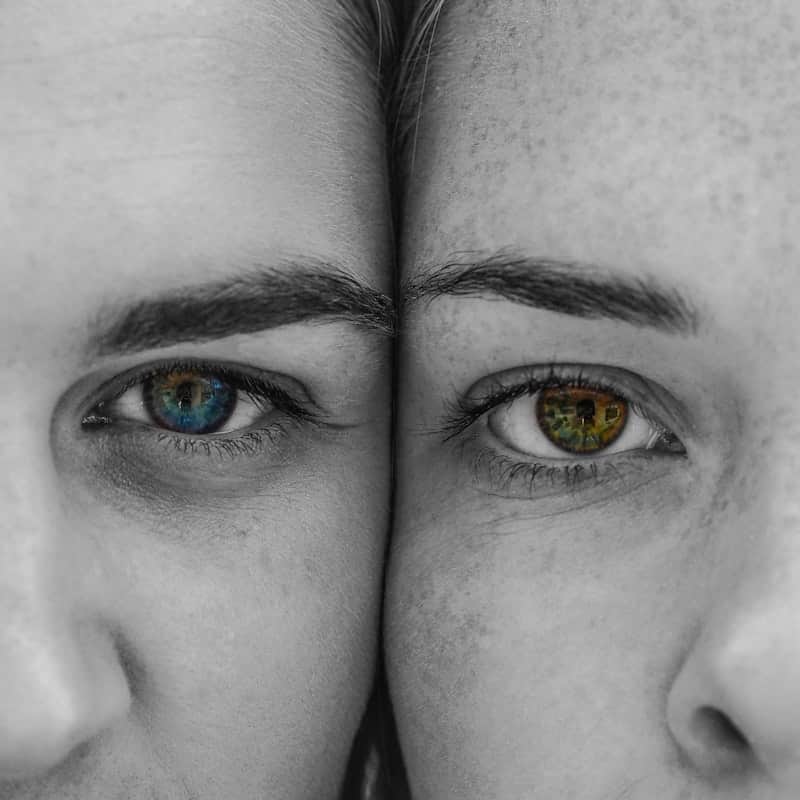
Input: Two people pressing the sides of their faces together so one eye of each shows. The photo is black and white except for the irises, which were left in color: the left iris is blue with a green-gold ring around the pupil, and the right is amber-green with brown near the pupil.
- Color intensity85%
- Warm undertone55%
- Pattern visibility78%
Note: Everything except the irises is black and white, so these look like selectively colored eyes. The colors may have been boosted in editing; an unedited photo in daylight gives a truer read.
Left eye
Primary color: Blue, with a green-gold ring around the pupil, a pattern called central heterochromia.
Tone: Mostly cool, with a warm center.
Makeup pick: Copper, peach and warm bronze shadows contrast the blue and pick up the gold ring. A soft brown liner reads gentler than black.
Right eye
Primary color: Amber-green (a hazel family color) with brown close to the pupil.
Tone: Warm.
Makeup pick: Plum, aubergine and mauve shadows make the green and amber stand out. A bronze or deep plum liner intensifies it without flattening it.
Mascara for both: Brown-black suits these lighter irises better than jet black, which can look harsh.
How it works
- 1
Take a close, well-lit photo of one eye
Get close enough that the iris fills a good part of the frame, with even lighting and no colored filter or heavy flash glare across the eye.
- 2
Upload the photo
One eye is usually enough, but you can run both if you suspect they differ slightly, which is common and not something to worry about.
- 3
Add a note if it helps
Mention your skin undertone or a specific occasion ("date night," "everyday look") in the details box to steer the makeup suggestions toward something you'd actually wear.
- 4
Read your result
You'll get the primary color, any secondary color or pattern like central heterochromia or flecks, an intensity read, and a set of makeup colors matched to what your eyes show.
Use cases
Shopping for eyeshadow that actually suits you
Instead of guessing at a palette in a store, get specific shade families (copper, plum, forest green) matched to your actual eye color and undertone.
Picking colored contacts that look natural
Knowing your base color and undertone helps you choose a contact shade that complements rather than clashes with your natural eye color.
Understanding heterochromia or unusual patterns
If you have flecks, a ring, or slightly different-colored eyes, the analyzer describes what it's actually seeing rather than forcing your eyes into one generic color name.
Prepping for photos or a special event
Get a liner and mascara recommendation ahead of a shoot or event so your eye makeup reads well in photos, not just in the mirror.
Tips for better results
- Use natural window light rather than overhead indoor lighting, which can wash out subtle tones.
- Avoid tinted contact lenses or colored filters when taking the photo; they'll override your real eye color.
- Crop the photo close to the eye so the iris isn't a small speck in a wider face shot.
- Skip heavy eye makeup in the photo since dark liner close to the iris can make the result harder to read.
- If your eyes look different in different lighting, try a couple of photos and see which reading feels closer.
Limitations
This is a visual read of what shows up in your photo, not a clinical eye exam. Lighting, camera color balance, and even the color of nearby clothing can shift how an iris photographs, so the exact shade named here is an estimate, not a fixed diagnosis. It has nothing to say about eye health, vision, or medical conditions affecting the eye; see an optometrist for anything related to your vision or eye health.
Frequently asked questions
Why did I get a slightly different eye color than what my ID or doctor says?
Lighting and camera settings shift how iris color renders in a photo, and many eye colors sit between named categories like hazel and amber. Both readings can be reasonable descriptions of the same eye.
Can it detect heterochromia?
It can note visible color differences between two eyes or patterns within one iris, like central heterochromia or flecks, if the photos show them clearly.
Does eye color change with lighting or mood?
Yes, lighter eyes especially (blue, green, hazel) can appear to shift shade depending on ambient light and pupil size, which is normal and not something the tool is getting wrong.
What makeup colors work for brown eyes?
It depends on the exact shade and undertone of the brown. The analyzer looks at your specific photo and suggests shadow and liner families rather than a generic "brown eyes" answer that ignores your undertone.
Can I upload a photo of someone else's eyes to compare?
Yes, you can run separate photos for comparison, which is useful if you and a friend want to compare makeup suggestions side by side.
Do I need a photo of both eyes?
One clear eye photo is enough for a full result. Upload both if your eyes look noticeably different from each other and you want a read on each.
Plans start at $9 a month. See pricing