Kpop Aesthetic Generator
Turn a regular photo into a bold, colorful K-pop idol look in one generation.
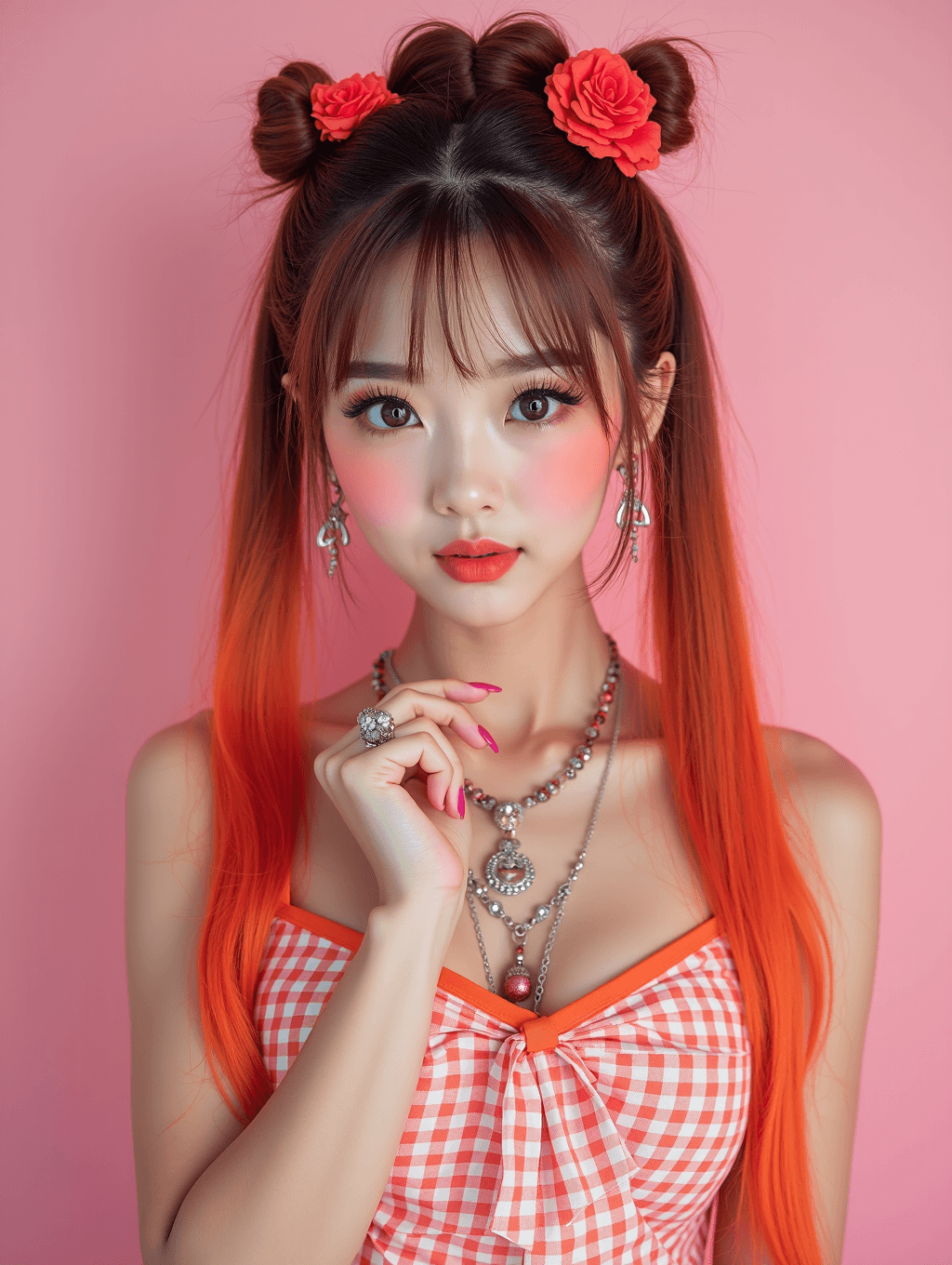
What the K-Pop Style Generator does
Getting that glossy, high-contrast K-pop idol look usually takes a stylist, a makeup artist, and studio lighting most people don't have access to. Here the AI applies that aesthetic to a photo you already have: vivid color, sharp idol-style makeup, and the polished, energetic styling associated with K-pop group photoshoots and album art. Upload a clear photo and describe any specifics you want, a hair color, an outfit style, a particular mood, and it generates a new version built around that look. It's a fun way to see yourself in the aesthetic without booking a shoot, not a literal transformation into any real idol's appearance.
See a sample result
Input: A plausible before-photo: a simple, well-lit selfie of a person facing the camera with natural hair and everyday makeup, taken against a plain indoor wall. The instruction asks for a vibrant K-pop idol look with double space buns, bold red lip color, and a red gingham outfit with statement jewelry. The result looks similar to the image at the top of this page.
Style applied: bold K-pop idol aesthetic with double space buns and long pigtails fading from brown to bright orange, blunt bangs, red roses pinned into the buns, dramatic winged eyeliner, matching bold red lip and blush, a red-and-white gingham top with a big front bow, layered statement necklaces, drop earrings and a cocktail ring.
What changed: hair color, hairstyle, makeup intensity, and outfit are all replaced to match the instruction. The AI also chose a new pose on its own (a hand raised under the chin with pink manicured nails) and reshaped the face toward a typical idol look: larger eyes, a slimmer V-shaped jaw, lighter and flawless skin. Check whether it still looks like you, and add "keep my face shape, skin tone and pose" to the instruction if it drifted.
Background and lighting: the background is simplified to a soft solid pink tone typical of K-pop promotional photography, with even, flattering studio-style lighting across the face.
This is a stylized generated image built around the aesthetic you describe, not a transformation into any specific real performer's appearance.
How it works
- 1
Upload a clear, front-facing photo
A photo with your face and upper body visible, decent lighting, and a simple background gives the model the clearest base to restyle.
- 2
Describe the specific look you want
The default instruction applies a general K-pop idol aesthetic, but you can edit it to ask for a specific hair color, outfit style, makeup intensity, or mood.
- 3
The model applies the styling
It restyles hair, makeup, and outfit toward the vibrant, polished K-pop look and often reworks the pose and face as well, so compare the result with your original.
- 4
Review and refine the result
If the color palette or styling isn't quite what you pictured, adjust the instruction wording and generate again; each run uses credits. If you upload more than one photo, they are combined into one result rather than restyled separately.
Use cases
Previewing a bold new hair color or style
Curious what bright red or pastel hair would look like on you before committing to a dye job? Generate the look first and see if it's a direction you want to take.
Creating a fun profile photo
Give a social profile a distinctive, high-energy look for a fan account, a themed event, or just a photo that stands out from a typical selfie.
Fan content and fandom projects
K-pop fans making edits, fan art, or themed content for a bias or group can use this as a starting point for a stylized personal photo.
Trying out idol-style makeup ideas
See how a bold eyeliner shape or a specific lip color reads on your own face shape before attempting the look yourself with real makeup.
Tips for better results
- Name a specific color palette or hairstyle in the instruction rather than leaving it generic, since 'vibrant K-pop style' alone can produce very different results each time.
- Put any text, like a stage name or group logo, in quotes in the instruction, and check the spelling in the result since the AI can misspell or invent text.
- Use a photo with your face clearly visible and not obscured by hair or shadows for the most recognizable result.
- If the styling comes out too subtle or too extreme, adjust the intensity in the instruction (a soft idol look versus a dramatic stage look).
- Results vary even with the same instruction, so if you try variations, change one detail per run; each run uses credits.
Frequently asked questions
Can I ask for a specific idol's exact look?
You can describe elements like hair color, makeup style, or outfit type, and the result will be a stylized aesthetic inspired by that description. It won't recreate a specific real person's likeness.
What kind of photo should I upload?
A clear, front-facing photo with good lighting and your face visible works best. Group photos or heavily obscured faces give the model less to work with.
Can I choose the outfit or hair color myself?
Yes, edit the instruction to name the exact outfit style, color, or hairstyle you want, since everything about the look is controlled through what you type there.
Will it change my face shape or features?
It can. The idol look often comes with idol beauty standards: a slimmer jaw, bigger eyes and lighter, smoother skin. If you want to keep your own features and skin tone, say so in the instruction and compare the result with your original.
Can I add text like a stage name to the image?
Yes, put the exact text in quotes in the instruction. Double-check the spelling in the result, since generated text can come out misspelled or stylized differently than expected.
How many times can I generate a new version?
Each generation uses credits, and your balance sets the limit. Change one thing per run (hair color, outfit or mood) so you can tell which change made the difference.
Plans start at $9 a month. See pricing