AI Actor Headshot Generator
Turn a regular photo into a clean, casting-style headshot in one pass.
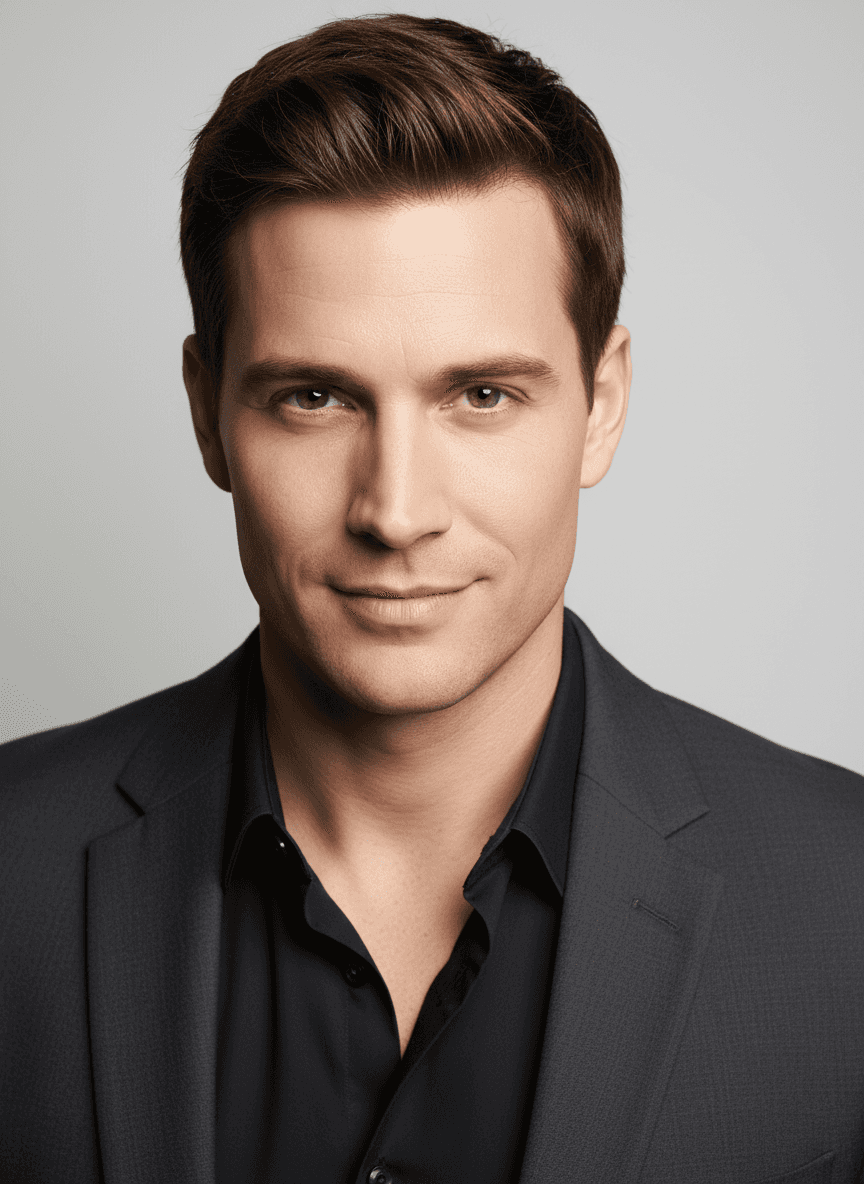
What the Actor Headshot Generator does
Casting directors and agencies expect a specific look: plain background, even lighting, and a straightforward expression that reads well in a thumbnail-sized grid. Booking a photographer for that isn't always practical when you need something quickly for a submission or an updated portfolio shot. Upload a photo of yourself and this tool restyles it into that format: a neutral gray or white backdrop, soft directional lighting on the face, and a composition framed the way casting headshots usually are. You can add your own instruction to steer details like wardrobe tone or expression.
See a sample result
Input: A casual phone photo of a man in his thirties with short brown hair, in a dark shirt and charcoal blazer, standing outdoors: uneven natural light with some shadow across the face, a busy background with trees and a parked car, and a relaxed, off-camera gaze rather than a posed expression.
The result replaces the outdoor scene with a smooth light gray studio backdrop and even, soft lighting that eliminates the harsh shadows from the original photo. He now faces the camera with a composed, slight smile, and the dark shirt and blazer read cleanly against the neutral background. The hairline and smile were redrawn, so compare them with the original before using the shot. Skin tone looks balanced rather than blown out on one side, and the crop is tightened to a standard head-and-shoulders framing typical of casting submissions. The result looks similar to the image at the top of this page.
How it works
- 1
Upload a clear photo of your face
A recent photo with even lighting and your face unobstructed gives the model the most to work with. Front-facing or a slight angle both work.
- 2
Add an instruction if you want a specific look
Type something like 'warmer smile' or 'darker jacket' to nudge the result toward a particular tone, or leave the default instruction as is for the clean studio style.
- 3
The model rebuilds the shot as a studio headshot
It replaces the background with a neutral gray or white backdrop, adjusts lighting to a soft, even studio setup, and reframes the composition to a standard headshot crop.
- 4
Download the result or try again
You get a new image back. If the expression or lighting isn't quite right, run it again with a different instruction or a different source photo.
Use cases
Submitting to a casting call on short notice
When a submission deadline doesn't leave time to book a photographer, generate a clean, on-brief headshot from a photo you already have.
Refreshing an outdated headshot
If your look has changed since your last professional shoot, use a current photo to get an updated version without scheduling a new session.
Building out a full portfolio set
Generate a few variations with different instructions to have options for comedic, dramatic, or commercial casting categories.
Testing a look before a real photoshoot
Try out wardrobe or expression ideas quickly so you know what to ask for when you do book a professional session.
Tips for better results
- Use a photo with your face clearly lit and not in heavy shadow for the most natural-looking result.
- A neutral or simple outfit in the original photo tends to translate more cleanly than busy patterns.
- Avoid sunglasses, hats, or hair covering the eyes; casting headshots need the full face visible.
- Try a couple of expressions across separate runs (neutral, slight smile) since casting categories often want different tones.
- Check the ears, collar, and any jewelry in the result, since generated images can shift small details there.
Limitations
This is a generative restyle, not a substitute for a professional photography session when one is required or requested. The model reworks lighting, background, and framing based on the source photo, but it can introduce small inconsistencies around hair, ears, or clothing texture since the image is generated rather than retouched pixel by pixel. Review the result closely before submitting it anywhere official, and only generate headshots of yourself or people who have agreed to it.
Frequently asked questions
Will casting directors accept an AI-generated headshot?
The rule every casting office shares is that your headshot must look exactly like the person who walks into the room. An AI result that smooths your skin, fixes your teeth or changes your hairline works against you. Many agencies and casting sites also expect a real photographer's shot, so check each call's guidelines and treat this as a stopgap or a planning tool.
Can I control the background color?
Type a preference like 'white background' or 'darker gray backdrop' into the instruction field, and the model will aim for that instead of the default neutral gray.
Does it work with a phone selfie?
Yes, though a photo taken by someone else at arm's length or on a tripod usually gives a straighter angle and better framing than a close-up selfie.
Can I generate different expressions from the same photo?
Yes, run the same source photo multiple times with different instructions, like 'confident smile' or 'serious, dramatic look', to build a small set of options.
Will it change my facial features?
The model tries to keep your actual features intact while changing the background, lighting, and framing, but as with any generated image, check details like eyes and teeth before using the result.
How many credits does one headshot cost?
Each generation uses credits from your plan, and trying a new instruction on the same photo counts as a separate run. The pricing page shows current credit costs.
Can I upload a photo of someone else, like a client or family member?
Only generate a headshot for someone who has given you permission to do so. Don't run this on photos of people who haven't agreed to it.
Plans start at $9 a month. See pricing