Font Finder
Upload a photo of text and get the font name, close matches, and where to find something similar.
What the Font Identifier does
That font on a poster, a package, or a screenshot always looks familiar right up until you try to name it. This tool reads a photo of text and works through its letterforms, stroke weight, and style to identify the most likely typeface, along with a few close alternatives when the exact match isn't certain. It's built for designers matching a client's brand font, marketers recreating an ad, and anyone trying to track down a typeface they spotted somewhere without a name attached. The result explains its reasoning in plain terms, not just a single guess with no context.
See a sample result
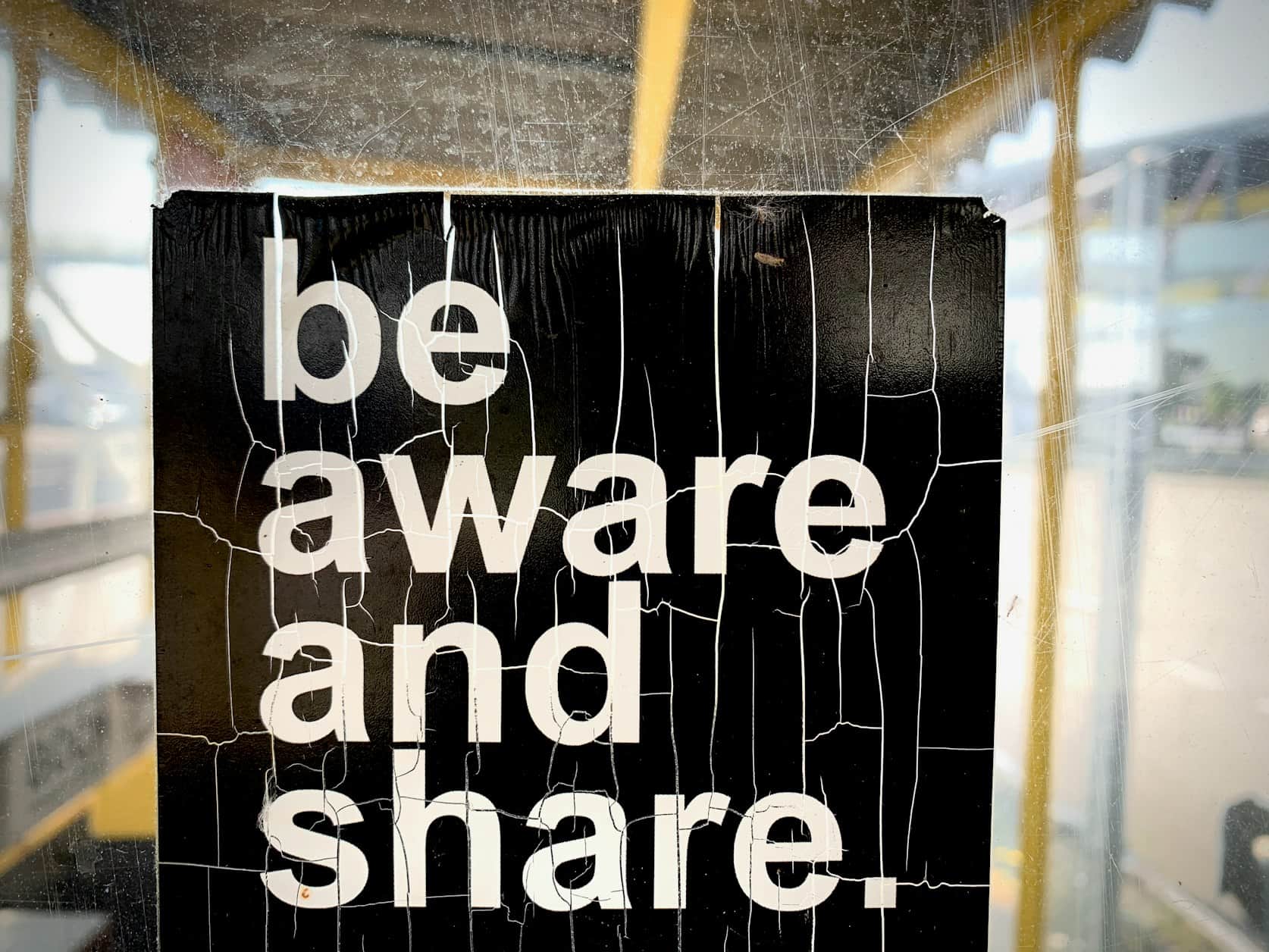
Input: A cracked, weathered black poster reading "be aware and share." in bold, condensed white letters, mounted under a bus shelter roof, shot in close-up daylight.
- Helvetica Neue Bold Condensed45%
- Franklin Gothic Heavy25%
- Akzidenz-Grotesk Condensed18%
- Arial Narrow Bold12%
Likely font family: A bold, grotesque sans-serif in the style of Helvetica Neue Bold Condensed or Franklin Gothic Heavy. The tight letter spacing and condensed width point toward a display-weight grotesque rather than a standard text font.
Letterform notes: The lowercase 'a' is double-story with a compact bowl, typical of grotesque sans-serifs, and the 'e' has a horizontal crossbar with minimal stylistic flair. Stroke weight stays consistent across the letters, suggesting a true bold cut rather than a faux-bolded regular weight.
Close alternatives: If it isn't an exact match to Helvetica Neue Condensed Bold, strong candidates include Akzidenz-Grotesk Condensed, Arial Narrow Bold, or Univers Condensed Bold, all of which share the tight aperture and blunt terminals visible here.
Where to look: Search for "condensed grotesque bold" on a font marketplace, or compare directly against Helvetica Neue and Franklin Gothic in a type specimen tool to narrow it down further.
How it works
- 1
Upload a clear photo of the text
A straight-on shot with the letters in focus works best. Crop tightly around the text if the rest of the image is cluttered.
- 2
The tool reads letterform details
It examines stroke weight, serif or sans-serif style, letter spacing, and distinctive shapes in individual characters like the 'a', 'g', or 'R'.
- 3
It ranks likely matches
Rather than a single answer, you get a set of candidate fonts with rough probabilities, since many typefaces share close family resemblances.
- 4
You get names and next steps
The result names the likely font family and close alternatives, plus notes on weight and style so you can search a font marketplace with confidence.
Use cases
Matching a client's brand font
A designer inherits a client's printed brochure with no source files and needs the typeface name before building new materials to match.
Recreating a design you spotted
Someone photographs a sign, poster, or package and wants to use a similar typeface in their own project without guessing.
Buying the right font license
A marketer identifies the likely font family first, then searches a font marketplace by name instead of scrolling through hundreds of options.
Matching type across print runs
A print shop matches new artwork to an existing brand's typeface using a photo of a past printed piece as reference.
Tips for better results
- Photograph the text straight on rather than at an angle to avoid distorting the letterforms.
- Crop the image so the text fills most of the frame; distant or tiny text is harder to read accurately.
- Include several words if possible, since more letters give the tool more distinctive shapes to compare.
- If the first guess doesn't look right, check the listed alternatives before assuming the match failed.
- Avoid photos where the text is heavily stylized with effects like outlines or gradients, since these can obscure the base letterforms.
Frequently asked questions
How accurate is font identification from a photo?
It's strong for common typefaces with distinctive letterforms, but very similar fonts (like Helvetica and Arial) can be hard to tell apart from a photo alone.
What if the exact font isn't identified?
You'll get close alternatives with similar style, weight, and structure, which is often enough to find a usable match through a font marketplace.
Does it work on handwritten or script text?
It can attempt a match, but handwritten and highly custom script fonts are harder to pin down than standard typefaces.
Can it identify fonts from a screenshot instead of a photo?
Yes, a clear screenshot works the same way as a photo, as long as the text is legible and not heavily compressed.
Will it tell me if a font is licensed or a system default?
It identifies the likely typeface name but doesn't check licensing status; verify that separately with the font's foundry or marketplace listing.
Why does it show several possible fonts instead of one answer?
Many typefaces share nearly identical letterforms, so listing close alternatives gives a more honest picture than forcing a single guess.
Plans start at $9 a month. See pricing