AI Art Generator
Upload a photo and get back a stylized piece of artwork built from it.
What the AI Art Generator does
Most AI art generators start from a blank text box. Here you start from a photo you already have, and it gets reworked into something closer to a painting or illustration: bold color, imaginative composition, and a look built for display rather than documentation. It's aimed at people who want a portrait, pet photo, or landscape turned into something they'd actually hang or post, without opening a design program or hiring an illustrator. The output keeps a recognizable trace of the original photo while pushing the color, texture, and mood into artistic territory. You upload a photo, optionally rewrite the instruction to name a style, and get back one reimagined piece per run.
See a sample result
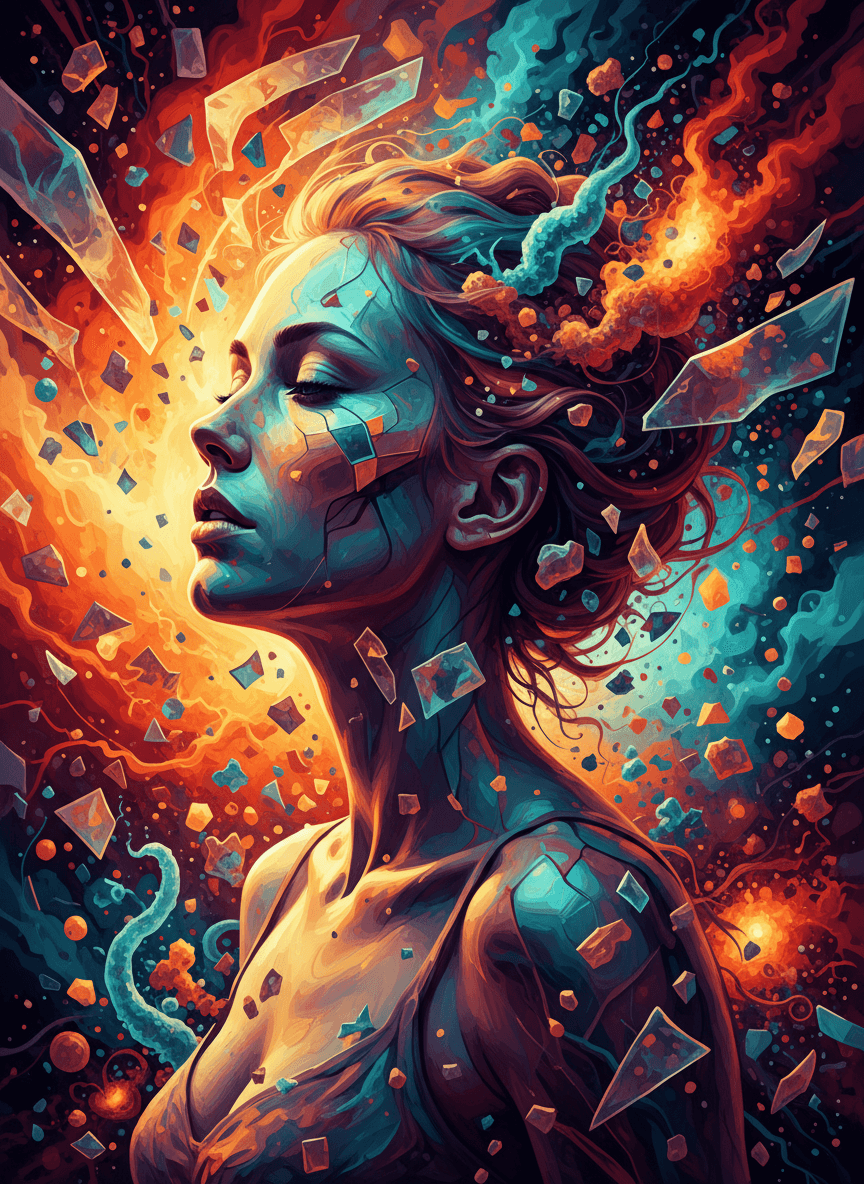
Input: A plain studio portrait of a woman in profile, eyes closed, head tilted slightly back, auburn hair pinned up loosely. The result looks similar to the image at the top of this page.
Composition
The subject's profile anchors the piece, framed by an explosion of warm orange and red light on one side and cooler teal energy on the other, giving the image a sense of motion radiating outward from her face.
Texture and detail
Sharp, faceted crystal shapes scatter across her skin and float through the surrounding space, catching light differently depending on their angle, which adds a fractured, almost stained-glass quality to the piece.
Color and mood
The palette leans into a fire-and-ice contrast: deep oranges and golds against teal and midnight blue, creating a piece that feels charged rather than calm.
Result
The original photo's pose and profile are still recognizable, but the surrounding color, light, and crystalline detail turn it into a standalone piece of artwork rather than an edited photograph.
How it works
- 1
Upload the photo you want turned into art
Portraits tend to give the most striking results, since facial features carry through into the artwork, but landscapes and object photos work too.
- 2
The AI reads composition and subject
It identifies the main subject, the framing, and rough color palette of your photo before deciding how to rebuild it as artwork.
- 3
A new artistic composition is generated
Color, texture, and visual elements are layered on top of the original structure, aiming for a piece that reads as art rather than a filtered photo.
- 4
You download the finished piece
The result comes back as a single image you can save, print, or share. If the mood doesn't match what you wanted, running it again on the same photo often produces a different take.
Use cases
Turning a favorite photo into wall art
A portrait or pet photo that already means something to you can become a printable piece with more visual interest than the original snapshot.
Making unique social media or profile art
A stylized version of your own photo stands out more in a feed than a straight portrait, without needing design skills to produce it.
Building a moodboard or reference set
Designers and hobbyists can generate quick artistic variations of a subject to explore color and composition ideas before committing to a direction.
Creating a gift with a personal touch
A stylized piece made from a photo of a person, pet, or place carries more weight as a gift than a generic print.
Exploring different visual styles on the same photo
Running the same source photo multiple times produces different artistic interpretations, useful for comparing directions before picking a favorite.
Tips for better results
- Start with a high-resolution photo, since fine detail in the original gives the generator more to build texture and color from.
- Portraits with clear lighting on the face tend to produce more striking results than photos shot in shadow.
- If the first result feels too chaotic, try a simpler source photo with a single clear subject and less background clutter.
- Run the same photo more than once if you want options (each run uses credits), since each pass can land on a different color palette or mood.
- Save the original photo separately, since the artwork is a new image rather than an edited version of the file you uploaded.
- Avoid photos with several equally prominent subjects, since the generator works best when there's one clear focal point to build the composition around.
Frequently asked questions
Can I turn a photo of a pet or landscape into art, not just a portrait?
Yes, portraits often produce the most dramatic results because facial features carry through clearly, but pet photos, landscapes, and object photos all work as source images.
Will the artwork look exactly like my photo, just painted?
No, the goal isn't a filter over your photo. The generator rebuilds the composition with new color, texture, and visual elements while keeping the general subject and pose recognizable.
Can I control the exact art style, like watercolor or pop art?
Yes. The instruction is editable, so you can replace the default with something like 'soft watercolor, muted pastels, white paper texture'. Left as is, it picks a bold, imaginative style on its own.
What resolution do I get back?
It comes back at the resolution the image model produces, which suits screens and small prints. For anything poster-sized, run it through an upscaler first and check the detail up close.
Can I use the result commercially?
You can use the artwork for personal projects like gifts or prints. If you plan to sell or publish it commercially, check that the source photo is one you have rights to use.
Why did two runs on the same photo produce different art?
Each generation makes independent creative choices about color and composition, so running the same photo twice can produce noticeably different pieces. That's expected, not an error.
Will faces and text come out right?
Not always. The generator repaints the whole image, so a face can shift in small ways and any lettering can come out garbled. If likeness matters, for a gift portrait for example, compare it with the original and rerun if it drifts.
Plans start at $9 a month. See pricing