Virtual Try On Clothes With AI
Upload a photo, describe the outfit, and preview how it might look on you before you order it.
What the Try On Clothes with AI does
Scrolling a product page and trying to picture a jacket on your own body instead of the model's is a guessing game. A generated preview gets you closer. Upload a photo of yourself, describe the outfit (a piece, a color, or a full look) or add a product photo as a second image, and the AI generates one version of your photo wearing it. It's useful before an online order, when deciding between two outfit options, or just for trying a style you're curious about without buying anything first. The result is a generated image, a preview to guide your decision, not a guarantee of how the actual garment will fit or drape on you.
See a sample result
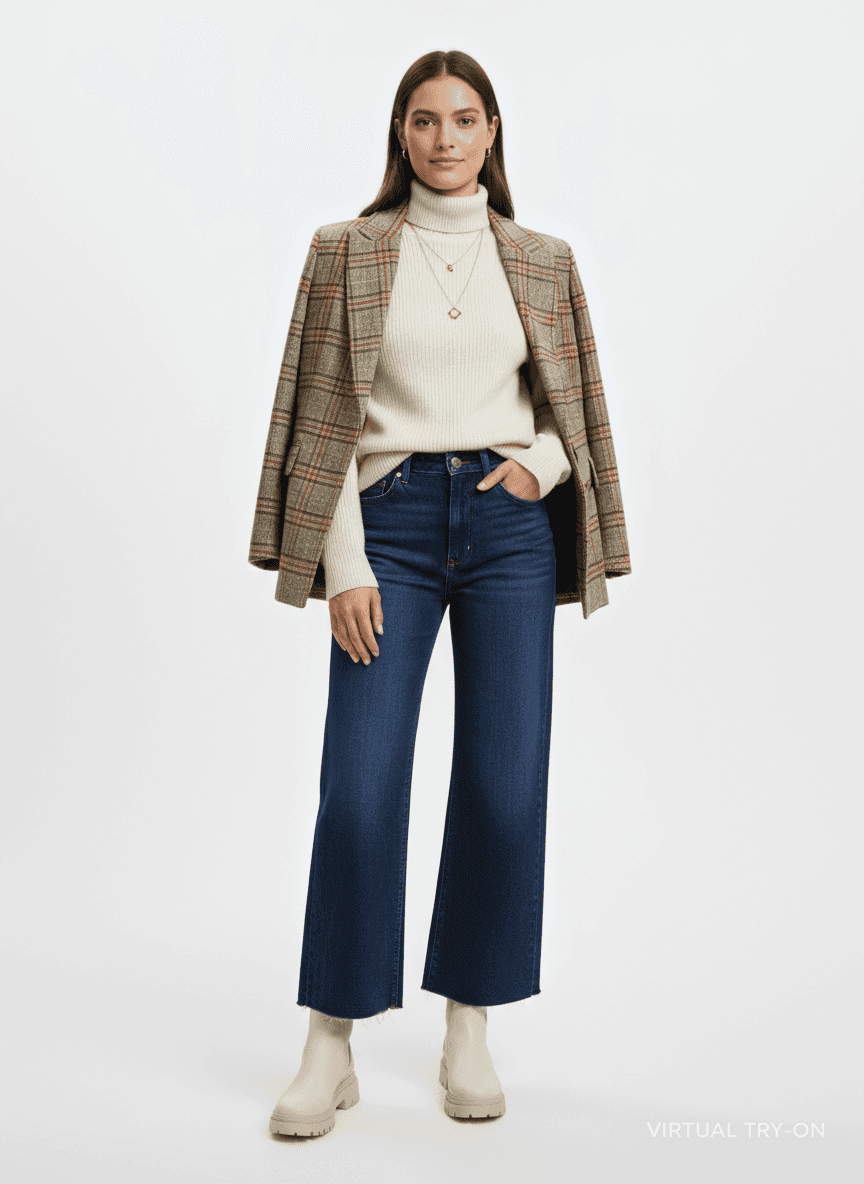
Input: A plausible before-photo: a plain, front-facing phone photo of a person standing against a neutral wall in a plain t-shirt and jeans, arms relaxed at their sides, with even indoor lighting. The instruction asks to try on a plaid wool blazer over a cream turtleneck with dark wide-leg denim and ankle boots. The result looks similar to the image at the top of this page.
Outfit applied: a heather-green and rust plaid wool blazer worn open over a cream ribbed turtleneck, paired with dark indigo wide-leg jeans with a raw hem and cream ankle boots.
What changed: the original top and bottom are fully replaced with the described outfit. The background turns into a clean, light-gray studio sweep, and the plaid has a soft matte finish consistent with wool.
What the AI changed on its own: the blazer is draped over the shoulders instead of worn, one hand moved into a pocket, and two layered gold necklaces (one with a clover-shaped pendant) appeared. It also stamped the words "VIRTUAL TRY-ON" in the bottom corner. The face is smoothed to a catalog look, so compare it with your original, and add "arms in the sleeves, no jewelry, no text" to the instruction if you want those details controlled.
Fit and drape: the blazer reads as a relaxed, slightly oversized cut, and the jeans sit at the natural waist with a straight drop through the leg, cropped at the ankle.
Use this as a style preview. The real garment's fit, fabric weight, and proportions on your body may differ from what's generated here, especially for structured pieces like blazers.
How it works
- 1
Upload a clear, front-facing photo
A photo with even lighting, a neutral background, and your full body or upper body visible works best. Avoid busy backgrounds or clothing that's already very baggy, since the model has to work around what's already there.
- 2
Describe the outfit in the instruction
Name the piece, color, or style you want to see: a plaid wool coat, a specific dress silhouette, or a full outfit. Be as specific as you want; the instruction is what drives the result.
- 3
The model generates the try-on
It builds a new version of your photo with the described outfit applied, aiming for natural fit, realistic lighting, and a clean, product-style look.
- 4
Review the result and adjust
If the color or style isn't quite right, edit the instruction and run it again; each run uses credits. Extra uploaded images, such as a product photo of the garment, are combined into the same result rather than processed as a batch.
Use cases
Deciding before an online order
Before you commit to a piece you can't try on in person, generate a preview to see if the color or silhouette works with your build and coloring.
Comparing two outfit options
Torn between two colors or styles for the same event? Generate both on the same base photo and compare them side by side instead of imagining each one separately.
Planning an outfit for an occasion
Trying to figure out what to wear to a wedding, interview, or event? Test a few looks on your own photo before you pull anything out of your closet or shop for something new.
Exploring a style you haven't worn before
If you're curious about a silhouette or color you've never tried, like a bold pattern or a structured blazer, this gives you a low-stakes way to see it on yourself first.
Tips for better results
- Use a photo with simple, well-lit clothing already on, since heavy layers or baggy fits under the outfit can confuse the result.
- Be specific in the instruction: name the garment type, color, and fit (fitted, oversized, cropped) rather than a vague style word.
- Keep your pose simple and front-facing for the clearest fit preview; complex poses can distort how the new outfit sits.
- If the first result doesn't look right, tweak the wording rather than starting over. Small instruction changes often fix odd draping or color.
- To see the same outfit in another pose, run the tool again with a different photo of yourself; each photo needs its own run.
Limitations
This is a generated image, not a real fitting. It's a style preview to help you decide, not a guarantee of how a garment's actual fabric, weight, or cut will look or fit on your body. Generative results can occasionally distort hands, faces, or fine details like buttons and seams, so check the result before relying on it, and remember that actual sizing, fabric stretch, and proportions can vary from what the AI generates.
Frequently asked questions
Will the outfit look exactly like the real product?
No. This generates a visual approximation based on your description, not the exact product photo or fabric. Colors, textures, and proportions may differ from the real item.
Can I try on a specific item from a store I'm shopping at?
Upload the product photo as a second image alongside your own photo and say in the instruction which garment to put on you. The images are combined into one result. Expect an approximation: logos, prints and small details like buttons are often redrawn, so compare with the product page.
What kind of photo works best to upload?
A clear, front-facing photo with even lighting and simple existing clothing gives the most reliable result. Busy backgrounds or heavy layering can make the outfit look off.
Can I try on a full outfit, or just one piece at a time?
Either works. Describe a single item like a jacket, or a full outfit including top, bottom, and shoes, all in the same instruction.
Does this tell me my actual clothing size?
No, it only generates a visual preview. Use the brand's own size guide for actual sizing since fit depends on fabric and cut details this tool doesn't measure.
Can I run it more than once with different outfits?
Yes. Each run gives one result and uses credits, so try one outfit per run and change the instruction between runs to compare looks.
Plans start at $9 a month. See pricing