AI Professional Headshot Generator
Upload a casual photo and get back a polished headshot ready for LinkedIn or a company page.
What the Professional Headshot Generator does
Booking a photographer for a headshot takes time you don't always have, especially when you just need something decent for LinkedIn by tomorrow. This generator takes a casual photo, a phone selfie, a vacation photo, anything with a clear view of your face, and rebuilds it into a polished, business-appropriate headshot: neutral background, professional attire, and even, flattering lighting. It's meant for job seekers updating a profile, freelancers building a portfolio, and teams that need consistent headshots without scheduling a shoot. You get an image that looks studio-shot, built from a photo you already have.
See a sample result
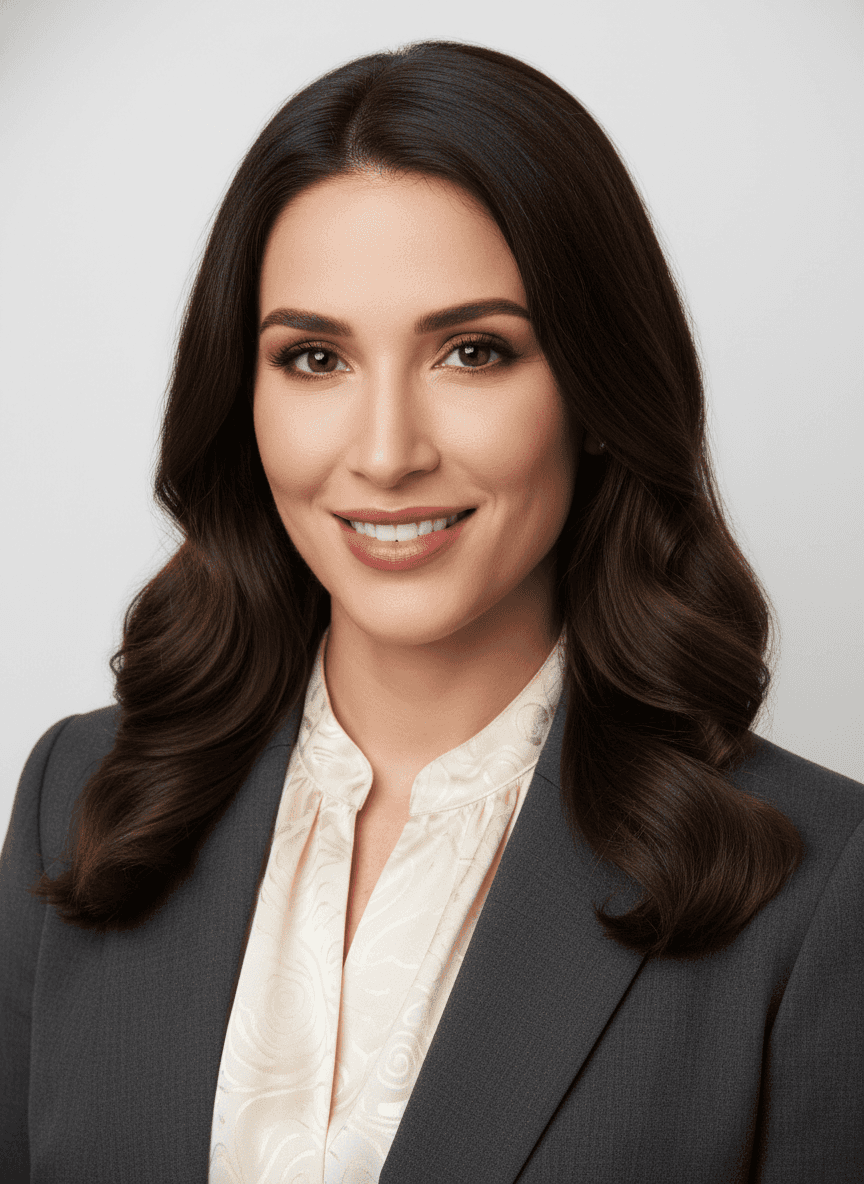
Input: A casual phone photo of a woman with long dark wavy hair, wearing a cream blouse, standing in a kitchen under warm overhead light. The result looks similar to the image at the top of this page.
Background: The original background was replaced with a clean, soft gray studio backdrop, evenly lit with no harsh shadows or distracting elements behind the subject.
Attire: Casual clothing was swapped for a structured dark gray blazer over a cream, subtly patterned blouse, a combination that reads as polished without looking overly formal.
Hair and expression: Hair was smoothed and styled with soft waves framing the face, and the expression was adjusted to a warm, confident smile with direct eye contact, the kind typically used in corporate bios and LinkedIn profiles.
Lighting: Even, soft front lighting was applied to remove harsh shadows under the eyes and along the jaw, giving the skin a natural, well-rested look without appearing overly retouched.
Result: The casual original becomes a headshot that could pass for a studio session, ready to use on a professional profile without looking obviously edited.
How it works
- 1
Upload a clear photo of your face
A front-facing or slightly angled photo with good lighting works best. The clearer your features are in the original, the more natural the result looks.
- 2
The AI replaces the background
Whatever's behind you in the original photo is swapped for a clean, neutral background, plain white, gray, or soft gradient, typical of professional headshots.
- 3
Attire and grooming are adjusted
Casual clothing is replaced with business-appropriate attire, and small details like hair and posture are cleaned up to match a corporate headshot style.
- 4
You get a polished, ready-to-use headshot
Download the result and use it directly on LinkedIn, a resume, a company bio page, or anywhere else a clean professional photo is expected.
Use cases
Updating a LinkedIn profile
A current, professional-looking photo makes a real difference to how a profile reads to recruiters and connections, without booking a studio session.
Building a consistent team page
Companies with remote or distributed teams can generate headshots with a matching background and style for everyone, even if the original photos vary wildly.
Preparing for a job search
A polished headshot alongside a resume and cover letter helps a job application look put-together, especially for roles where a photo is expected.
Freelancers and consultants building a portfolio
A professional photo on a personal site or proposal deck adds credibility, and this gives a fast option before a client meeting or launch.
Tips for better results
- Start with a photo where your face is clearly visible and not obscured by hair, sunglasses, or harsh shadows.
- A slight angle toward the camera, rather than a dead-on mugshot pose, usually reads as more natural in the final result.
- Avoid heavily filtered or low-resolution source photos, since the generator works from the detail that's actually there.
- If you need headshots for a whole team, use photos with similar framing so the final set feels visually consistent.
- Name the attire in the instruction (navy suit, open-collar shirt, knit sweater) to match your industry, and try a second version if the first misses; each run uses credits.
Limitations
The generator works from the face and pose in your original photo, so it can't fully correct for extreme angles, heavy motion blur, or a face that's largely obscured. The final image is a stylized reconstruction, not a photograph, so fine details like exact hair texture, jewelry, or fabric pattern may shift slightly from what you'd get in a real studio session. Check the eyes, teeth, and hairline closely, because a generated face can drift from yours in small ways, and a headshot that doesn't match you in person defeats the purpose. For headshots tied to identity verification, official documents, or a company's strict brand photography standards, a real photographer is still the safer choice.
Frequently asked questions
Will the headshot still look like me?
Usually, since it starts from your face in the uploaded photo. It's a generative edit, though, so small things like eye shape, teeth, skin texture, or the smile can drift. Compare it with a real photo and rerun if it doesn't look like you.
Can I choose the background color or style?
Yes. Edit the instruction to ask for a plain white background, a soft gray studio look, or an office blur, and the generator will lean toward that instead of its default.
Is this good enough for LinkedIn or a company website?
For most everyday professional uses, yes. If your company has strict brand photography guidelines or you need the photo for an official ID, check with them first.
What kind of photo should I avoid uploading?
Avoid group photos, photos where your face is partially turned away or in shadow, and very low-resolution images, since these give the generator less to work with.
Can I generate headshots for a whole team at once?
You can run each person's photo through individually. Using similarly framed source photos across the team helps keep the results looking consistent as a set.
Plans start at $9 a month. See pricing