T-Shirt Mockup Generator
Put your t-shirt design on a model in a clean, natural photo before you list it anywhere.
What the T-Shirt Mockup Generator does
A design that looks great on a flat file can still fall flat once it's on an actual shirt, and buyers rarely commit to a flat graphic on a plain background. This tool takes your design and places it onto a person wearing a shirt in a natural pose, so you can see how it reads on fabric before you upload it to a storefront. It's built for print-on-demand sellers, small apparel brands, and anyone listing shirts on Etsy, Shopify, or a marketplace who needs a believable product photo without booking a photoshoot. Upload your artwork and get back a mockup with the design redrawn onto the garment. Check it against your file, since the AI can alter small details.
See a sample result
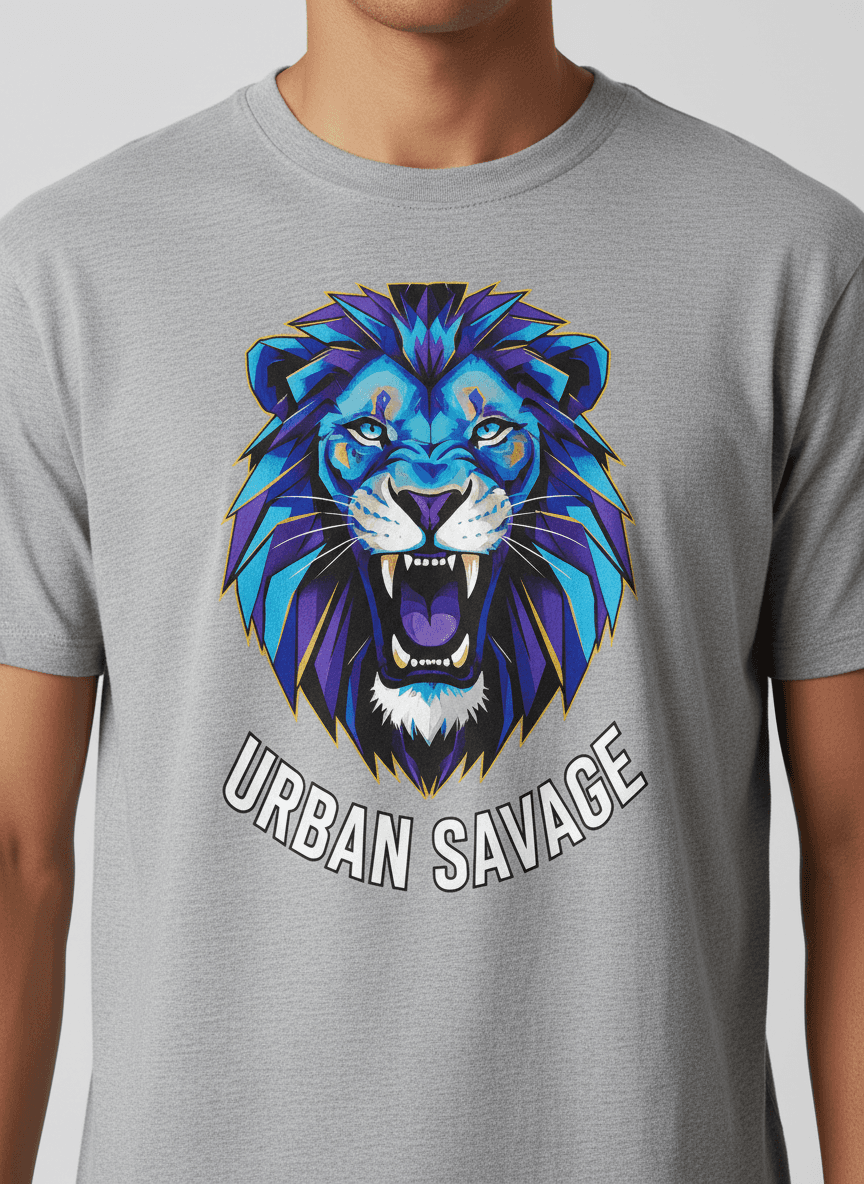
Input: A flat PNG of a geometric lion-head graphic in blue and purple with the words URBAN SAVAGE curved beneath it, on a transparent background. The instruction was edited to ask for a heather gray crewneck on a male model, cropped at the chest. The result looks similar to the image at the top of this page.
What was added
A bold, geometric blue and purple lion-head graphic with the text "URBAN SAVAGE" curved beneath it was placed centered on the chest, sized to sit naturally within the shirt's print area without crowding the collar or hem.
Fit and finish
The design follows the fabric's natural folds across the chest, and the edges of the graphic pick up faint shadow where the shirt creases, so it reads as a printed design rather than a flat sticker. Color saturation was matched to look like a real screen print rather than an overly glossy digital overlay.
Presentation
A plain light gray background and soft studio lighting give a clean, catalog-style product photo. The lettering came out correctly spelled here, but the lion's mane lost a few small facets compared with the source file, so a close check matters before it goes on a listing.
How it works
- 1
Upload your design or a photo showing it
A clean image of your graphic, logo, or text design works best. You can add a second image, such as a photo of a model or a blank shirt in the color you sell, and describe how to combine them in the instruction.
- 2
The AI places it on a model wearing a shirt
The image model generates a person wearing a shirt with your design at a natural chest placement and scale, following the fabric's folds so it looks printed rather than pasted flat on top.
- 3
Lighting and fit get matched to the shirt
Shadows and highlights are applied to the design so it follows the shirt's contours, and the fit is kept natural instead of stretched or distorted across the model.
- 4
Download the mockup for your listing
You get back a clean product photo with the design clearly visible. Compare it line by line with your artwork before listing it: the design is redrawn, so colors, small shapes, and lettering can drift.
Use cases
Print-on-demand store listings
Sellers on Printful, Etsy, or a Shopify store need product photos for every design variant. This gives you a usable mockup without ordering a sample of each shirt first.
Client design approval
Freelance designers show a client how a logo or graphic will actually look worn, instead of sending a flat file that's hard to judge on real fabric.
Testing a design before printing
See how a design reads at real garment scale and placement before committing to a print run, which can catch sizing or color issues early.
Social media and ad creative
A mockup on a model works better for social posts and ads than a flat graphic, giving potential buyers a clearer sense of the finished product.
Building a consistent product catalog
Sellers with dozens of designs can generate mockups in the same pose and setting for each one, keeping a storefront looking consistent instead of mixing styles across listings.
Tips for better results
- Use a design file with a transparent or plain background so the placement onto the shirt looks clean rather than boxed in.
- Higher resolution artwork holds up better once it's scaled to a realistic print size on the mockup.
- If the design has fine text, check the mockup at full size, since small text can lose legibility once placed on fabric folds.
- Name the shirt color in the instruction if you sell several, since the same design can read differently on light versus dark fabric.
- Keep your original design file separate from the mockup output, since the mockup is for previewing and marketing, not for sending to a printer.
- Compare the mockup against your intended print size to make sure proportions still look right once scaled for your listing photos.
Frequently asked questions
Can I use this for actual print files?
No. The mockup is a preview photo for listings and marketing. Keep your original design file at full resolution for the actual print production.
Does it work with any t-shirt color?
Yes. Name the color in the instruction ('black oversized tee', 'sand heather') or upload a photo of a blank shirt in that color along with your design.
Can I place a design on more than one shirt style?
Yes. Run the design again with a different garment named in the instruction, a v-neck, a crewneck, a hoodie, to build a mockup for each variant. Each run uses credits.
Will the design placement look the same every time?
Placement follows the model's pose and the fabric's natural folds in each photo, so results vary slightly between different base images by design.
Is this good enough to use on Etsy or Shopify listings?
Many print-on-demand sellers use mockups as listing photos. Just make sure the mockup matches what buyers will receive: if the AI changed the artwork or the shirt color, fix it or rerun, since a listing photo that differs from the product leads to returns and complaints.
Can I upload a full outfit photo instead of a plain shirt?
You can add one as a second image, but a plain, front-facing shirt gives the cleanest placement. A busier outfit or an unusual pose can make the design look less natural.
Plans start at $9 a month. See pricing