What the E-Girl Photo Generator does
Split-dye hair, a distressed graphic tee, fishnets, and a bedroom lit entirely in pink and blue neon are the shorthand for the egirl look, and getting all of it right with makeup, wigs, and a ring light takes real effort. This generator builds that aesthetic around a photo you already have instead. It's for anyone curious what they'd look like with the alt internet aesthetic, building a themed profile picture, or just wanting a fun edit without buying props or booking a shoot. Upload a clear photo of yourself, add a note if you want a specific hair color or setting, and you get back an edited image with the styling, hair, and backdrop changed to match.
See a sample result
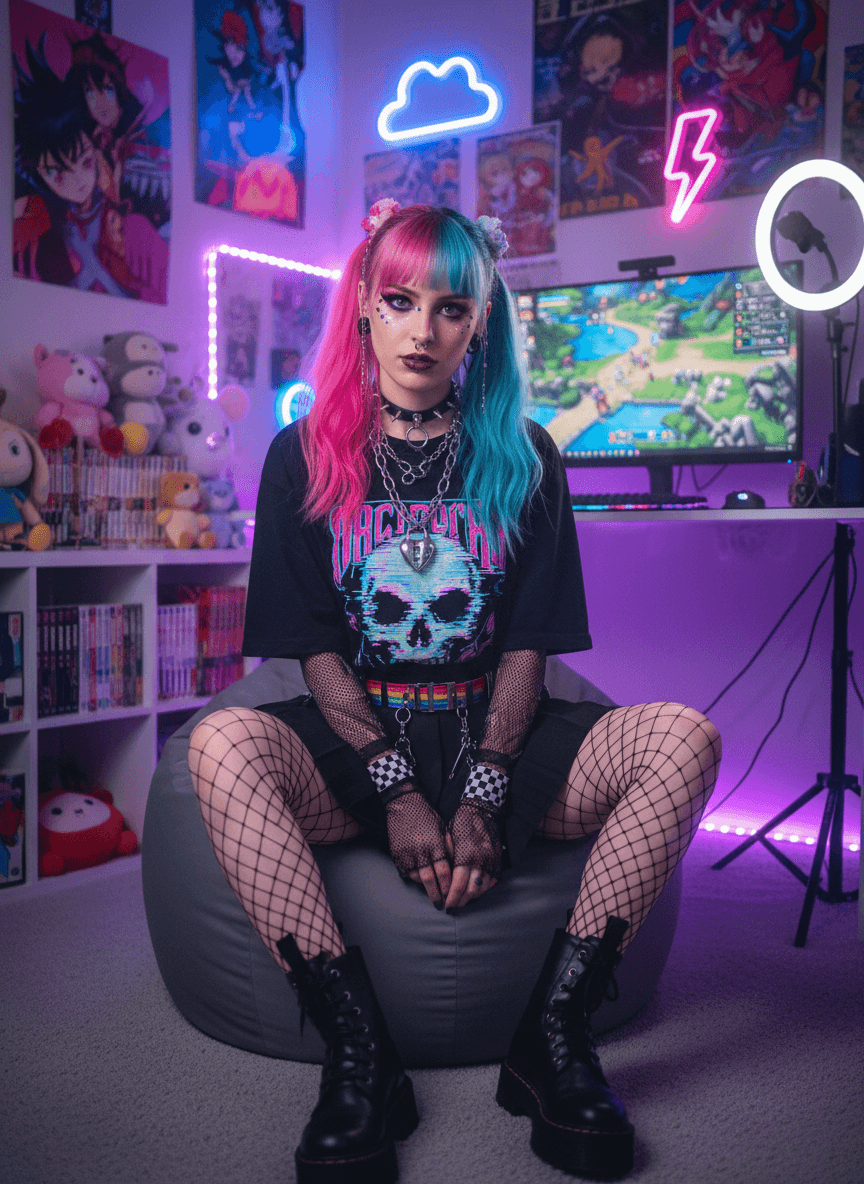
Input: A plain, well-lit selfie taken indoors: a young woman facing the camera in a plain top, natural hair, and a neutral wall behind her, the kind of photo most people already have on their phone. The result looks similar to the image at the top of this page.
Hair and makeup: The hair is recolored into a pink and teal split dye worn in two high pigtails with bangs, paired with dark smudged eyeliner, dark lipstick, and small rhinestones under the eyes.
Outfit: A black skull graphic tee replaces the plain top, with a chunky chain necklace and choker, fishnet gloves and tights, a rainbow belt, and platform combat boots.
Setting and pose: The selfie became a full-length shot of her sitting on a gray beanbag in a purple-lit gaming room, with anime posters, plushies, a ring light, and neon cloud and lightning-bolt signs. The pose, framing, and expression all changed, so the AI invented her body and legs.
What to check: The face is a close but not exact match to the selfie. The posters look like real anime characters and the shirt carries lettering, so avoid using the image commercially and check any text before posting it.
How it works
- 1
Upload a clear photo of yourself
A front-facing photo with your face and shoulders visible works best. Even lighting helps the model keep your features recognizable once the hair, makeup, and outfit change.
- 2
Add an instruction if you want something specific
The instruction box is editable, so you can name a hair color combo, a particular outfit piece, or a room detail like posters or string lights instead of leaving it to the default look.
- 3
The model rebuilds the styling and setting
It swaps in split-dye or brightly colored hair, alt-style clothing like graphic tees and chokers, and a neon-lit backdrop, while trying to keep your face and pose consistent with the original.
- 4
Review the result before you use it
Check the face, hands, and any text on clothing or posters closely, since generative edits occasionally soften details or invent small elements in busy backgrounds.
Use cases
Themed profile pictures
Get a consistent look for a gaming handle, Discord avatar, or social profile without sourcing wigs, makeup, or a matching backdrop.
Trying out a look before committing
See roughly how split-dye hair or a heavier eyeliner style would read on your face shape before booking a salon appointment.
Cosplay and content planning
Use the edit as a mood reference for a costume, a stream overlay, or a themed photo shoot you're planning to shoot for real later.
Fun edits for friends
Turn a group photo or a friend's headshot into a shareable, exaggerated alt-style edit for a laugh, without needing any editing software.
Tips for better results
- Use a photo where your whole face is visible and not angled away from the camera.
- Name a specific hair color pairing in the instruction box if you want something other than the default pink and teal.
- Avoid photos with heavy existing filters, since they can clash with the color grading the model applies.
- If the first result looks off around the hands or accessories, run it again with a note pointing out what to fix.
- A plain or simple background gives the model more room to build a convincing neon bedroom scene.
- Keep accessories in the original photo minimal so the added chokers and jewelry read clearly instead of overlapping existing items.
Frequently asked questions
Will it actually dye my hair or change my real appearance?
No. It only edits the photo you upload. Your hair, clothes, and room stay exactly as they are outside the image.
Can I choose a different hair color than pink and teal?
Yes. Type the colors or style you want into the instruction box before generating, and the model will use that instead of the default look.
Does it work with photos that already show a bedroom or bright background?
It works with most backgrounds, but a simpler original background tends to give the neon scene more room to look convincing.
How many photos can I upload at once?
You can upload multiple images in one go, which is useful for comparing how a couple of different source photos turn out.
Why does the result cost credits instead of being included automatically?
Each generation runs an AI edit that takes compute time, so every image you generate uses credits from your account.
Can I use the result as a profile picture?
Yes, most people use it exactly for that: a themed avatar for gaming, Discord, or a social account.
Will the edited photo still look like me?
It aims to keep your face shape, expression, and pose recognizable while changing hair, outfit, and background. It's not a filter over your existing hair, so the change is noticeable.
Plans start at $9 a month. See pricing