Chibi Maker
Turn any photo into an adorable chibi character with oversized eyes and a tiny body.
What the Chibi Style Generator does
Chibi art takes the opposite approach from realistic portraits: instead of accuracy, it exaggerates for cuteness, shrinking the body down, blowing up the eyes, and simplifying everything else into a playful cartoon shape. This tool applies that transformation to your photo, turning a person into a chibi character while keeping enough of the original, like hair color, outfit, or expression, that the result still feels like a version of you or whoever's in the photo. It's a popular style for profile pictures, stickers, and fan art, and you don't need any drawing skill to get a result that looks like it came from an artist who specializes in the style.
See a sample result
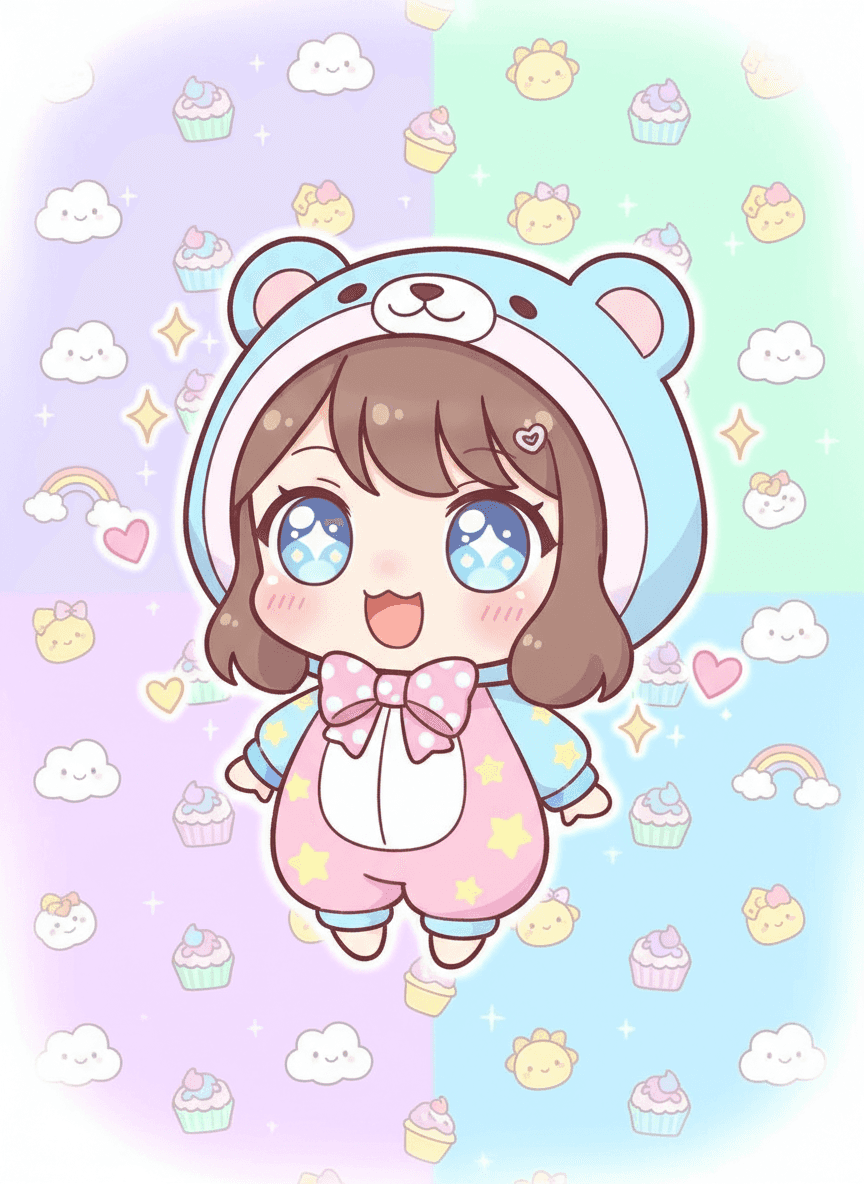
Input: A smiling selfie of a young woman with a short brown bob and bangs, wearing a light blue hoodie with bear ears. The instruction was edited to add 'pastel background with clouds and cupcakes'. The result looks similar to the image at the top of this page.
Style applied: Kawaii chibi character
The proportions are classic chibi: a head that takes up nearly half the total height, a compact body, and short limbs that read as cute rather than anatomically accurate. The eyes are the focal point, drawn large with layered highlights that give them a glassy, sparkling look, which is what most people associate with the chibi aesthetic first.
Details worth noting
- The bear-ear hoodie from the photo became a full bear-hood onesie with a pink bow, a costume element the AI added on its own
- Soft pink blush across the cheeks reinforces the cute, youthful expression
- Pastel color palette (blue, pink, mint) keeps the whole image visually gentle rather than bold
- Background pattern of clouds and sweets matches the playful tone instead of competing with the character
This is a good reference for how far the style pushes exaggeration: almost nothing about the original proportions survives, which is the point of chibi art rather than a flaw.
How it works
- 1
Upload a clear photo of a person
A photo where the face is visible and well lit gives the tool the most to work with when exaggerating features into chibi proportions.
- 2
The AI applies chibi proportions
It shrinks the body down, enlarges the head and eyes, and simplifies clothing and hair into rounded, cartoon-friendly shapes typical of the style.
- 3
Kawaii details are added
Expect big sparkling eyes, a small nose and mouth, soft blush on the cheeks, and an overall playful, exaggerated expression rather than a neutral one.
- 4
Save your chibi character
Use the result as a profile picture, a sticker, or a fun keepsake version of yourself or someone else in the photo.
Use cases
Making a profile picture with personality
Turn your photo into a chibi avatar for gaming profiles, Discord, or social media where a cartoon version stands out more than a straight photo.
Creating a custom sticker of yourself or a friend
Generate a chibi version to use as a sticker pack, a chat sticker, or a small printed keepsake.
Turning a pet or family photo into fan art
Apply the style to a favorite photo as a gift, since chibi versions of people and pets tend to read as charming rather than unflattering.
Getting a mascot-style image for a project
Use a chibi character as a lighthearted mascot for a stream, blog, or small brand that wants a cute visual identity without hiring an illustrator.
Making a fun birthday or holiday card
Turn a photo of the recipient into a chibi character and drop it into a card or digital greeting, which tends to land better with kids and anime fans than a standard photo print.
Tips for better results
- Use a photo with a clearly visible face, since the eyes and expression carry most of the chibi style.
- Simple backgrounds work better than busy ones, letting the character be the clear focus.
- Outfits with distinct colors or patterns translate well into the simplified chibi clothing style.
- If the first result keeps too much of the original proportions, add 'super-deformed, head as big as the body' to the instruction.
- A photo with a smile or expressive face tends to produce a more charming chibi expression than a neutral one.
Frequently asked questions
What does 'chibi' actually mean?
Chibi is a Japanese art style term for characters drawn with small, exaggerated bodies and oversized heads and eyes, used widely in anime and manga fan art for a cute effect.
Will the chibi character still look like the person in the photo?
The tool keeps recognizable details like hair color, hairstyle, and outfit, but body proportions are heavily exaggerated by design, so it's a stylized likeness rather than a literal one.
Can I turn a pet's photo into a chibi character?
Yes, the same proportions and style can be applied to animals, though results tend to be most detailed and reliable starting from a clear, well-lit photo.
Is this the same as an anime avatar generator?
It's related but more specific: chibi style always uses small-body, big-head proportions, while general anime style generators may keep more realistic body proportions.
Can I use the result commercially, like on merchandise?
You can use the image personally, but check your own rights to the original photo and any relevant terms before using a generated character for commercial products.
Why do the eyes look so exaggerated?
Oversized, detailed eyes are a defining feature of chibi and kawaii art styles, so the tool deliberately enlarges them well beyond realistic proportions as part of the effect.
Can I add a costume or outfit theme to the chibi version?
Yes. Edit the instruction to describe it, like 'bear onesie' or 'school uniform with a red scarf', and the finished character wears that instead of a version of your real outfit.
Plans start at $9 a month. See pricing