Album Cover Generator
Turn a photo into finished-looking album cover art with typography and genre styling built in.
What the Album Cover Generator does
A track is finished long before the artwork is, and most musicians aren't designers. This tool takes a photo, a portrait, a landscape, an object, anything you'd want as a starting point, and rebuilds it into cover art with bold graphics, layered color, and a typographic treatment that reads as a real release rather than a snapshot with text slapped over it. It's aimed at independent artists and bands who need cover art for a single, an EP, or a full album and don't have a budget for a designer or the time to learn layout software. Upload your photo, type your artist name and title into the instruction, and you get back a styled composition built around it.
See a sample result
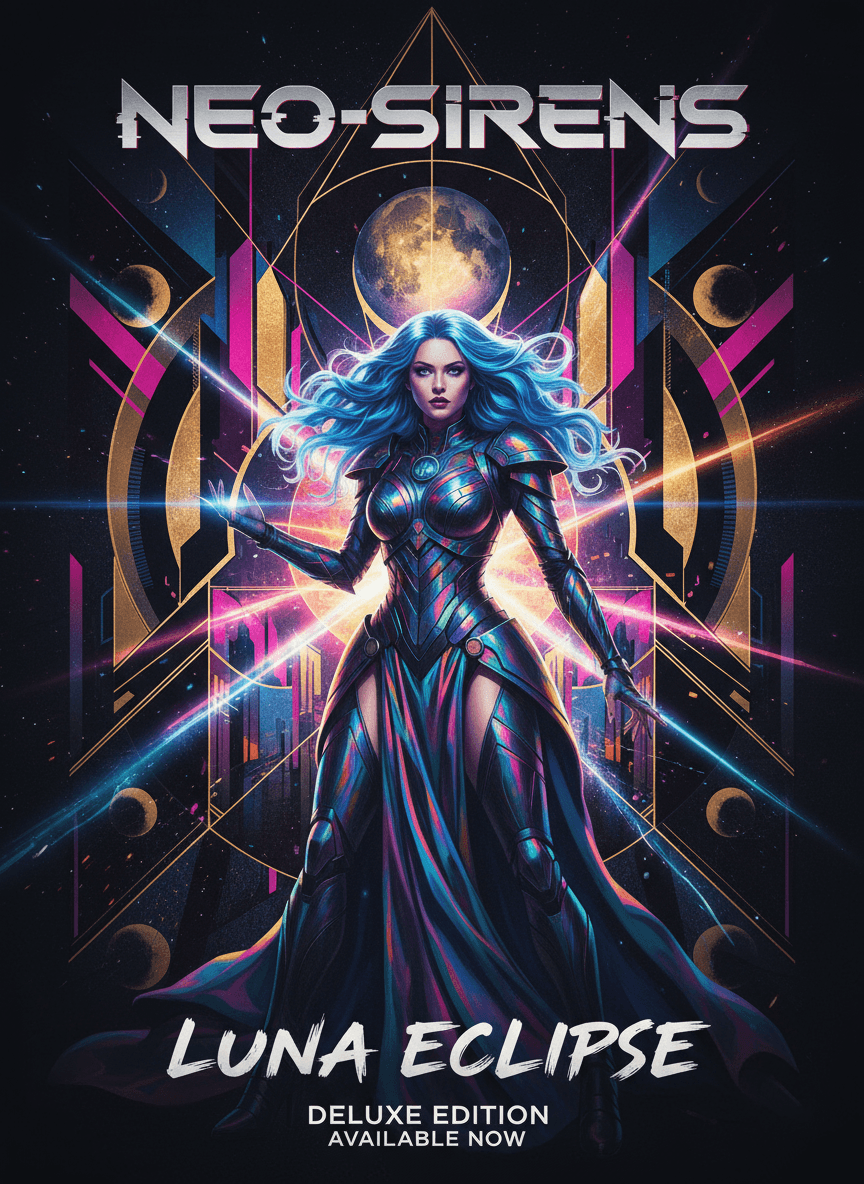
Input: A full-length photo of a singer with long, dyed blue hair in a black stage outfit, shot against a plain dark wall. The instruction was edited to add the band name 'Neo-Sirens', the title 'Luna Eclipse', and 'synthwave, sci-fi'. The result looks similar to the image at the top of this page.
Cover concept
The singer became the centerpiece of a synthwave cover: the black outfit was turned into iridescent armor, a full moon was added behind her as a glowing focal point, framed by radiating gold and magenta light beams and a symmetrical geometric backdrop of overlapping circles and city silhouettes.
Typography
A metallic, angular display font spells out "NEO-SIRENS" across the top in a futuristic style that echoes the armor's sheen, while "LUNA ECLIPSE" sits lower in a rougher, hand-painted script for contrast. The AI also added a "Deluxe Edition, Available Now" tag nobody asked for, so remove it or rerun if you don't want it.
Color and mood
The palette leans into deep black, electric blue, and hot pink against gold accents, giving the cover a sci-fi, night-driven mood that reads clearly as a genre release at thumbnail size, not just a portrait with a filter.
How it works
- 1
Upload a photo to build the cover around
A portrait of the artist, a moody landscape, or an object tied to the release all work. Simple, high-contrast source photos give the tool more room to add graphic elements without the result looking cluttered.
- 2
The AI restyles it into cover art
It reworks lighting and color into a bold, genre-appropriate look, adds graphic elements like line work, glow, or geometric framing, and treats the composition the way a real cover artist would frame a subject.
- 3
Typography gets built into the design
Write the exact artist name and title into the instruction and the generator draws them in a style that matches the artwork. Left out, it invents its own text, so always spell out what you want.
- 4
Download the finished cover
The shape usually follows your photo, so crop it to a square for streaming. Distributors often ask for 3000 x 3000 pixels, which may mean upscaling, and check every letter of the text before you submit it.
Use cases
Cover art for a self-released single
Independent artists uploading to Spotify or Apple Music need square artwork before a release goes live. This gives you a finished option without hiring anyone.
EP or album artwork on a tight deadline
When a release date is set and the art still isn't, running a few photos through the generator gets you working options fast enough to hit the date.
Vinyl or CD sleeve concepts
Bands pressing physical copies can use a generated cover as the starting concept for a print-ready sleeve, then hand it to a printer for final formatting.
Bandcamp and social promo art
The same cover can double as promo art for social posts and a Bandcamp page, keeping the visual identity of a release consistent across platforms.
Tips for better results
- Use a photo with a clear subject and simple background so the added graphics and typography have room to work without crowding the frame.
- High-resolution source photos hold up better once cropped down to a square streaming thumbnail.
- If the title text comes out hard to read against the background, try a photo with less busy detail behind the subject.
- Name the genre and mood in the instruction (lo-fi, black metal, 90s R&B) to compare treatments; each run uses credits.
- Check the final crop at thumbnail size, since that's how most listeners will actually see it on a streaming app.
Frequently asked questions
Can I use the cover art commercially on streaming platforms?
People do use generated covers on their releases, but check your distributor's artwork rules (size, no URLs or logos you don't own) and whether they ask you to disclose AI-generated art. Don't include other artists' names, faces, or trademarks.
Does it match a specific music genre automatically?
It guesses a genre look from your photo unless you tell it. Add the genre to the instruction, like 'dark ambient, grainy black and white' or 'bright bubblegum pop', and the styling follows.
Can I edit the text after it's generated?
The text is drawn into the image, not a separate layer, so you can't retype it. Change the wording in the instruction and run it again, or fix small typos in an image editor.
What size should my uploaded photo be?
A higher-resolution photo gives the generator more detail to work with and holds up better once you crop the result down for a streaming platform's square format.
Will it work with a photo of a band instead of one person?
Yes, group photos work the same way. Keep in mind that busier photos with several people can leave less clean space for the typography, so a simpler pose or crop often reads better.
Can I generate cover art without a photo of a person?
Yes, objects, landscapes, and abstract shots all work as source images. The tool restyles whatever you upload, it doesn't require a portrait.
Plans start at $9 a month. See pricing