AI Meme Generator
Upload a photo and get back a meme with bold caption text added in the classic format.
What the Meme Generator does
Stock meme templates get old fast, especially when the joke is really about a specific photo of you, your pet, or your friend group. This generator builds the meme around your own picture instead, adding bold, high-contrast caption text in the classic top-and-bottom layout. It's for reaction images, inside jokes, and group chat material where a generic template doesn't quite fit. Upload a photo, tell it what the caption should say or what tone you're going for, and you get back a new version of the photo with meme-style text drawn in. The AI draws the letters itself, so always read the caption before you post it.
See a sample result
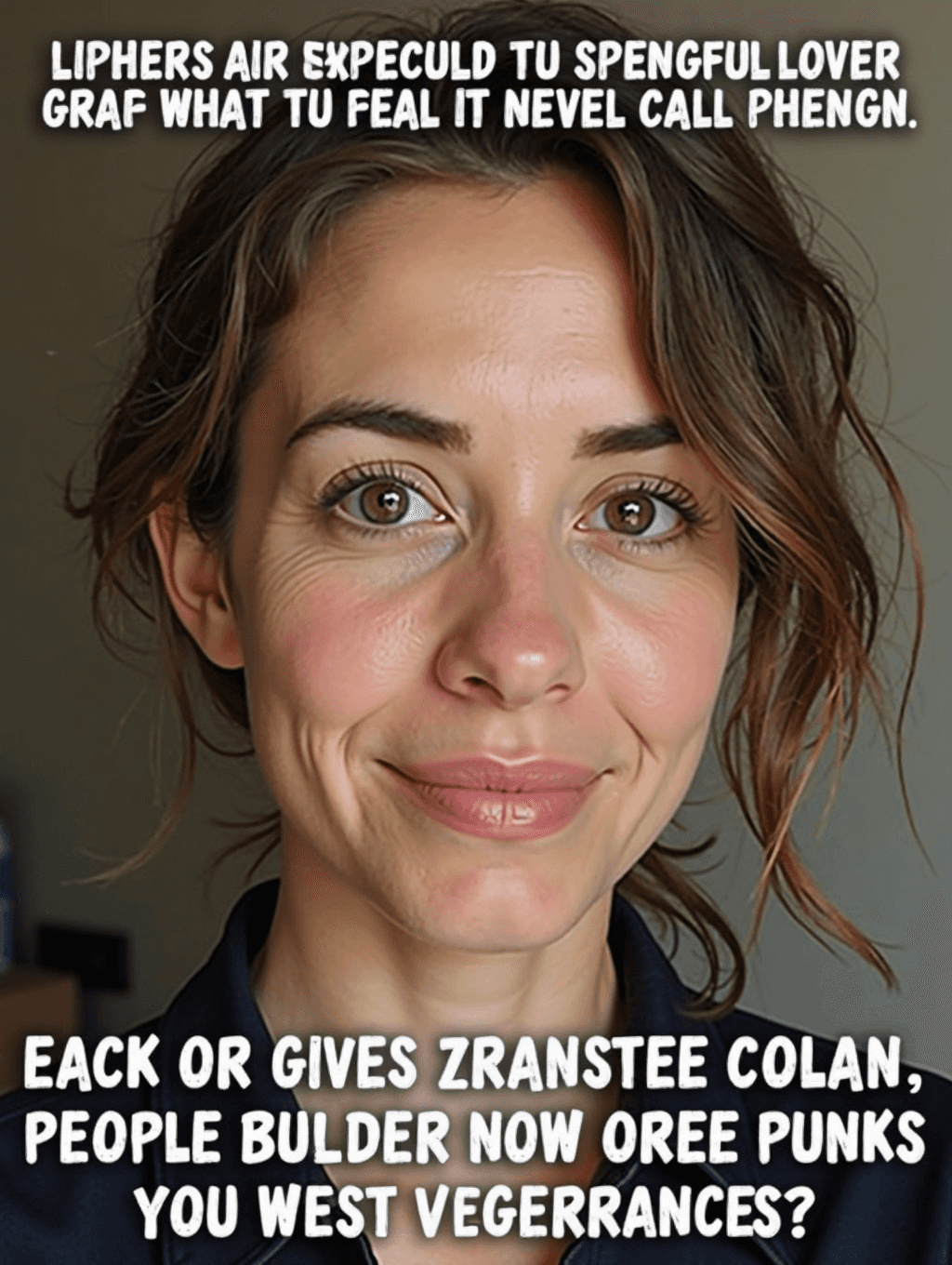
Input: A close-up selfie of a woman with loosely pinned-up brown hair, smiling gently at the camera in soft indoor light, with the default instruction left as is (no caption supplied). The result looks similar to the image at the top of this page.
Caption placement: Bold, white, all-caps text with a black outline across the top and bottom of the photo, the classic meme layout, clear of her eyes and mouth.
The problem: With no caption supplied, the AI invented one, and the letters came out as near-words that don't say anything ("LIPHERS AIR EXPECULD TU SPENGFUL LOVER..."). This is the most common failure for AI meme tools: the layout looks right, but the text is gibberish.
Formatting: Contrast and sharpness were boosted for a punchy shared-meme look. Her face and background stayed close to the selfie, though skin texture was redrawn.
The fix: Edit the instruction to include the exact caption in quotes, for example: top text "ME AT 9AM", bottom text "ALREADY DONE WITH TODAY". Short lines in plain words come out far more reliably, and you should still read every letter before posting.
How it works
- 1
Upload the photo you want turned into a meme
Any clear photo works, whether it's a selfie, a candid shot, or a picture of a pet doing something photo-worthy.
- 2
Tell it what the caption should say
The instruction box is editable, so type the exact joke or line you want, or describe the tone if you want the model to come up with wording itself.
- 3
The model adds bold meme-style text
It redraws the image with large, high-contrast caption text, usually in the familiar top-and-bottom layout. It's a generative edit, so the photo itself can shift slightly too.
- 4
Check the text before you post it
Read the caption closely. Generated text can be misspelled or turn into gibberish, especially when the AI writes the joke itself, so give it an exact line in quotes and run it again if the letters come out wrong.
Use cases
Inside jokes for a group chat
Turn a photo from a group hangout into a captioned meme that references something only your friends would get.
Reaction images
Build a custom reaction meme from your own expression instead of searching for a stock template that's close enough.
Pet and family photos
Add a caption to a funny photo of a pet or a kid's expression for something more shareable than the plain photo.
Event and trip recaps
Caption photos from a trip or event with a running joke, then post the set together for a lightweight recap.
Tips for better results
- Give an exact caption if you have a specific line in mind, rather than a vague topic.
- Use a photo where the subject's face is clearly visible so the text placement avoids covering it.
- Keep the caption short. Long lines get harder to read once they're wrapped in a bold meme font.
- If the joke doesn't land, try rephrasing the instruction rather than regenerating with the same wording.
- A photo with a plain or simple background lets the caption text stand out more clearly.
- Save a few versions with different captions before picking one, since the first draft isn't always the funniest.
Frequently asked questions
Can I write my own caption instead of letting the AI decide?
Yes, and you should. Put the exact text in quotes in the instruction box. The AI still draws the letters, so check the spelling; short, common words come out most reliably.
What font and style does it use?
By default it aims for the classic bold, white, outlined meme lettering in a top-and-bottom layout. You can ask for a different look, like a caption bar above the photo, in the instruction.
Can I turn a photo of a pet or another person into a meme?
Yes, any photo works, including pets, friends, or group shots, as long as you have the right to use the photo.
Will it change anything about the photo besides adding text?
It can. Besides the text, it often boosts contrast, and because the whole image is regenerated, faces and backgrounds can shift a little. Compare it with your original if the likeness matters.
Can I upload more than one photo at a time?
Yes, the tool accepts multiple images if you want to caption a few photos in one session.
Does making a meme use credits?
Yes, each generated meme uses credits from your account since it runs a fresh AI edit rather than a template fill-in.
Can I regenerate if the joke or the layout doesn't work?
Yes, adjust the instruction and run it again. Small changes, like naming a specific line instead of a general topic, usually fix a caption that missed the mark.
Does it work well with photos of animals or objects, not just people?
Yes, the caption layout works the same way regardless of the subject, so pet photos and object shots caption just as easily as portraits.
Plans start at $9 a month. See pricing