Nano Banana Prompt Generator
Upload a photo you like and get a detailed nano banana prompt written to recreate its look.
What the Nanobanana Prompt Generator does
Sometimes the easiest way to write a good nano banana prompt isn't to start from a blank box, it's to start from a photo that already has the look you want. Nano Banana is the nickname for Google's Gemini image model, and it responds well to plain, descriptive sentences. Upload an image and the AI writes one for you: the subject, the composition, the lighting, the color palette, and the overall style, in a single ready-to-paste prompt. You also get a breakdown of the key elements and a short style note. It won't hand you a list of trending prompts; it writes one prompt from the reference you give it, which you can then edit and paste into Gemini or any other image generator.
See a sample result
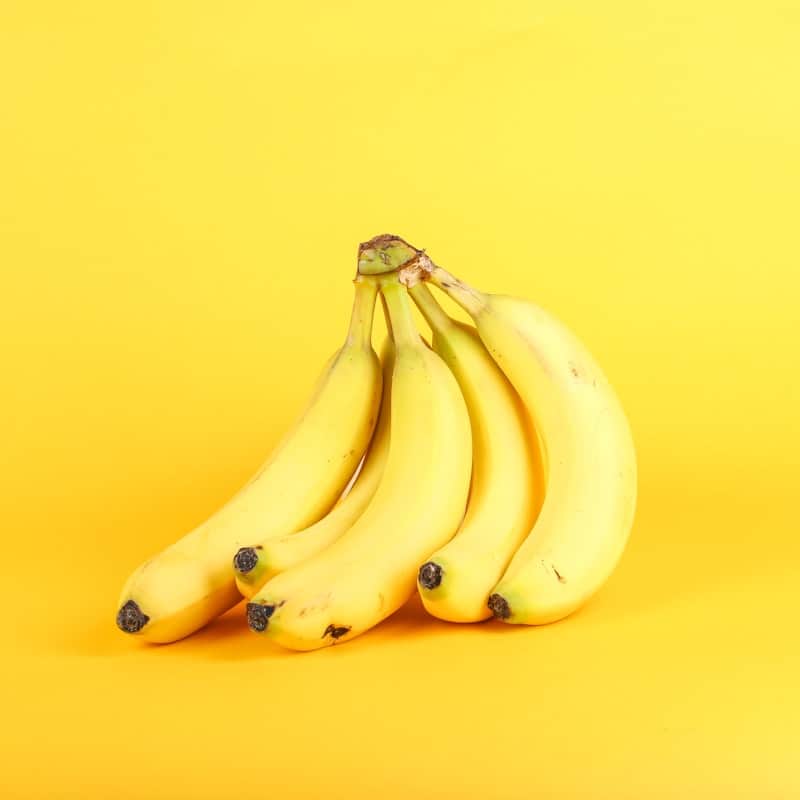
Input: A bunch of ripe yellow bananas standing upright on their stem ends, with dark tips and a few brown speckles, photographed straight-on against a seamless bright yellow backdrop in soft, even light with a faint shadow underneath.
- Prompt detail88%
- Style accuracy84%
- Composition match90%
Prompt: A bunch of ripe yellow bananas standing upright on their stem, with dark tips and a few natural brown speckles, photographed straight-on and centered against a seamless saturated yellow backdrop. Soft, even studio light with a faint shadow under the fruit. Minimal, playful product-photography style, square framing, lots of empty space above.
Key Elements: ripe banana bunch, upright stance, dark tips and speckles, seamless yellow background, centered subject, soft shadow.
Style: Clean commercial product photography with a monochromatic color scheme, flat even lighting, and a minimal, centered layout that keeps full attention on the subject.
How it works
- 1
Upload the reference image
Choose a photo, illustration, or rendered image with the look you want to recreate. Clear subjects and distinct lighting or color style give the AI more to work with.
- 2
Add notes if you want a specific angle
Use the details box to mention anything you want emphasized, like "focus on the lighting" or "I want to change the subject but keep the style."
- 3
The AI breaks the image down
It analyzes the content, composition, artistic style, color palette, lighting and atmosphere, then writes them up as one descriptive prompt in the order Nano Banana handles well: subject, setting, style, lighting.
- 4
Get a ready-to-use prompt and breakdown
You receive a formatted prompt, a list of the key visual elements it captured, and a short note on the style and technical choices, plus a set of scores rating how detailed and specific the prompt turned out.
Use cases
Recreating a photo style you found online
You saved an image with lighting or color grading you like and want a prompt that captures that same look for your own generations.
Learning how to structure your own prompts
Seeing how a real image breaks down into subject, style and lighting terms helps you write better prompts from scratch next time.
Adapting a style to a new subject
Use the generated prompt as a base, then swap out the subject description while keeping the lighting and style language intact.
Speeding up a moodboard or concept pass
Run your key reference images one at a time to build a set of prompts covering different looks for a project.
Tips for better results
- Use a reference image with a clear subject and distinctive lighting or color style, rather than a busy or cluttered photo.
- Mention in the details box if you plan to change the subject but keep the style, so the prompt separates the two clearly.
- Higher-resolution reference images let the AI pick up finer details like texture and lighting direction.
- If the first prompt feels too generic, add a note asking for more specific color or lighting language.
- Save prompts that work well so you can reuse the same style language across future generations.
Limitations
The generated prompt is a written description of what the AI sees in your reference image, not an exact extraction of pixel data. Fine details like exact typography, precise object positions, or a specific brand's proportions may not translate perfectly into words, and any image you generate from the prompt will be a fresh interpretation rather than a duplicate of the original.
Frequently asked questions
Does this generate an image, or just a prompt?
It produces a text prompt based on the image you upload, formatted for nano banana. You then take that prompt and use it with an image generator to create a new image.
Will the prompt recreate my exact image?
It captures the subject, style, lighting and composition as closely as it can describe them in words, but a generated image from that prompt will be a new interpretation, not an identical copy.
Can I upload an illustration or painting instead of a photo?
Yes, the tool reads content and style from any kind of image, including illustrations, paintings and renders, not only photographs.
What if I want a prompt for a different subject in the same style?
Mention that in the details box before running the tool, and the response will separate the style description from the subject so you can swap the subject yourself.
Is this a list of Nano Banana prompts to copy?
No. Prompt galleries give you someone else's prompts. This tool writes a new prompt from an image you choose, so the result matches the look you actually want. Edit it freely before you use it.
Why does it give me scores?
The scores rate how detailed and specific the generated prompt is, and how closely its style and composition description matches the reference image, so you can judge whether it's ready to use.
Does this only work for nano banana, or other image generators too?
Nano Banana has no special syntax; it reads natural descriptive sentences, and so do most modern image generators. The prompt is written with Nano Banana in mind, but it works as a starting point in other generators too.
Plans start at $9 a month. See pricing