Superhero Generator
Upload a photo and get a comic-book superhero version of yourself back, costume and all.
What the Superhero Generator does
Everyone has wondered what they'd look like as the hero on the cover of their own comic. This tool takes a photo of you and rebuilds it as a comic-book style superhero: a costume, a cape, a heroic pose, and the bold linework and lighting of a printed comic cover rather than a photo edit. You can name a costume color, a specific power, or a mood in the instruction box, and the tool builds the scene around that. The result is a single stylized image, good for a profile picture, a novelty print, or just seeing your own comic-cover moment.
See a sample result
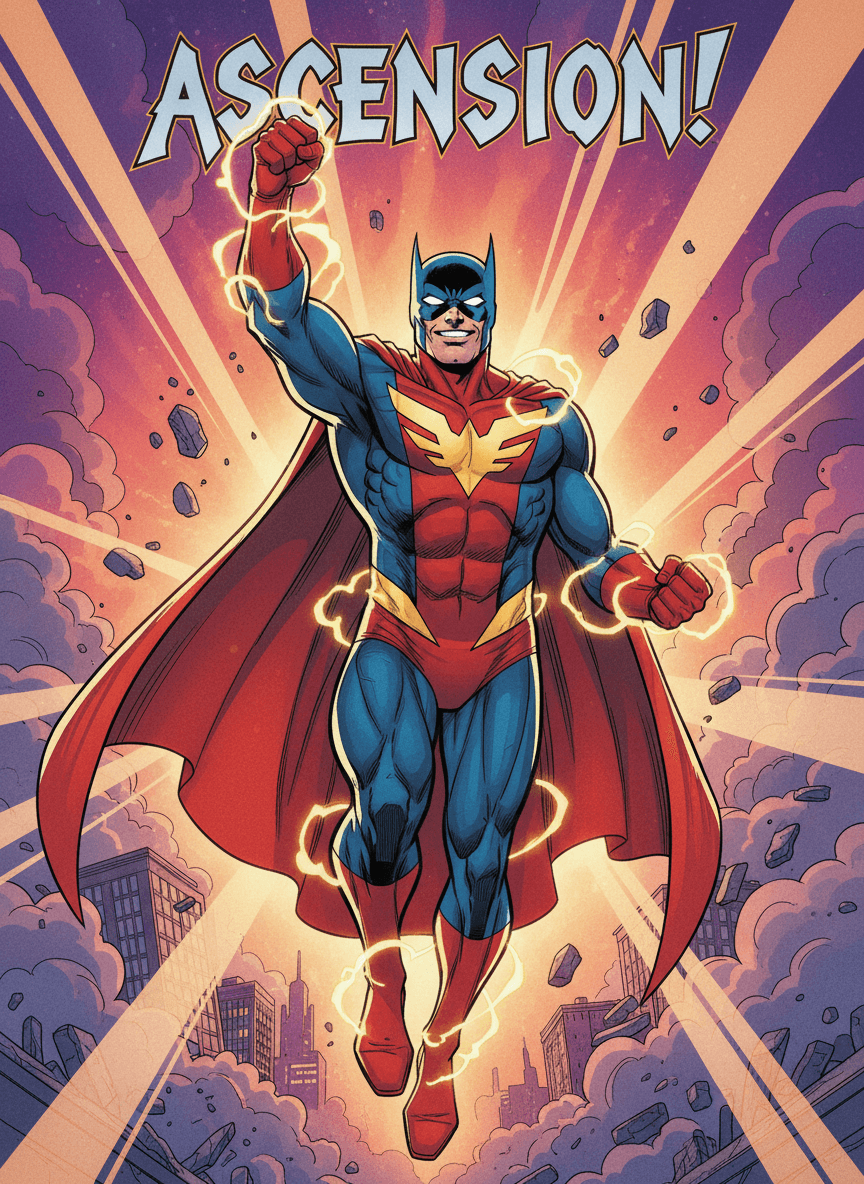
Input: A straight-on photo of a smiling man's face and shoulders in a plain shirt, taken against a neutral background in even lighting, similar to a casual portrait shot for a profile picture. The result looks similar to the image at the top of this page.
The result reads like the cover of a comic book. The man now wears a red and blue costume with a gold star emblem on the chest, a flowing red cape, and crackling yellow lightning around his fists and boots. He rockets upward with one fist raised through purple and orange light rays and flying debris, above a small city skyline wrapped in smoke. Bold lettering reading "ASCENSION!" runs across the top like a cover title, a word the AI chose on its own.
What to know: The AI added a pointed cowl mask that covers most of his face, so only the grin carries over, and the mask looks a lot like a famous comic hero's. If you want to be recognizable, ask for no mask in the instruction, and don't use results that resemble existing characters for anything you sell.
How it works
- 1
Upload a photo with your face and shoulders visible
A clear, front-facing or slightly angled shot gives the tool enough to work with for the pose, face, and costume fit. Multiple photos can be uploaded if you want to try different starting shots.
- 2
Add an instruction if you want a specific look
Name a costume color, a power like flight or fire, or a comic era you like, such as a retro or modern style, and the generation will lean into that instead of a generic default.
- 3
The AI builds the costume, pose, and comic scene
It adds a superhero costume and cape, shifts the pose to something heroic, and surrounds the figure with comic-book lighting, motion lines, or a city backdrop.
- 4
You get back one comic-style image
The result renders like a comic book cover, sometimes with title lettering or effects, built around your likeness rather than a stock hero.
Use cases
A profile picture with personality
Swap a plain headshot for a comic-style hero version on social media or a gaming profile.
A birthday or novelty gift
Turn a photo of a friend or family member into their own superhero cover as a printable or shareable gift.
Comic con and fandom content
Get a hero version of yourself to go with a costume, a fan account, or a con photo series without commissioning custom art.
A fun activity for kids
Let a kid see themselves as the hero of their own story, useful for a birthday theme or a classroom project.
Tips for better results
- Use a photo where your face and shoulders are both visible so the costume and cape have room to render around you.
- Name a specific costume color or power in the instruction box if you don't want the default heroic look.
- Avoid group photos; the tool is built around a single clear subject and works best that way.
- Check any title text or lettering in the result closely, since generated text can occasionally come out garbled.
- Try the generation more than once if the pose or costume style doesn't match what you pictured; results vary between runs.
- If you want a specific comic era, mention it directly, since a golden-age look and a modern cinematic-comic look produce noticeably different costumes and lighting.
Frequently asked questions
Will it change my face?
It redraws your face in a comic-art style, so expect a stylized version rather than a close likeness, and it may add a mask that hides most of your face. Ask for an unmasked hero in the instruction if you want to be recognized.
Can I choose the costume color or a specific power?
Yes, use the instruction box to name a color, a power like flight or super strength, or a comic style you want, and the generation will build around that.
Does it work with a photo of more than one person?
It's built around one clear subject. A group photo may still generate something, but results are more consistent with a single person in frame.
Why does the result sometimes have text on it?
Comic covers often include title lettering, and the tool can add similar text for effect. Check it closely, since AI-generated text occasionally misspells or distorts.
How many credits does one generation use?
Each generation run uses credits from your account, the same as other editing tools on the site, so check your balance before running multiple variations.
Can I upload more than one photo?
Yes, the tool accepts multiple images if you want the generation to draw from more than one shot of the same person or scene.
Can I get a more realistic hero look instead of a comic-book style?
The default leans toward bold comic-book art with linework and dramatic lighting. Describing a more photographic, cinematic look in the instruction box pushes the result in that direction, though the comic influence tends to still show through.
Plans start at $9 a month. See pricing