Cyberpunk Generator
Upload a photo and get a neon-soaked, futuristic cyberpunk version of it back.
What the Cyberpunk Generator does
A rainy neon street, wires overhead, a jacket lit up like a circuit board: that's the look this tool builds around a photo you already have. Give it a clear picture of yourself, a friend, or a character, and it rebuilds the scene as a Blade Runner-style cyberpunk world, complete with towering signage, artificial rain, and glowing accents worked into your outfit. It's aimed at anyone who wants a striking avatar, a piece of concept art for a character, or just wants to see themselves dropped into a dystopian megacity for a night. The instruction field controls the specifics, so you're not locked into one color scheme or setting.
See a sample result
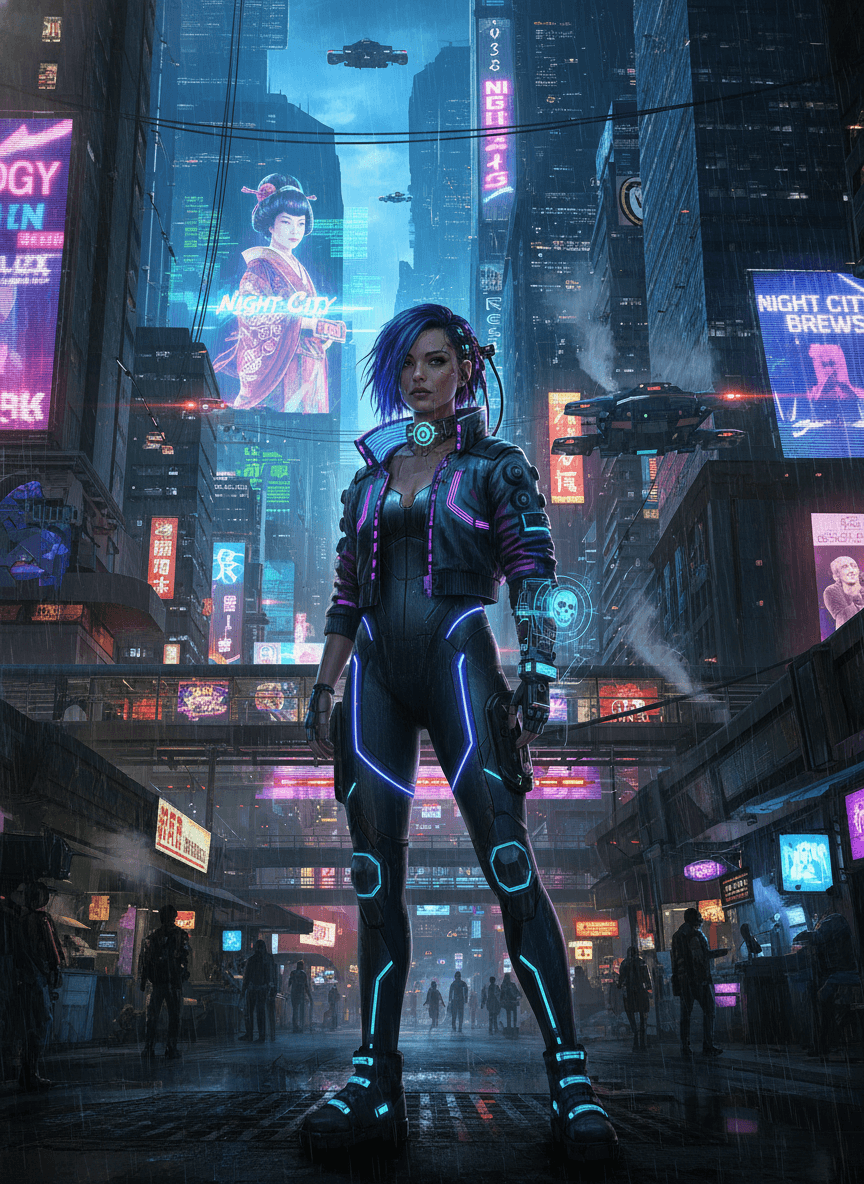
Input: A waist-up phone photo of a woman with shoulder-length dark hair in a plain black leather jacket, standing against a light indoor wall. The result looks similar to the image at the top of this page.
The photo is rebuilt as a full-body shot on a rain-soaked cyberpunk street at night. Skyscrapers covered in neon billboards in magenta, cyan and violet rise on both sides, a giant hologram of a woman in a kimono fills one building, and flying cars hover between the towers. The jacket becomes a cropped leather jacket with glowing trim over a bodysuit lined with blue light strips, and one arm gets a lit gauntlet projecting a small skull hologram.
What the AI changed on its own: the hair turned electric blue, the waist-up framing became a full-body standing pose, and the legs, boots and stance were invented. Several signs read "NIGHT CITY", a name tied to a well-known video game, and the rest of the signage is half-legible pseudo text. Check the face closely, since this kind of edit can drift toward a generic, idealized look, and put your own sign wording in quotes in the instruction if you plan to share or print it.
How it works
- 1
Upload a clear photo
A front-facing or upper-body shot with good lighting gives the AI the clearest read on your face and outfit to rebuild around.
- 2
Edit the instruction to set the details
Name a neon color scheme, a specific outfit element, or a city backdrop (rain-soaked alley, rooftop, market street) instead of leaving it to chance.
- 3
The AI rebuilds the scene
It adds neon lighting, futuristic city elements, and tech-styled clothing details and often redraws the pose and framing too, so the face is the part to check first.
- 4
Review the result
Check the face and any lettering on signage in the background, since generative edits can shift small details or invent text that wasn't asked for.
Use cases
Gaming and forum avatars
Turn a normal photo into a striking profile picture for a gaming platform, Discord server, or forum built around sci-fi or cyberpunk themes.
Character art for tabletop or D&D campaigns
Generate a quick visual reference for a character concept before commissioning full artwork or as a placeholder token for online play.
Album covers and playlist art
Build neon, futuristic cover art for a synthwave or electronic music playlist using a photo of yourself or a bandmate as the base.
Costume and cosplay planning
Preview how a cyberpunk-styled outfit, hair color, or accessory might look on you before committing to buying or building the real thing.
Social media theme posts
Create a one-off aesthetic post or story image that stands out from a normal photo feed.
Tips for better results
- Name a specific neon color scheme in the instruction, like magenta and cyan, if you want a particular palette instead of a default one.
- Mention a specific setting, such as a rooftop, a market alley, or a rain-soaked street, to control the backdrop.
- If you want text on a sign or screen in the scene, put the exact wording in quotes in the instruction and check the result carefully, since generated text can come out misspelled.
- Use a photo where your face and jacket or top are both clearly visible, since the AI restyles clothing as part of the transformation.
- If the first result misses the mood, adjust the instruction and run it again; each run uses credits, so change one thing at a time.
Frequently asked questions
Can I choose the neon colors or does the AI pick them?
You choose. Name a color scheme in the instruction, such as purple and teal or amber and blue, and the result will build around it instead of a default palette.
Will it keep my face looking like me?
It usually keeps the overall look, but the edit is generative: the pose, framing and hair can change, and the face can drift toward a smoother, more generic look. Check the eyes and mouth, and say "keep my face and hair unchanged" in the instruction if likeness matters.
Can I add specific cyberpunk elements, like cybernetic parts or a specific vehicle?
Yes, describe them in the instruction. Anything you want in the scene, from a robotic arm to a hovering drone, goes through the instruction field rather than being fixed.
Does it work on photos of more than one person?
It works best with one clear subject. Group photos can confuse which face and outfit to rebuild around, so a solo shot gives more consistent results.
What size or shape will the output image be?
It follows the shape of the photo you upload. If you need a specific size or aspect ratio for a platform, crop or resize the result afterward.
Can I use the result as a profile picture or cover art?
Yes, that's a common use for it. Just review the final image first, since generated details like signage text or small facial features can occasionally come out slightly off.
Plans start at $9 a month. See pricing