AI Surreal Art Generator
Upload a photo and get it reworked into dreamlike surreal art with impossible, symbolic elements added.
What the Surreal Art Generator does
Surrealism works by putting things where they don't belong: melting objects, floating creatures, a face that becomes part of something else entirely. This generator takes a photo you upload and rebuilds it around that kind of logic, adding fantastical elements, distorted proportions, and a dreamlike mood inspired by artists like Dali rather than a simple color filter. What you get back looks closer to a painted or composited artwork than a photo, since it can replace parts of the original scene with symbolic objects and creatures. It suits anyone who wants an art piece from a personal photo, not a quick edit of one.
See a sample result
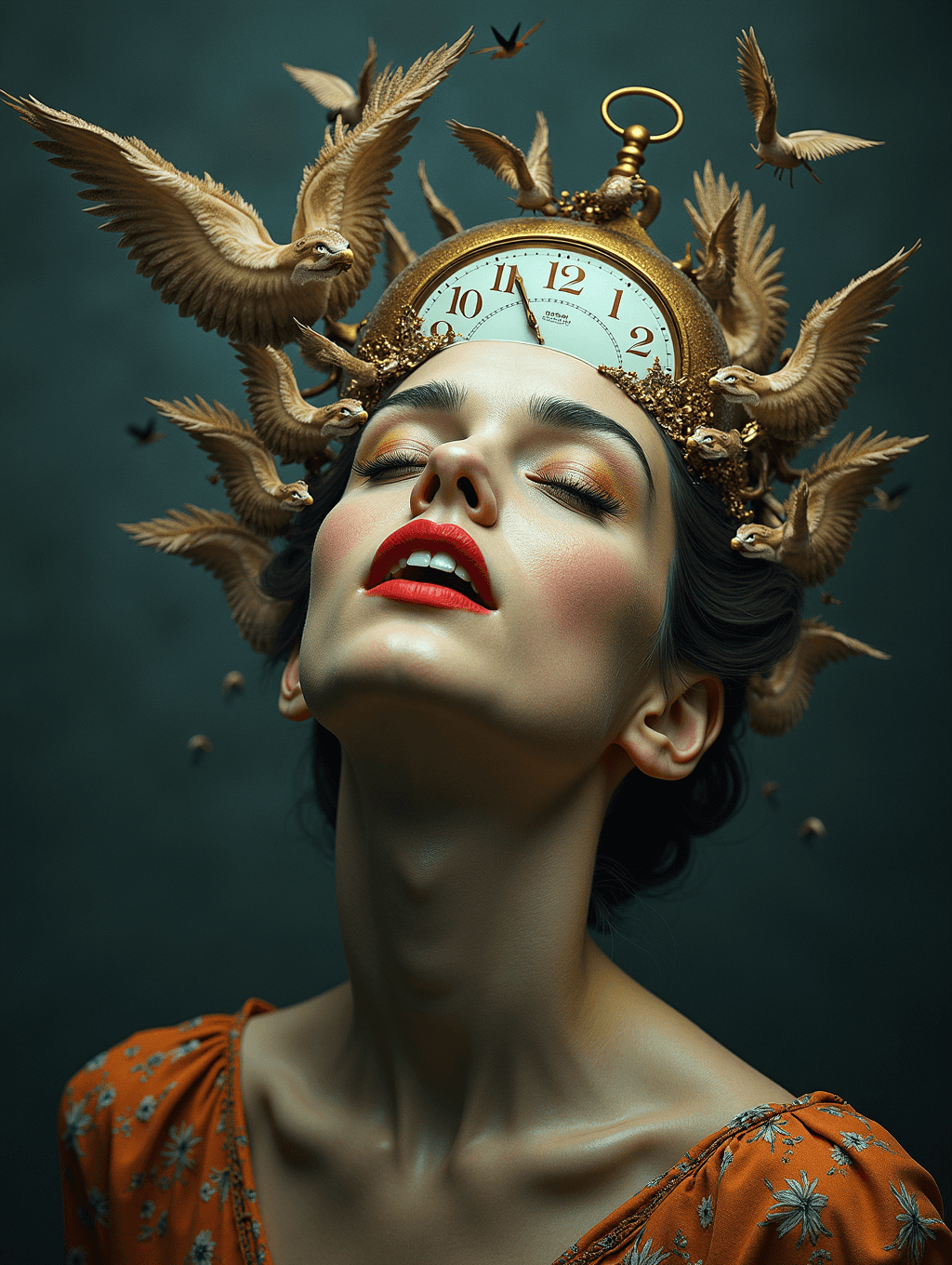
Input: A close, well-lit portrait of a woman with her eyes open, facing the camera in a patterned top against a plain background. The result looks similar to the image at the top of this page.
The result closes her eyes and tilts her head back, replacing the top of the head with an ornate antique pocket watch, its face and hands rendered in gold and cream tones. A dozen small, wing-spread birds in warm gold and tan feathers surround the head like a crown, some frozen mid-flight above the shoulders. The skin is smoothed toward a painterly finish, with bold red lipstick and warm bronze eyeshadow added, and the plain background is replaced with a dark, textured teal backdrop that reads more like a studio painting than a photo. Her top becomes an orange floral garment. The clock face has numerals, but they're jumbled and out of order, typical of generated text. Nothing in the result claims to be a real photograph; it reads as a composited, dreamlike artwork built from the original portrait. The eyes, hands, and any invented text or symbols are the parts most likely to look slightly off on close inspection, as with any generative art piece.
How it works
- 1
Upload a photo with a clear subject
A portrait or a photo with one clear focal point gives the model something to build the surreal elements around, whether that's a face, an object, or a full figure.
- 2
Describe the surreal direction in the instruction
The default leans toward melting clocks, birds, and Dali-style distortion, but the instruction is editable, so you can ask for water, flames, floating objects, or a different symbolic theme.
- 3
The model adds impossible elements and reworks proportions
It can merge objects into the subject, add creatures or symbolic props, distort scale and perspective, and shift the color palette toward a moodier, more painterly range.
- 4
Download the finished piece
You get one surreal artwork per run, closer to a composited illustration than a photo edit, so review it as art rather than expecting a realistic likeness.
Use cases
A statement piece for a wall or gallery print
Turn a personal photo into an art-style image worth printing and framing, rather than keeping it as an ordinary snapshot.
Album art or a striking social media post
Generate a surreal, eye-catching image for a music release, a portfolio piece, or a post meant to stand out in a feed.
A creative gift for someone who likes surrealism
Turn a photo of a friend, partner, or pet into a dreamlike artwork as a personal, unusual gift.
Concept exploration for illustration or design work
Use it to quickly test a surreal visual idea before committing to a hand-painted or hand-illustrated version.
Tips for better results
- Use a photo with one clear subject rather than a busy scene with several competing focal points.
- Name a specific symbolic theme in the instruction, such as water, flames, or floating books, for a more personal direction than the melting-clock default.
- Expect proportions, background, and sometimes the whole setting to change, since this rebuilds the image around a concept rather than filtering it.
- Treat any text, symbols, or fine detail in the result as art rather than something meant to be legible or accurate.
- If the first result doesn't land on the mood you wanted, change the theme in the instruction and run it again; each run uses credits.
Frequently asked questions
Will this just apply a color filter to my photo?
No. It's a generative rebuild, so it can add creatures, merge objects into your subject, and change the background and proportions, not just shift the color tone.
Can I ask for a specific surreal theme instead of clocks and birds?
Yes, the instruction is editable. Describe a different symbolic element, like water, fire, or floating objects, and the model will build around that instead.
Is this trying to copy Salvador Dali's actual paintings?
No, it's a general style inspired by surrealist art, not a reproduction of any specific painting or artist's copyrighted work.
Will I still recognize myself in the result?
Often only partly. Surreal edits can cover or replace large parts of a face or figure with symbolic elements, so expect a stylized artwork rather than a clear likeness.
What kind of photo works best as a starting point?
A clear, well-lit photo with one obvious subject gives the model the clearest shape to build the surreal elements around.
Can I run more than one photo through it?
You can add more than one image, but they all feed into one artwork as references (useful for combining a portrait with an object), and credits are charged per image. To compare source photos, run them one at a time.
Plans start at $9 a month. See pricing