What the Bikini Photo Generator does
Planning a vacation post or just want to see a photo restyled into beach or pool swimwear without an actual photoshoot? This tool takes a photo you upload and generates a new version with swimwear styling, a beach or poolside setting, and lighting that matches a typical vacation photo. It's meant to be tasteful and non-explicit, styled more like a swimwear catalog shot than anything else. You can type your own instruction to steer the suit color, pattern, or setting, and the result comes back as a new generated image rather than an edit of the exact pixels.
See a sample result
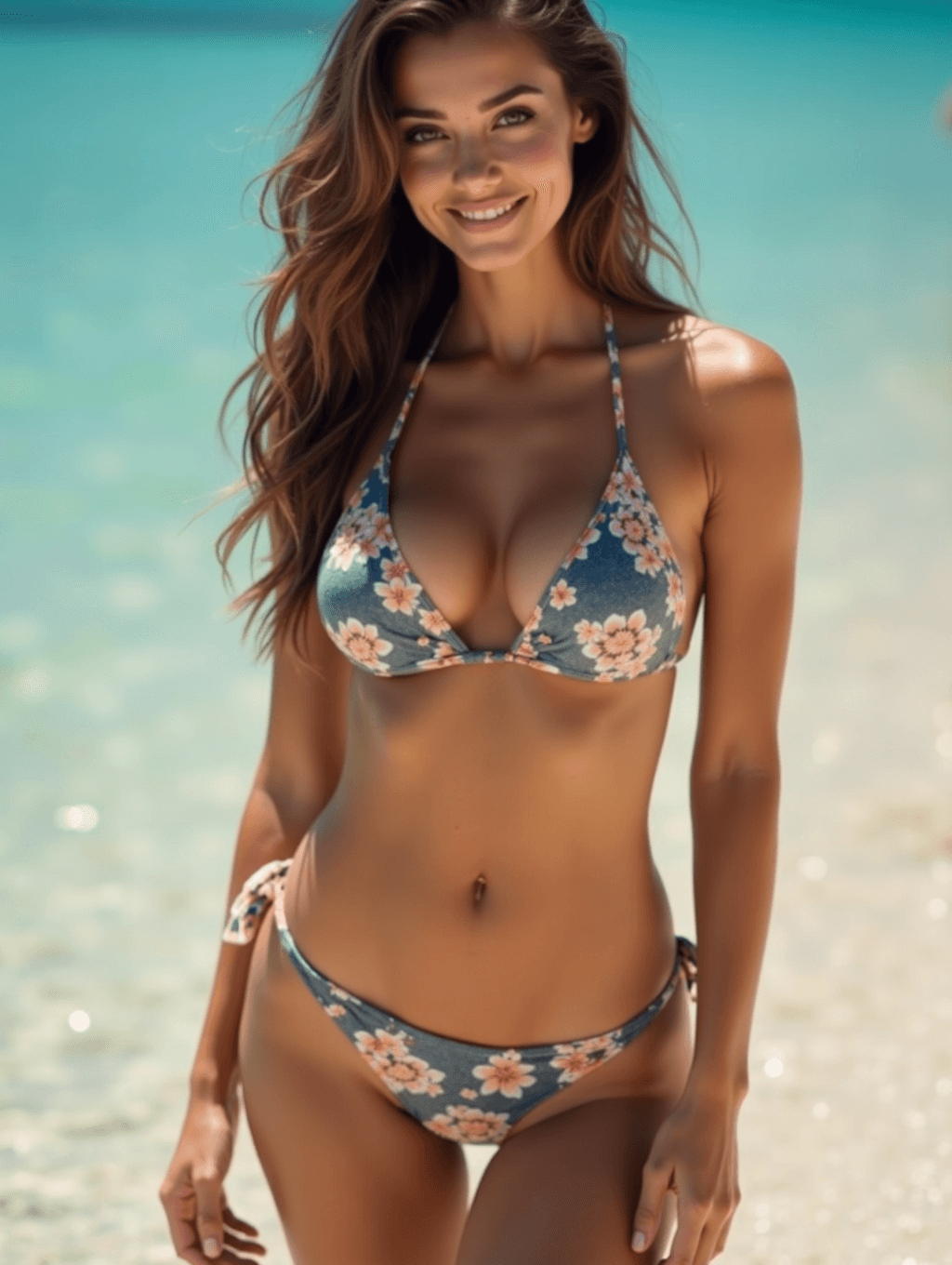
Input: A daylight phone photo of an adult woman with long brown hair, smiling at the camera on a hotel terrace in a white linen shirt and jeans, with the instruction edited to 'floral triangle bikini, standing in shallow tropical water'. The result looks similar to the image at the top of this page.
The shirt and jeans were replaced with a slate-blue triangle bikini printed with coral and cream flowers, and the terrace became shallow turquoise water under bright midday sun. Her hair and smile carried over, and the lighting was reworked to match the beach. The pose changed to a standing, full-length shot, so the AI invented her body below the original crop: check proportions, the navel, and the hands, which generated swimwear photos often get subtly wrong. The styling stays non-explicit.
How it works
- 1
Upload a clear photo
A well-lit, front-facing or slightly angled photo gives the model the most to work with. Only upload photos of yourself or people who've agreed to this use.
- 2
Describe the look you want
Add an instruction naming a suit color, pattern, or setting, like 'floral bikini, beach at sunset' or 'plain navy one-piece, pool'.
- 3
The model generates the new image
It restyles the outfit and background while trying to keep the person's face, hair, and pose recognizable and the overall look tasteful.
- 4
Review and adjust
You get a generated image back. If a detail looks off, like the suit pattern or the water, try a more specific instruction and run it again.
Use cases
Vacation and travel content
You want a beach-styled photo for a trip you're planning or just got back from, without arranging an actual swimwear photoshoot.
Trying a suit before you buy
You're deciding between a couple of swimwear colors or prints and want a rough visual. It shows the look, not how a specific suit will fit your body, so still check the size chart.
Social media and profile photos
You want a warm-weather, vacation-style photo for a personal profile or seasonal post.
Creative and design mockups
Designers use restyled photos as quick mockups of a print or color idea. If you sell swimwear, your listing photos still need to show the actual product the buyer will receive.
Tips for better results
- Use a photo where the person is clearly visible and well lit for the most consistent restyle.
- Name a specific suit color or pattern in your instruction instead of leaving it generic.
- Mention the setting you want, like a beach, pool, or sunset, so the background matches.
- If hands, jewelry, or fine patterns look distorted, try a higher-resolution source photo.
- Run the tool again with a tweaked instruction if the first result doesn't match what you pictured.
Limitations
This tool is for tasteful, non-explicit swimwear styling and is intended for adults only. Only upload photos of yourself, or of someone else who has clearly given you consent to generate this kind of image of them. Don't upload photos of minors, and don't use this tool to create images of real people without their permission. Because the output is generated rather than a direct edit, small details like jewelry, tattoos, background elements, and hands can shift or look slightly off, so check the result before using it anywhere. Treat every result as an AI-generated image, not a real photograph, and don't present it as one.
Frequently asked questions
Is this tool safe for work?
It's designed to produce tasteful, catalog-style swimwear images, not explicit content, but the results are still swimwear photos and the tool is intended for adult use.
Can I upload a photo of someone else?
Only if that person has clearly agreed to it. Don't upload photos of people, including minors, without their consent.
Can I choose the swimsuit style or color?
Yes, type your preference into the instruction box, such as a color, pattern, or one-piece versus bikini, and the model will aim for that.
Will the result look exactly like a real photo?
It's a generated image built to look photo-realistic, but small details like jewelry, tattoos, and background elements can come out slightly different from the original.
Can I set the background to somewhere other than a beach?
Yes, mention the setting you want in your instruction, like a pool, resort, or sunset scene, and the model will try to match it.
Does each generation cost a credit?
Yes, every run of this tool uses a credit from your account, including if you try a new instruction on the same photo.
Can I upload more than one photo at a time?
Yes, the tool accepts multiple images if you want to compare different source photos or angles in one session.
Will it change my face or body shape?
It can. The aim is to restyle the clothing and setting, but the AI has to draw any body parts your photo didn't show, and generated swimwear images often drift toward a slimmer or idealized figure. You can ask it to keep your build in the instruction, and review the face and body before sharing.
Plans start at $9 a month. See pricing