What the Age Progression does
Curiosity about your future face is normal, whether you're wondering how you'll look at retirement or just want to settle an argument about who ages better. This tool takes a photo you upload and generates a new image of the same person aged forward: grayer or thinner hair, deeper lines, softer skin tone, and other changes that come with time. It's built for a quick, shareable result rather than a scientific forecast, and you can add your own instruction, like asking for a specific decade or a particular hair color, to steer the outcome.
See a sample result
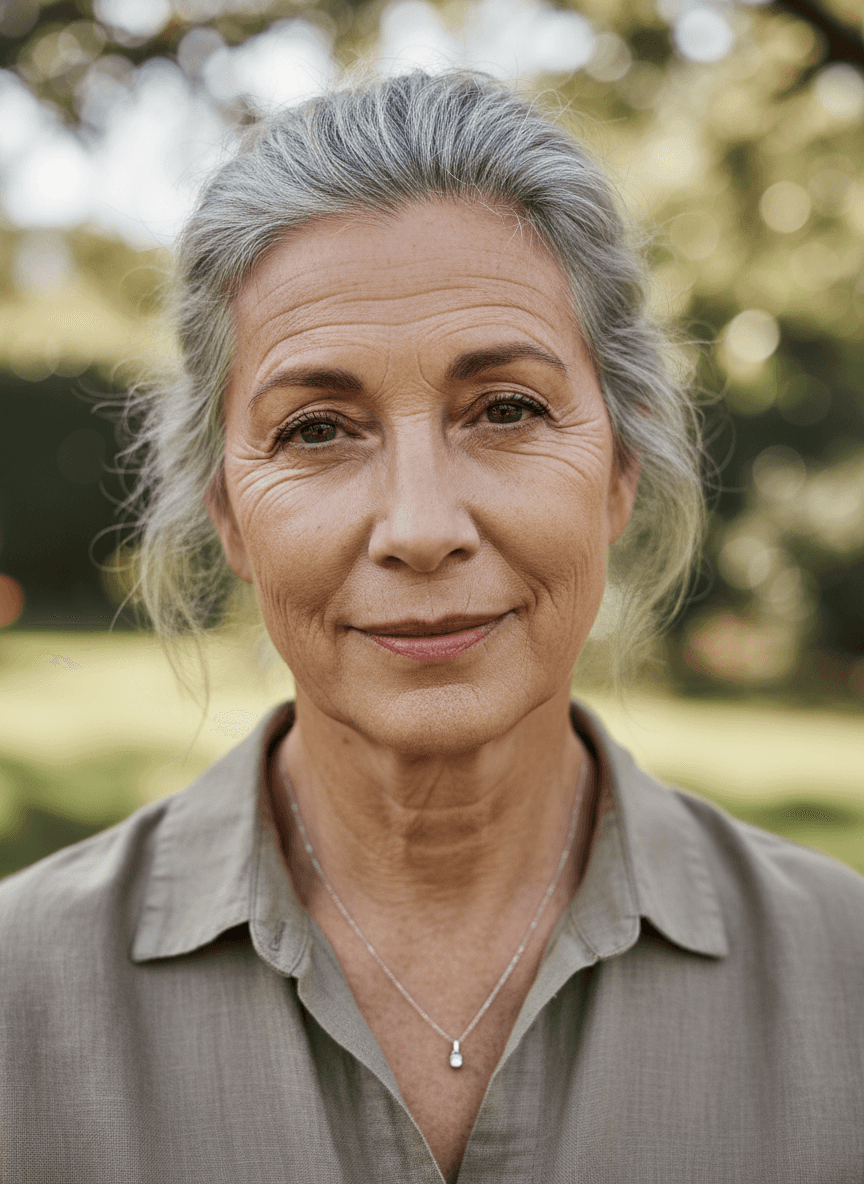
Input: A clear, front-facing outdoor portrait of a woman in her late 30s with dark brown hair pulled back, a relaxed expression, a taupe collared shirt, and a thin pendant necklace, against a blurred park background. The result looks similar to the image at the top of this page.
The result shows the same woman aged into her late 50s or 60s. Her hair has turned mostly gray and is pulled back loosely, with visible strands escaping around the face. Fine lines run across her forehead and around her eyes, her skin tone has softened, and the jawline and neck show the gradual changes that come with age. The shirt, necklace, and park background carried over. Her expression changed from neutral to a slight closed-mouth smile, which the instruction didn't ask for, so compare the eyes and mouth with the original.
How it works
- 1
Upload a clear, front-facing photo
Good lighting and a face that isn't obscured by sunglasses, heavy shadow, or a hat gives the model the most detail to work from.
- 2
Add an instruction if you want
You can type a note like 'age me to around 70' or 'keep the hair color' to guide how far forward the result goes.
- 3
The model generates an aged version
It reworks the face with older-looking skin texture, hair color and thinning, and other age-related changes, while trying to keep the person recognizable.
- 4
Download or refine the result
You get a new image back. If it doesn't look right, you can run it again with a different instruction or a sharper source photo.
Use cases
Curiosity about your own future look
You want a rough, fun idea of how your face might change over the next few decades without waiting to find out.
Family or friend group photos
You're settling a friendly debate about who will age gracefully, or making a joke gift out of an aged photo of a sibling or partner.
Creative and storytelling projects
Writers, artists, and game designers use aged portraits as visual references for a character at a later stage of life.
Costume or theme party planning
Seeing an aged version of your face first can help you plan makeup, hair, or wardrobe for an 'old age' costume or role.
Tips for better results
- Use a photo with even, natural light; harsh shadows can get exaggerated in the aged result.
- A front-facing angle works better than a strong side profile.
- Try a specific instruction, like an age range or hairstyle, rather than leaving it blank.
- If the first result looks off around the eyes or teeth, run it again; small generative errors vary between attempts.
- Higher-resolution source photos tend to keep more detail in the skin texture of the result.
Limitations
This is a generative preview, not a scientific or medical prediction of aging. The AI model makes a plausible guess based on typical patterns of aging in photos, but genetics, health, sun exposure, and lifestyle all affect real aging in ways a single photo can't capture. Details like teeth, ears, jewelry, and background elements can shift slightly between the original and the result since the image is generated, not edited pixel by pixel, so check those areas before using the result anywhere important. Treat it as entertainment, not a forecast.
Frequently asked questions
How accurate is the aged result?
It's a plausible, generated estimate based on common aging patterns, not a scientific prediction. Real aging depends on genetics, health, and lifestyle factors the tool can't know about.
Can I choose a specific age or decade?
Yes, type it into the instruction field, like 'age progression to 65' or 'show me in my 80s', and the model will aim for that range.
Will it keep me recognizable?
The model tries to preserve core facial features like eye shape, nose, and bone structure while aging the skin, hair, and other details around them, but generated images can shift small details.
Can I upload a photo of someone else?
Only upload photos of yourself or people who have given you consent to generate an image of them. Don't use this tool on photos of people who haven't agreed to it.
Can I use it to age a photo of a missing person?
No. Missing person age progressions are made by trained forensic artists working with family photos and case details, and they go through the police or an organization like the National Center for Missing & Exploited Children. A generated image could mislead a search, so contact them instead.
Does it work on group photos?
It works best with a single clear face. Group photos can confuse which face to age, or age everyone at once in ways that look inconsistent.
How many credits does one generation cost?
Each generation uses a credit from your account, the same as the site's other AI edit tools. Trying a different instruction on the same photo counts as a new run.
Can I age a photo forward more than once?
You can, though running an already-aged result through the tool again can start to look unnatural since the model is working from a generated image rather than a real photo.
Plans start at $9 a month. See pricing