Hair Color Changer
Preview a new hair color on your own photo before you sit in a salon chair.
What the Hair Color Changer does
Committing to a hair color is a real decision, and box-dye packaging or a stylist's swatch book rarely tells you how a shade will actually look against your skin tone and features. This tool takes a photo of you and applies a new hair color to it, keeping your face, lighting, and hair shape intact so the preview looks like you, not a generic model. It works whether you're weighing a subtle change, like adding warmth to your natural shade, or something more dramatic. The output is a single edited photo you can compare against your original.
See a sample result
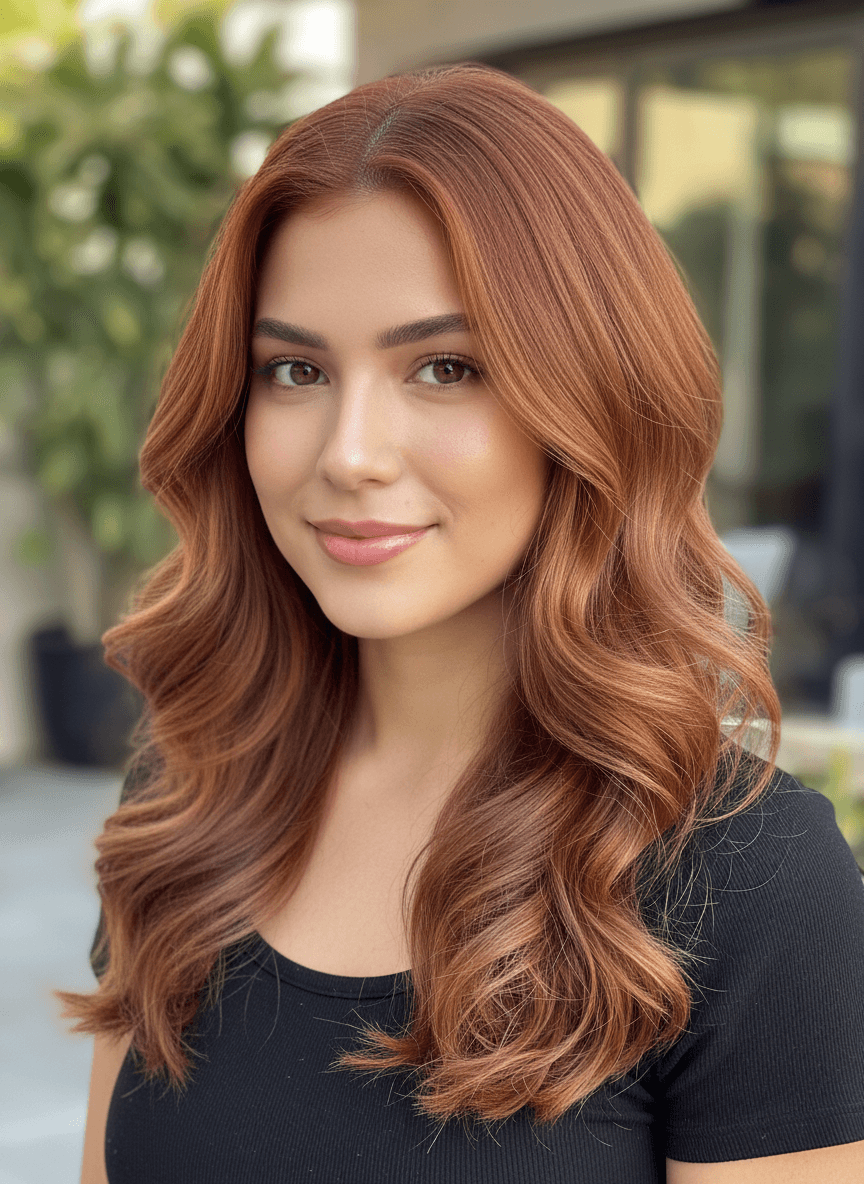
Input: A front-facing portrait of a woman with long, loosely waved medium-brown hair and a black top, taken outdoors in natural daylight against a softly blurred background, with the instruction set to warm copper red. The result looks similar to the image at the top of this page.
Color applied: Warm copper red
The hair now shows a rich auburn base with lighter copper highlights woven through the mid-lengths and ends, giving it dimension rather than one flat tone. The color transition near the roots looks gradual rather than sharply cut, which is what keeps a dyed result from reading as artificial in photos. The warmth in this shade picks up the golden undertones in the skin, and the color holds its saturation consistently across every strand catching the outdoor light, including the loose waves framing the face.
How it works
- 1
Upload a clear, front-facing photo
A photo where your hair and face are both fully visible, taken in good natural light, gives the tool the most accurate base to work from.
- 2
Name the color you want
Edit the instruction text to include a specific shade, like copper red or ash blonde, or a direction like warmer or lighter. Leave it as is and the tool picks a shade it thinks suits you.
- 3
The color is applied to your existing hair
Your hairstyle, length, and part stay the same. Only the color changes, blended to look like a realistic dye job rather than a flat filter.
- 4
Compare the result to your original photo
Look at how the new shade sits against your skin tone and eye color before deciding whether it's worth bringing to a stylist.
Use cases
Deciding between colors before a salon appointment
Preview a couple of shade options on your own face so you walk into your appointment with a clearer idea instead of pointing at a swatch book.
Testing a dramatic change without the commitment
See what a big shift, like going from dark to platinum or adding a bold fashion color, would actually look like before you touch a bottle of dye.
Showing your stylist a specific reference
Bring an edited photo of yourself in the target color to your appointment so your stylist has a reference that's actually your face and hair shape.
Trying a seasonal or temporary look
Preview a color you're only considering for a season, like a warmer summer shade, before deciding it's worth the upkeep.
Settling a debate with friends or a partner
Generate a couple of options and let other people weigh in on a photo of you rather than describing the idea out loud.
Tips for better results
- Use a photo where your natural hair color and skin tone are clearly visible, without heavy filters.
- Be specific about the shade you want, like ash brown or copper red, rather than a vague description.
- Try more than one shade so you have options to compare side by side.
- Check the result against different lighting in your head, since salon lighting can look different from daylight.
- Keep your original photo open next to the result so the change is easier to judge.
Limitations
This is a visual preview, not a guarantee of what a salon dye job or box color will produce. Real hair color results depend on your hair's current color, porosity, and condition, plus the specific dye and process used, none of which this tool accounts for. Use it to explore direction and bring ideas to a stylist rather than as a promise of an exact outcome.
Frequently asked questions
Will the color look exactly like this after I actually dye my hair?
Not exactly. Real dye results depend on your hair's current color, texture, and condition, so treat this as a direction to explore rather than a guaranteed outcome.
Can it change my hairstyle along with the color?
No, it keeps your existing length, part, and style and changes only the color, so the shape of your hair stays recognizably yours.
What if I want a color that doesn't exist naturally?
Fashion colors like pastel pink or bright blue work too. Describe the shade clearly and the tool will apply it the same way it would a natural color.
Does it work on curly or textured hair?
Yes, the tool applies color to the hair shape already in your photo, whether that's straight, wavy, or curly, without flattening or restyling it.
Can I try more than one color on the same photo?
Yes, running the same photo through with different color requests is the easiest way to compare a few options against each other.
Why does the color look slightly different from what I expected?
Lighting and your original hair color both affect how a new shade renders. A lighter base and brighter lighting tend to show truer color than a dark, dim photo.
Plans start at $9 a month. See pricing