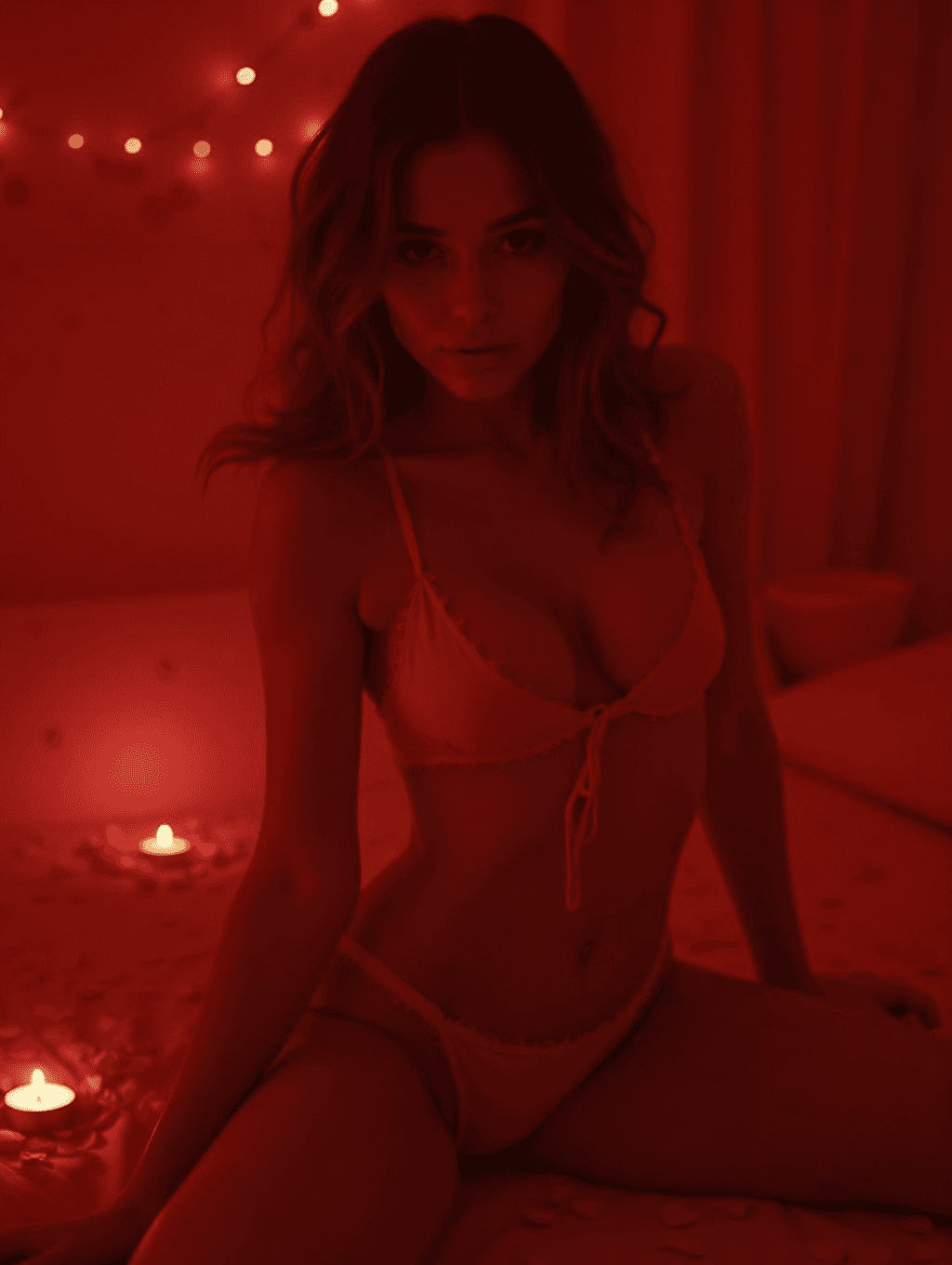
What the Sexy Valentine Generator does
Valentine's Day photoshoots usually need a set, lighting, and an outfit most people don't have on hand. This tool takes a photo of you and restyles the scene around it: warm candlelight, a romantic red-toned setting, and Valentine's styling cues like petals or soft string lights, with a mood that leans seductive rather than plain. The default look is revealing, usually lingerie and bare skin, so it's meant only for adults sharing photos of themselves, whether that's for a partner, a personal project, or just to see the look. Every run needs a real photo to work from and uses your own likeness, so the result is a styled version of you, not a stock model.
See a sample result
Input: A simple, well-lit selfie of a woman in a plain top against a neutral wall, taken with good front lighting and a relaxed, front-facing pose. The result looks similar to the image at the top of this page.
The background becomes a warm, dimly lit room washed in deep red tones, with a scattering of rose petals and small tealight candles placed around the frame and a string of warm fairy lights blurred softly in the background. Her pose shifts to a relaxed, seated position on a bed, looking toward the camera, and her outfit changes to a two-piece lingerie set: revealing, as the default instruction asks, but not explicit. Skin tones and lighting are pushed warmer and moodier throughout to match the candlelit setting, and the overall grain and softness reads like a styled evening photoshoot rather than a daylight snapshot. Because this is a generative edit, check her face, hands, and any jewelry closely, since fine details can shift slightly from the original photo.
How it works
- 1
Upload a clear photo of yourself
A well-lit photo showing your face and upper body gives the AI the most to work with. Only upload photos of yourself or people who have given you clear consent to use their photo this way.
- 2
Add styling notes in the instruction box
Name a color, a specific setting, or a mood, like 'soft pink lighting' or 'rose petals on a bed,' and the result follows that direction instead of a generic default.
- 3
The AI restyles the scene and lighting
It rebuilds the background into a romantic, candlelit set, adjusts wardrobe and pose toward a Valentine's-themed look, and pushes the color grading warm and red.
- 4
Review the result before sharing
Check faces, hands, and any text or jewelry closely, since generative edits can shift small details. Run it again with a clearer instruction if something looks off.
Use cases
A Valentine's gift for a partner
Create a styled, romantic photo of yourself to share privately with a partner instead of setting up an actual photoshoot with props and lighting you don't own.
A themed personal photo project
Use it as one part of a broader seasonal photo series, adjusting the instruction each time for a different setting or color palette.
Trying a look before committing to it
See how a red-and-candlelight aesthetic would suit a photo of you before booking a real photographer or buying a specific outfit.
Content for your own private use
Generate images for your own account or personal archive where you control who sees them, since the tool only works from photos you provide.
Tips for better results
- Only upload photos of yourself, or of someone else who has clearly agreed to have their photo used this way.
- Name a specific color or setting in the instruction, like 'deep red' or 'soft candlelight only,' for a more consistent result.
- Start from a simple, well-lit photo rather than one with a busy background, since the AI has to rebuild everything behind you.
- Review faces, hands, and jewelry closely before sharing, since generative edits can add small, unintended changes.
- Keep this content private or share it only where you control the audience, since it's styled to be intimate rather than for public feeds.
Limitations
This tool is for adults only, using your own photos or photos of another adult who has clearly consented. Never upload a photo of anyone under 18. The default instruction asks for a revealing, seductive look, so expect lingerie or bare skin unless you change the instruction. It's a generative edit, not a real photograph, so it can invent details like jewelry, background objects, or fabric texture that weren't in your original photo, and faces or hands are the most likely spots for small errors. It isn't built for explicit nudity, but a generative model doesn't always land exactly where you expect, so review every result before sharing it. Treat results as a styled version of your photo, not an accurate depiction of a real scene or moment.
Frequently asked questions
Whose photo can I upload?
Only your own photo, or a photo of another adult who has clearly consented to having their image used this way. This is not for photos of people who haven't agreed to it.
Will the result be explicit?
It isn't built for explicit content, but the default is revealing: lingerie, bare skin, and intimate lighting. If you want something tamer, say so in the instruction, for example 'red silk robe, candlelight, nothing revealing'. Always check the result before you share it.
Can I choose the outfit or setting myself?
Yes, describe a color, setting, or specific styling detail in the instruction box, and the result will follow that direction instead of a generic default.
Why does my face look slightly different in the result?
This is a generative edit, meaning the AI rebuilds much of the image rather than lightly adjusting your photo. Faces and hands are the most common spots for small unintended changes, so review the result before sharing.
Can I use a photo of someone else, like a partner's photo?
Only with that person's clear, direct consent to have their photo used this way. Never upload someone else's photo without asking them first.
Does it work with a photo that already has a background?
Yes, but the AI mostly replaces the background rather than keeping it, so a simple starting photo usually gives a cleaner result than a cluttered one.
Plans start at $9 a month. See pricing