What the Christmas Photo Generator does
Booking a holiday photographer, finding a matching sweater, and getting a tree decorated in time for a card usually takes weeks of planning. This generator skips that by building the festive scene around a photo you already have. It's for holiday cards, group chat photo dumps, or anyone who wants a cheerful seasonal picture without the setup. Upload a clear photo, add a note about the outfit or setting you want, and the AI rebuilds it as a warm, decorated holiday scene: a lit tree, stockings, string lights, and cozy winter clothing, while aiming to keep your face recognizable. Pose and expression can change, so check the result before it goes on a card.
See a sample result
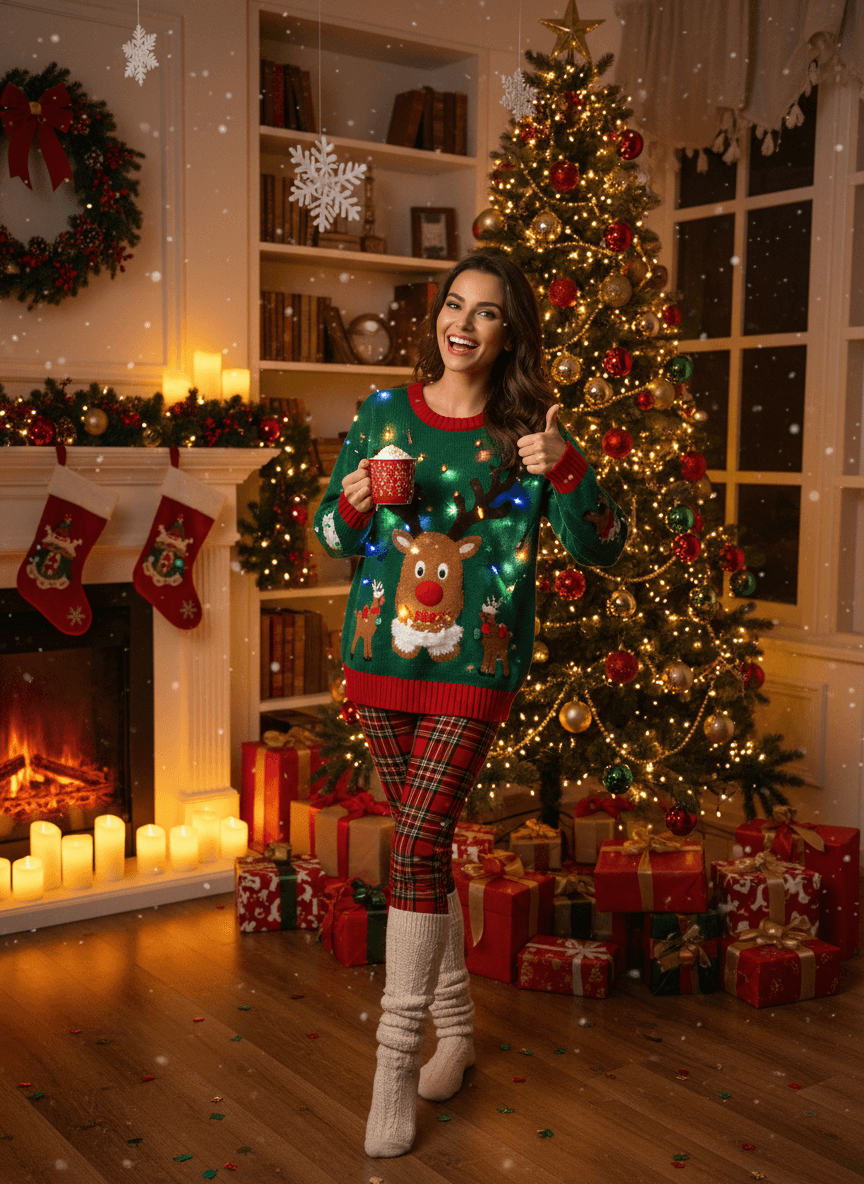
Input: A simple, evenly lit photo taken at home: a woman with long dark hair standing in a plain room in jeans and a gray top, arms relaxed, facing the camera against a bare wall. The result looks similar to the image at the top of this page.
Outfit: The plain top is replaced with a green Christmas sweater featuring a reindeer knit pattern and small embedded lights, paired with plaid leggings and knit boots that fit a cozy winter theme.
Setting: The bare wall becomes a living room built around a decorated tree hung with ornaments and a gold star topper, a mantel lined with stockings and candles, and wrapped gifts stacked on the floor.
Atmosphere: Warm, low lighting from the tree and candles replaces the flat indoor light of the original, and a light snowfall effect is layered over the scene along with a few scattered paper snowflakes for extra texture.
What changed that you didn't ask for: The AI gave her a red mug, a thumbs-up, and a wide open-mouthed smile, so the pose and expression no longer match the original. Her hair and general look carried over, but compare the face with the source photo. If you want your own pose kept, say so in the instruction.
How it works
- 1
Upload a clear, front-facing photo
A photo where your face and upper body are visible gives the model the most to work with when it rebuilds the outfit and background.
- 2
Add a note for a specific look
The instruction box is editable, so you can ask for a particular sweater color, a fireplace instead of a tree, or a snowy window instead of indoor decorations.
- 3
The model builds the festive scene
It replaces the background with a decorated room, warm string lights, and gift-wrapped boxes, and adjusts the outfit toward holiday knitwear or seasonal colors.
- 4
Check the details before sharing
Look closely at hands, faces, and any text on ornaments or gift tags, since generated scenes can soften or slightly alter small details.
Use cases
Holiday cards without a studio visit
Get a festive portrait for a printed or digital card without scheduling a photographer or decorating a room in your own home.
Group chat and social posts
Turn a casual photo into a seasonal one for a family group chat, a social post, or a yearly holiday photo tradition.
Matching a theme across a family
Run separate photos of family members through the same instruction so everyone ends up with a similar tree and sweater theme for a card layout.
Quick seasonal profile pictures
Refresh a profile picture for the season without buying a sweater or setting up lights just for one photo.
Tips for better results
- Use a photo with your face and shoulders clearly visible for the most consistent result.
- Mention a specific color scheme in the instruction box if you want red and gold instead of the default green and red.
- A plain background gives the model more space to build a convincing tree and mantel scene.
- If the sweater pattern looks off in the first try, ask for a simpler design in a follow-up instruction.
- Bright, even lighting in the original photo helps the warm tree and candle lighting blend in more naturally.
- Keep hands and faces unobstructed in the source photo, since those are the details worth double-checking in the result.
Frequently asked questions
Do I need a Christmas sweater or decorations for this to work?
No. The AI adds the sweater, tree, and decorations to the image itself, so you can upload a photo taken in any outfit or room.
Can I ask for a different holiday theme, like a fireplace instead of a tree?
Yes. Type what you want into the instruction box, such as a fireplace scene or a snowy window, before generating the image.
Will it work with a photo of more than one person?
It works best with one or two people clearly visible in frame. Larger groups can lose detail as the model rebuilds the whole scene.
Can I upload more than one photo?
Yes, the tool accepts multiple images at once if you want to compare a couple of source photos or try a few outfits.
Does this cost anything each time I generate an image?
Each generation uses credits from your account, since every image runs a fresh AI edit rather than a saved template.
Can I use the result to print a holiday card?
Yes, for a digital or printed card. The output keeps roughly the shape of your photo, so crop it to your card layout, and check the file size before printing large, since you may need to upscale it first.
Can I keep my actual outfit and just change the background?
Mention that in the instruction box, such as asking to keep the current clothing and only add the decorated room, and the model will lean toward that instead of the default sweater swap.
Plans start at $9 a month. See pricing