Glasses Try On
See how a pair of glasses would actually sit on your face before you buy them.
What the Glasses Try On does
Shopping for glasses online usually means guessing from a product photo on a stranger's face, or holding a frame up to a mirror and hoping. This tool adds a realistic pair of glasses to your own photo instead, positioning the frame across your nose and ears the way real glasses sit rather than pasting a flat cutout over your eyes. Describe the frame you want in the instruction, or add a product photo of a frame as a second image, and the AI draws it onto your face. It aims to change only the eyewear, though small details of your face can shift. It's useful whether you're comparing frame shapes before an order, deciding if you can pull off a bolder style, or just curious how you'd look with glasses at all.
See a sample result
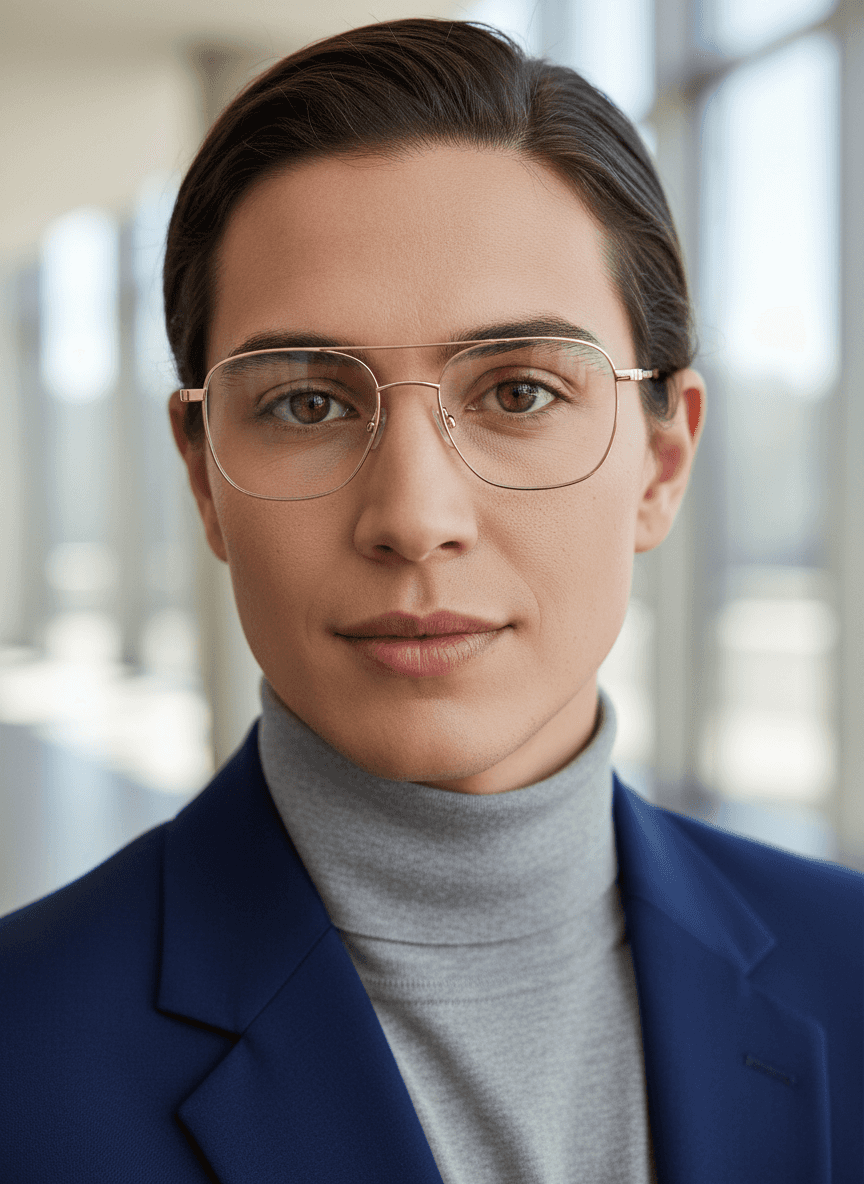
Input: A close-up front-facing portrait of a person with dark hair slicked back, in a navy blazer over a gray turtleneck, photographed in a bright corridor with tall windows. The instruction was edited to ask for 'thin gold metal frames, squared aviator shape'. The result looks similar to the image at the top of this page.
Frame applied: Thin gold-tone metal aviator-style glasses
The frame sits level across the bridge of the nose with the temple arms following the natural line back toward the ears, which keeps the fit looking worn rather than pasted on. The thin metal build lets the eyebrows and eye shape stay visible rather than getting boxed in, and the lens catches a faint reflection of the window light behind the camera, matching the room's lighting.
What to notice
- Frame width lines up with the widest part of the face rather than overhanging
- Nose pads rest at the bridge instead of sliding down
- A soft highlight along the top rim suggests the same light source lighting the face
- The overall shape reads as a professional, understated choice rather than a bold statement frame
This is a good example of how a thin metal frame tends to look less dramatic in a photo than a thick acetate style would on the same face.
How it works
- 1
Upload a clear, front-facing photo
A photo taken straight-on in good light, with your whole face visible and hair pulled back from your temples, gives the most realistic frame placement.
- 2
The AI places the frame for a natural fit
It looks at the width of your face, the bridge of your nose, and where your ears are, then draws the frame where real glasses would rest. It's a visual estimate, not a measurement.
- 3
Glasses are rendered onto your photo
The frame, lenses, and hinges are added with realistic shading and reflections, aiming for a fit that looks worn rather than digitally overlaid.
- 4
Compare the result to your bare-faced photo
Look at the shape against your face before deciding if it's a frame worth ordering or bringing up at your next eye exam.
Use cases
Comparing frame shapes before an online order
Try a rounder frame against a rectangular one on your own face instead of relying on a model photo that doesn't share your face shape.
Deciding if you're ready for a bolder frame
See how a thick acetate or colorful frame would actually look before committing to a style that's a big jump from what you usually wear.
Preparing for an eye exam or optician visit
Walk in with a couple of styles already in mind instead of trying on dozens of frames in the store from scratch.
Deciding between glasses and contacts
If you're not sure whether you want to wear glasses at all, seeing yourself in a pair first can make that decision easier than imagining it.
Tips for better results
- Use a straight-on photo rather than an angled selfie so the frame lines up symmetrically.
- Pull hair away from your temples so the tool can see where the arms of the glasses would rest.
- Name one frame shape per run in the instruction (round tortoiseshell, black rectangular acetate, clear cat-eye) and compare the results side by side.
- Good, even lighting helps the glasses render with realistic shading instead of looking flat.
- Remove any glasses you're currently wearing in the source photo for the cleanest result.
Limitations
This is a visual preview meant to help you compare styles, not a substitute for trying on real frames or an eye exam. It doesn't account for your actual prescription, lens thickness, or how a frame feels physically on your face, and different lighting or camera angles can change how a result looks. Confirm fit and comfort with an optician before buying.
Frequently asked questions
Can this tell me my actual glasses prescription?
No, it only previews how a frame looks visually. You still need an eye exam from an optometrist to get an accurate prescription.
Will the frame size be accurate to my face?
No. It draws a frame that looks proportionate to your face, but it doesn't know real frame measurements like lens width or bridge size. An optician or the retailer's size guide is how you confirm fit.
Can I try on sunglasses instead of regular frames?
Yes, describe the style you want, whether it's clear prescription lenses or tinted sunglasses, and the tool applies that look to your photo.
Does it work if I already wear glasses in my photo?
It works best on a photo without existing glasses, since the tool needs a clear view of your eyes and nose bridge to place a new frame accurately.
How do I compare several frame styles?
One style per run, and each run uses credits. Shortlist three or four styles, write each one into the instruction in turn, and compare the results side by side.
Can I see a specific pair from an online store?
You can add the store's product photo as a second image and ask the tool to put those glasses on you. The AI redraws the frame rather than copying it, so the color, thickness, or shape can come out slightly different from the real pair.
Why does the frame look slightly off in some results?
Odd angles, tilted heads, or uneven lighting in the source photo can throw off how naturally the frame sits, so a straight, well-lit photo gives the most reliable result.
Plans start at $9 a month. See pricing